
How to Use KINOCY: Examples, Pinouts, and Specs
 Design with KINOCY in Cirkit Designer
Introduction
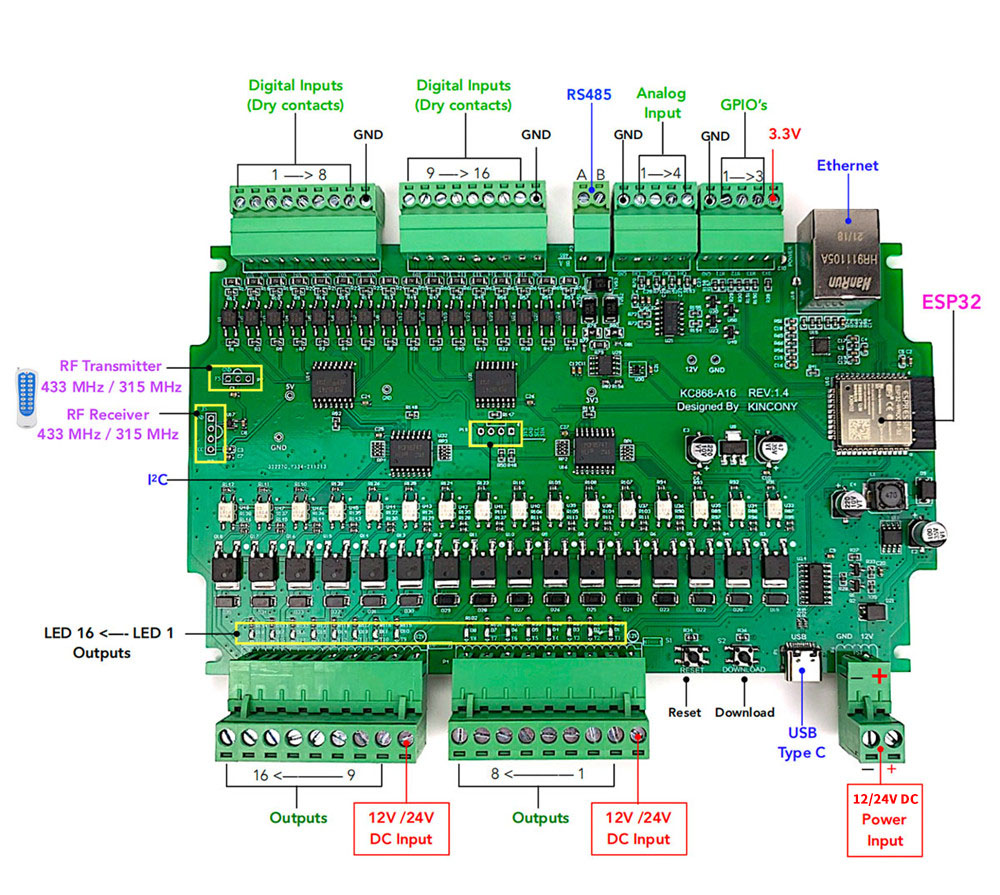
KINOCY, manufactured by MUKTI, is a brand renowned for its high-quality electronic components, including sensors, controllers, and other circuit elements. The KC868-A16 is a versatile and reliable component designed for use in automation, robotics, and other electronic systems requiring precise control and monitoring. Its robust design and ease of integration make it a popular choice for both hobbyists and professionals.
Explore Projects Built with KINOCY
 Open Project in Cirkit Designer
 Open Project in Cirkit Designer
 Open Project in Cirkit Designer
 Open Project in Cirkit Designer
Explore Projects Built with KINOCY
Open Project in Cirkit DesignerOpen Project in Cirkit DesignerOpen Project in Cirkit DesignerOpen Project in Cirkit DesignerCommon Applications and Use Cases
- Home automation systems
- Industrial control systems
- Robotics and mechatronics
- IoT (Internet of Things) devices
- Smart appliances and energy management systems
Technical Specifications
The KC868-A16 is a 16-channel relay controller with advanced features for seamless integration into various electronic systems. Below are its key technical details:
Key Technical Details
- Operating Voltage: 12V DC
- Relay Channels: 16
- Relay Type: SPDT (Single Pole Double Throw)
- Maximum Load per Channel: 10A at 250V AC or 10A at 30V DC
- Communication Interface: RS232, RS485, and Ethernet
- Control Protocols: Modbus RTU, TCP/IP
- Operating Temperature Range: -20°C to 70°C
- Dimensions: 200mm x 120mm x 40mm
- Power Consumption: < 2W (idle state)
Pin Configuration and Descriptions
The KC868-A16 features a terminal block for relay outputs and communication ports for interfacing. Below is the pin configuration:
Relay Output Terminal Block
| Pin Number | Description |
|---|---|
| 1-16 | Relay output channels 1-16 |
| COM | Common terminal for relays |
| NC | Normally Closed terminal |
| NO | Normally Open terminal |
Communication Ports
| Port Type | Pin Description |
|---|---|
| RS232 | TX (Transmit), RX (Receive), GND |
| RS485 | A (Data+), B (Data-), GND |
| Ethernet | RJ45 connector for TCP/IP communication |
Usage Instructions
The KC868-A16 is designed for easy integration into automation and control systems. Follow the steps below to use the component effectively:
Connecting the KC868-A16
- Power Supply: Connect a 12V DC power supply to the power input terminals.
- Relay Outputs: Wire the devices you want to control (e.g., lights, motors) to the relay output terminals. Use the NO (Normally Open) or NC (Normally Closed) terminals based on your application.
- Communication Interface: Choose the appropriate communication interface (RS232, RS485, or Ethernet) and connect it to your controller or PC.
Controlling the Relays
The KC868-A16 supports Modbus RTU and TCP/IP protocols for relay control. Below is an example of controlling the relays using an Arduino UNO via RS485:
Arduino UNO Example Code
#include <ModbusMaster.h>

// Create an instance of the ModbusMaster library
ModbusMaster node;

// Define the RS485 control pin
#define RS485_CONTROL_PIN 2

void preTransmission() {
  digitalWrite(RS485_CONTROL_PIN, HIGH); // Enable RS485 transmission
}

void postTransmission() {
  digitalWrite(RS485_CONTROL_PIN, LOW);  // Disable RS485 transmission
}

void setup() {
  pinMode(RS485_CONTROL_PIN, OUTPUT);
  digitalWrite(RS485_CONTROL_PIN, LOW);

  // Initialize Modbus communication
  Serial.begin(9600); // Set baud rate for RS485
  node.begin(1, Serial); // Set Modbus slave ID to 1
  node.preTransmission(preTransmission);
  node.postTransmission(postTransmission);
}

void loop() {
  // Turn on relay 1
  uint8_t result = node.writeSingleCoil(0, 1); // Relay 1 is coil 0
  delay(1000); // Wait for 1 second

  // Turn off relay 1
  result = node.writeSingleCoil(0, 0);
  delay(1000); // Wait for 1 second
}
Important Considerations and Best Practices
- Ensure the total load on each relay does not exceed the specified maximum (10A at 250V AC or 30V DC).
- Use appropriate snubber circuits or flyback diodes when switching inductive loads to protect the relays.
- Verify the communication settings (baud rate, slave ID, etc.) match your controller's configuration.
- Avoid exposing the component to extreme temperatures or humidity.
Troubleshooting and FAQs
Common Issues and Solutions
Relays not responding:
- Verify the power supply is connected and providing 12V DC.
- Check the communication interface connections and settings.
- Ensure the relay control commands are sent correctly.
Communication failure:
- Confirm the baud rate and protocol settings match between the KC868-A16 and the controller.
- Check the RS485 or Ethernet cable connections for faults.
Relays stuck in one state:
- Inspect the connected load for short circuits or excessive current draw.
- Replace the relay if it is damaged due to overloading.
FAQs
Q: Can I use the KC868-A16 with a Raspberry Pi?
A: Yes, the KC868-A16 can be controlled using a Raspberry Pi via RS485 or Ethernet. Use libraries like pymodbus for Modbus communication.
Q: What is the maximum cable length for RS485 communication?
A: RS485 supports cable lengths up to 1200 meters, but ensure proper termination resistors are used.
Q: Can I control the relays manually without a controller?
A: Yes, you can manually toggle the relays using the onboard test buttons (if available) or by applying control signals directly.
This concludes the documentation for the KINOCY KC868-A16. For further assistance, refer to the manufacturer's datasheet or contact MUKTI support.