
How to Use TMP36: Examples, Pinouts, and Specs
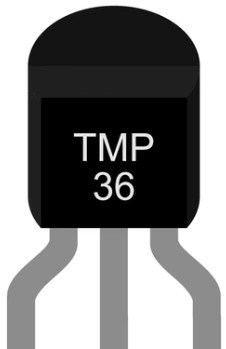
 Design with TMP36 in Cirkit Designer
Introduction
The TMP36 is a low-voltage, precision centigrade temperature sensor that provides an analog output voltage proportional to the temperature in degrees Celsius. It is designed to operate from a single power supply, making it ideal for low-power applications. The TMP36 is easy to use, requiring no external calibration or trimming. Its linear output and wide operating temperature range make it a popular choice for temperature monitoring in various applications.
Explore Projects Built with TMP36
 Open Project in Cirkit Designer
 Open Project in Cirkit Designer
 Open Project in Cirkit Designer
 Open Project in Cirkit Designer
Explore Projects Built with TMP36
Open Project in Cirkit DesignerOpen Project in Cirkit DesignerOpen Project in Cirkit DesignerOpen Project in Cirkit DesignerCommon Applications
- Environmental monitoring systems
- HVAC (Heating, Ventilation, and Air Conditioning) systems
- Consumer electronics
- Industrial temperature sensing
- IoT (Internet of Things) devices
- Arduino and microcontroller-based projects
Technical Specifications
The TMP36 is a versatile and reliable temperature sensor. Below are its key technical details:
| Parameter | Value |
|---|---|
| Supply Voltage (Vcc) | 2.7V to 5.5V |
| Supply Current | 50 µA (typical) |
| Output Voltage Range | 0.1V to 2.0V |
| Temperature Range | -40°C to +125°C |
| Accuracy | ±2°C (typical) |
| Output Scale Factor | 10 mV/°C |
| Output Impedance | 0.1 Ω |
| Response Time | 1 second (typical) |
Pin Configuration and Descriptions
The TMP36 is typically available in a 3-pin TO-92 or SOIC-8 package. Below is the pinout for the TO-92 package:
| Pin | Name | Description |
|---|---|---|
| 1 | Vcc | Positive power supply (2.7V to 5.5V) |
| 2 | Vout | Analog output voltage proportional to temperature |
| 3 | GND | Ground (0V reference) |
Usage Instructions
The TMP36 is straightforward to use in a circuit. Follow these steps to integrate it into your project:
- Power the Sensor: Connect the Vcc pin to a power supply (2.7V to 5.5V) and the GND pin to the ground.
- Read the Output: Connect the Vout pin to an analog input pin of a microcontroller or ADC (Analog-to-Digital Converter). The output voltage corresponds to the temperature in degrees Celsius.
- Calculate the Temperature: Use the formula below to convert the output voltage to temperature: [ T(°C) = \frac{V_{out} - 500 , \text{mV}}{10 , \text{mV/°C}} ] Here, ( V_{out} ) is the output voltage in millivolts.
Important Considerations
- Decoupling Capacitor: Place a 0.1 µF ceramic capacitor between Vcc and GND to reduce noise.
- Avoid Overvoltage: Do not exceed the maximum supply voltage of 5.5V to prevent damage.
- Thermal Coupling: Ensure good thermal contact between the sensor and the object/environment being measured for accurate readings.
- Output Impedance: The low output impedance of the TMP36 allows it to drive capacitive loads directly, but avoid excessive capacitance to maintain stability.
Example: Using TMP36 with Arduino UNO
Below is an example of how to use the TMP36 with an Arduino UNO to measure temperature:
// TMP36 Temperature Sensor Example with Arduino UNO
// Connect TMP36: Vcc to 5V, GND to GND, Vout to A0 (analog pin)

const int sensorPin = A0;  // TMP36 output connected to analog pin A0
float voltage;             // Variable to store sensor output voltage
float temperatureC;        // Variable to store temperature in Celsius

void setup() {
  Serial.begin(9600);  // Initialize serial communication at 9600 baud
}

void loop() {
  int sensorValue = analogRead(sensorPin);  // Read analog value from TMP36
  voltage = sensorValue * (5.0 / 1023.0);  // Convert ADC value to voltage
  temperatureC = (voltage - 0.5) * 100.0;  // Convert voltage to temperature

  // Print temperature to Serial Monitor
  Serial.print("Temperature (C): ");
  Serial.println(temperatureC);

  delay(1000);  // Wait 1 second before next reading
}
Troubleshooting and FAQs
Common Issues
Incorrect Temperature Readings
- Cause: Noise in the power supply or incorrect wiring.
- Solution: Add a 0.1 µF decoupling capacitor between Vcc and GND. Double-check the wiring.
No Output Voltage
- Cause: Sensor not powered or damaged.
- Solution: Verify the power supply voltage and connections. Replace the sensor if necessary.
Fluctuating Readings
- Cause: Electrical noise or unstable power supply.
- Solution: Use a stable power source and ensure proper grounding.
FAQs
Q: Can the TMP36 measure negative temperatures?
A: Yes, the TMP36 can measure temperatures below 0°C. The output voltage will drop below 500 mV for negative temperatures.
Q: What is the maximum distance between the TMP36 and the microcontroller?
A: The distance should be minimized to reduce noise and signal degradation. For longer distances, use shielded cables or signal conditioning.
Q: Can the TMP36 be used with a 3.3V power supply?
A: Yes, the TMP36 operates with supply voltages as low as 2.7V, making it compatible with 3.3V systems.
Q: How do I improve accuracy in noisy environments?
A: Use a decoupling capacitor, ensure proper grounding, and avoid placing the sensor near high-frequency noise sources.