The STM32F411 BlackPill is a compact development board designed by STMicroelectronics, featuring the STM32F411 microcontroller. This microcontroller is part of the STM32 family, known for its high performance, low power consumption, and rich feature set. The BlackPill form factor makes it ideal for embedded applications, prototyping, and projects requiring a small footprint.
Explore Projects Built with STM32F411 BlackPill
Use Cirkit Designer to design, explore, and prototype these projects online. Some projects support real-time simulation. Click "Open Project" to start designing instantly!
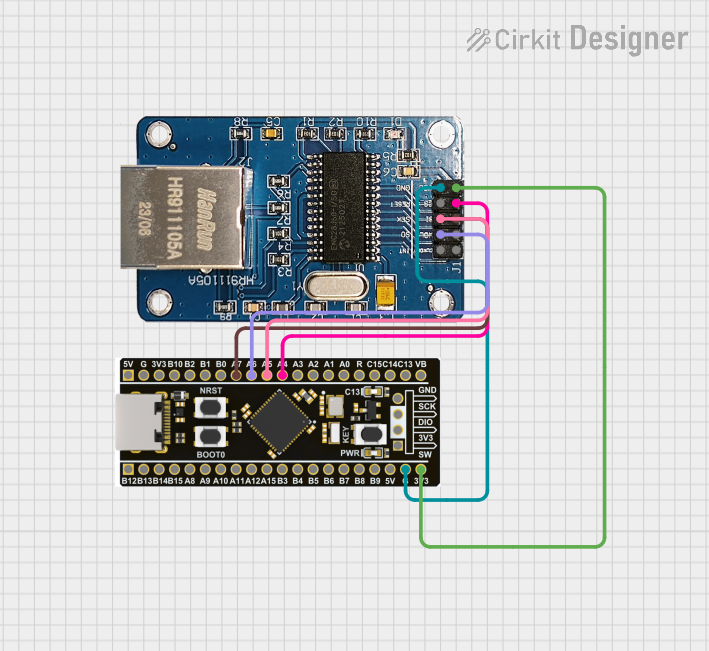
This circuit integrates an STM32F4 BlackPill microcontroller with an ENC28J60 Ethernet Board to enable Ethernet connectivity. The microcontroller communicates with the Ethernet board via SPI, with connections for power, ground, and SPI signals (SI, SO, SCK, and CS). The provided code is a basic template for further development.
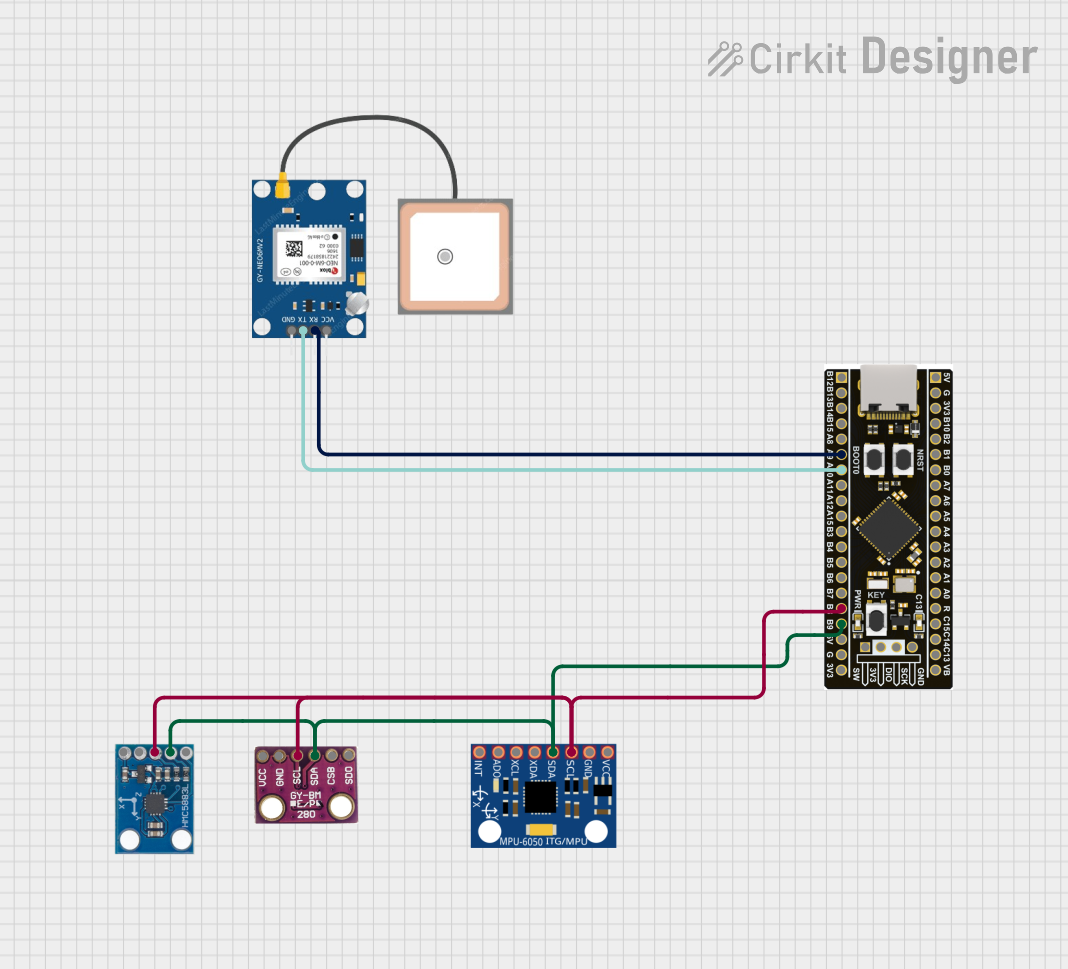
This circuit integrates an STM32F4 microcontroller with a GPS module (NEO 6M), an accelerometer and gyroscope (MPU-6050), a barometric pressure sensor (BMP280), and a compass (HMC5883L). The microcontroller communicates with the sensors via I2C and the GPS module via UART, enabling it to gather and process environmental and positional data.
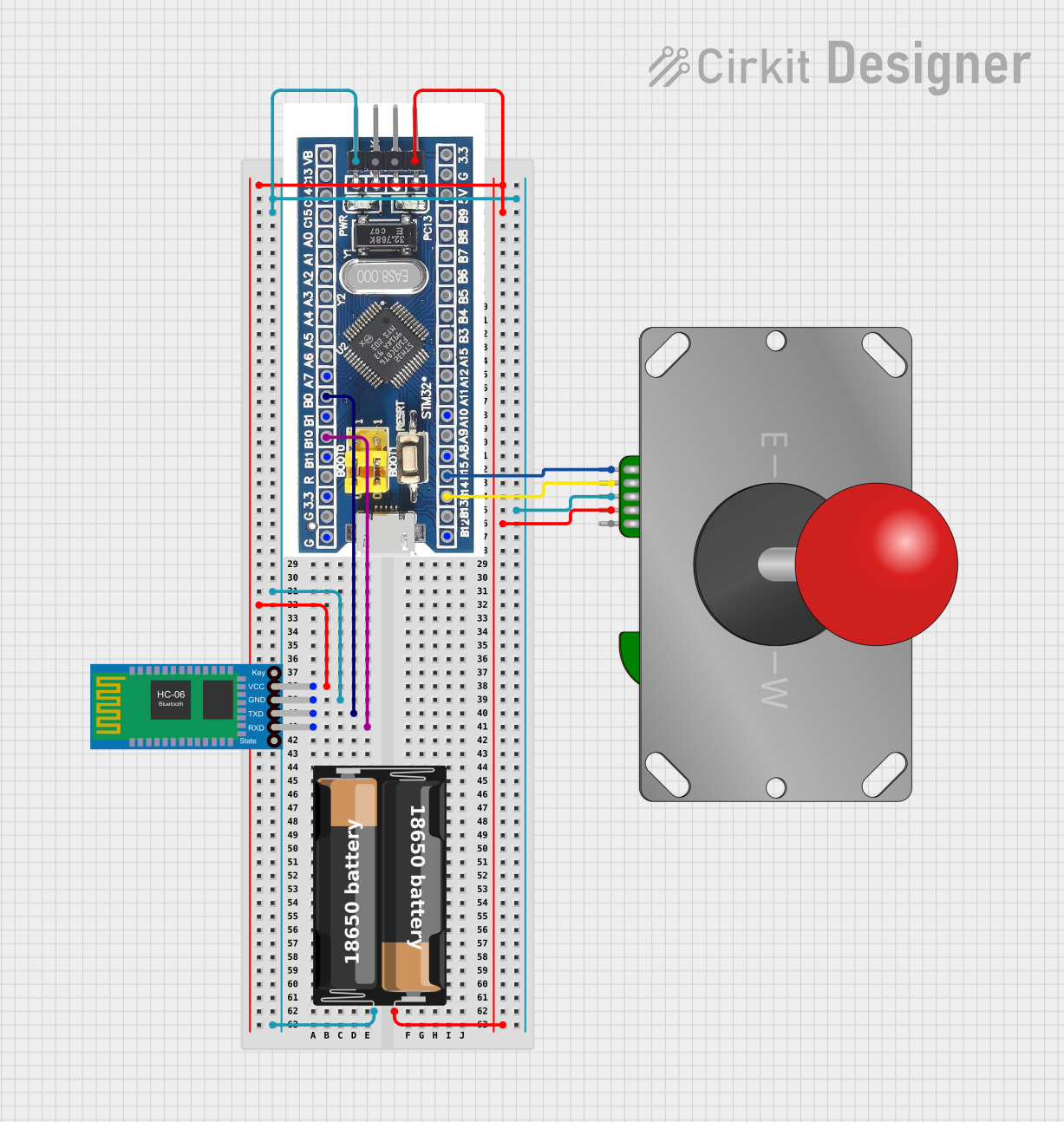
This circuit features an STM32F103C8T6 microcontroller interfaced with a Bluetooth HC-06 module for wireless communication and an Adafruit Arcade Joystick for user input. The microcontroller's pins B0 and B10 are connected to the TXD and RXD pins of the Bluetooth module, enabling serial communication, while pins B14 and B15 interface with the joystick's directional controls. The circuit is powered by a battery, with power distribution managed through the microcontroller's 3.3V pin and common ground connections.
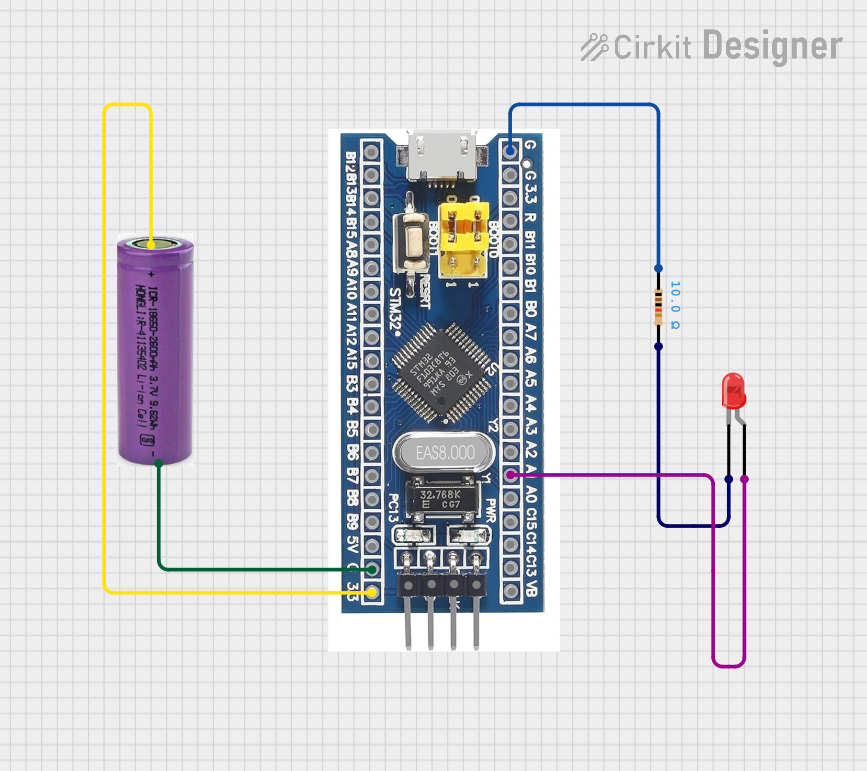
This circuit features an STM32F103C8T6 microcontroller powered by a 3.3V battery, which controls a red LED. The LED is connected to pin A1 of the microcontroller through a 10-ohm resistor to limit the current.
The STM32F411 BlackPill is built around the STM32F411CEU6 microcontroller, which offers a balance of performance and efficiency. Below are the key technical details:
Key Technical Details
Microcontroller: STM32F411CEU6 (ARM Cortex-M4 core with FPU)
Clock Speed: Up to 100 MHz
Flash Memory: 512 KB
SRAM: 128 KB
Operating Voltage: 3.3V
I/O Voltage Levels: 3.3V (5V-tolerant inputs)
Communication Interfaces:
3x USART/UART
3x SPI
3x I2C
1x CAN
USB 2.0 Full-Speed (with OTG support)
ADC: 12-bit, up to 16 channels
DAC: 12-bit, 2 channels
Timers: 10 (including advanced control timers)
GPIO Pins: 37 (multiplexed with peripherals)
Power Supply: 5V via USB or external VIN pin
Dimensions: 53 mm x 22 mm
Pin Configuration and Descriptions
The STM32F411 BlackPill has a 40-pin layout. Below is the pinout description:
Pin
Name
Function
Description
1
GND
Ground
Common ground for the board
2
3.3V
Power Output
3.3V regulated output
3
5V
Power Input
5V input from USB or external source
4
PA0
GPIO/ADC_IN0
General-purpose I/O or ADC input
5
PA1
GPIO/ADC_IN1
General-purpose I/O or ADC input
6
PA2
GPIO/USART2_TX
UART transmit pin
7
PA3
GPIO/USART2_RX
UART receive pin
8
PA4
GPIO/DAC_OUT1
General-purpose I/O or DAC output
9
PA5
GPIO/SPI1_SCK
SPI clock pin
10
PA6
GPIO/SPI1_MISO
SPI data input
...
...
...
...
40
NRST
Reset
Active-low reset pin
Note: For the full pinout, refer to the official datasheet.
Usage Instructions
The STM32F411 BlackPill is versatile and can be used in a variety of applications. Below are the steps to get started and some best practices.
How to Use the Component in a Circuit
Powering the Board:
Connect the board to a computer or USB power source using a Micro-USB cable.
Alternatively, supply 5V to the VIN pin and connect GND to the ground.
Programming the Board:
Use an ST-Link programmer or USB bootloader to upload firmware.
Compatible IDEs include STM32CubeIDE, Keil uVision, and PlatformIO.
Connecting Peripherals:
Use GPIO pins for digital input/output.
Connect sensors to ADC pins for analog input.
Use UART, SPI, or I2C for communication with external devices.
Example Circuit:
Connect an LED to PA5 (with a 220-ohm resistor in series).
Use PA0 as a button input with a pull-down resistor.
Important Considerations and Best Practices
Voltage Levels: Ensure all connected peripherals operate at 3.3V logic levels. Use level shifters for 5V devices.
Power Supply: Avoid exceeding the 5V input limit to prevent damage.
Boot Modes: Use the BOOT0 pin to select between bootloader and normal operation modes.
Debugging: Use the SWD (Serial Wire Debug) interface for debugging and programming.
Example Code for Arduino IDE
The STM32F411 BlackPill can be programmed using the Arduino IDE with the STM32 core installed. Below is an example of blinking an LED connected to PA5:
// Define the LED pin
#define LED_PIN PA5

void setup() {
  pinMode(LED_PIN, OUTPUT); // Set PA5 as an output pin
}

void loop() {
  digitalWrite(LED_PIN, HIGH); // Turn the LED on
  delay(500);                  // Wait for 500 milliseconds
  digitalWrite(LED_PIN, LOW);  // Turn the LED off
  delay(500);                  // Wait for 500 milliseconds
}
Tip: Install the STM32 Arduino core from the Arduino Boards Manager to enable support for STM32F411.
Troubleshooting and FAQs
Common Issues and Solutions
Board Not Detected by USB:
Ensure the correct drivers are installed (e.g., STM32 Virtual COM Port driver).
Check the USB cable for data transfer capability (some cables are power-only).
Unable to Upload Code:
Verify the BOOT0 pin is set correctly for programming mode.
Ensure the correct board and port are selected in the IDE.
Peripherals Not Working:
Double-check connections and pin assignments in the code.
Ensure peripherals are powered and operating at 3.3V logic levels.
Board Overheating:
Check for short circuits or excessive current draw from peripherals.
Ensure the power supply voltage does not exceed 5V.
FAQs
Q: Can the STM32F411 BlackPill run on battery power?
A: Yes, you can power the board using a 3.7V LiPo battery with a suitable regulator.
Q: Is the STM32F411 BlackPill compatible with Arduino libraries?
A: Yes, many Arduino libraries are compatible when using the STM32 Arduino core.
Q: How do I reset the board?
A: Press the onboard reset button or pull the NRST pin low.
Q: Can I use the BlackPill for USB device applications?
A: Yes, the STM32F411 supports USB OTG, allowing it to act as a USB device or host.
By following this documentation, you can effectively utilize the STM32F411 BlackPill for your embedded projects. For more details, refer to the official datasheet and reference manual from STMicroelectronics.


 Open Project in Cirkit Designer