
How to Use 18650 4s holder: Examples, Pinouts, and Specs
 Design with 18650 4s holder in Cirkit Designer
Introduction
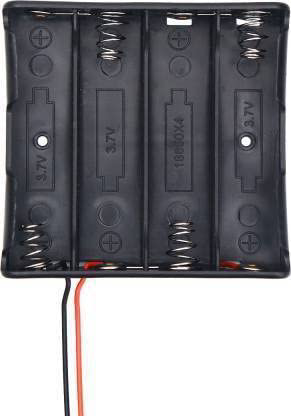
The 18650 4S holder is a battery holder designed to securely house four 18650 lithium-ion cells in a series configuration. This configuration allows the batteries to provide a higher combined voltage, making it ideal for applications requiring a stable and higher voltage power source. The holder simplifies the process of connecting and replacing batteries in electronic projects, ensuring a reliable and organized setup.
Explore Projects Built with 18650 4s holder
 Open Project in Cirkit Designer
 Open Project in Cirkit Designer
 Open Project in Cirkit Designer
 Open Project in Cirkit Designer
Explore Projects Built with 18650 4s holder
Open Project in Cirkit DesignerOpen Project in Cirkit DesignerOpen Project in Cirkit DesignerOpen Project in Cirkit DesignerCommon Applications and Use Cases
- Powering portable electronic devices
- DIY electronics and robotics projects
- Renewable energy systems (e.g., solar-powered setups)
- Uninterruptible power supplies (UPS)
- Electric bicycles and scooters
- Prototyping and testing circuits requiring a 14.8V nominal voltage
Technical Specifications
- Manufacturer: [Specify Manufacturer Name]
- Part ID: [Specify Manufacturer Part ID]
- Material: High-quality plastic (ABS or equivalent) with metal spring contacts
- Battery Configuration: 4S (four cells in series)
- Nominal Voltage Output: 14.8V (3.7V per cell × 4)
- Maximum Voltage Output: 16.8V (4.2V per cell × 4 when fully charged)
- Current Rating: Dependent on the batteries used (typically up to 10A)
- Dimensions: [Specify dimensions, e.g., 80mm × 60mm × 20mm]
- Weight: [Specify weight, e.g., 50g]
- Connection Type: Soldering pads or pre-attached wires (varies by model)
- Mounting Options: Screw holes or adhesive backing (varies by model)
Pin Configuration and Descriptions
The 18650 4S holder typically has two main terminals for connection: positive (+) and negative (-). These terminals represent the combined output of the four batteries in series.
| Pin/Terminal | Description | Notes |
|---|---|---|
| Positive (+) | Positive output terminal | Connect to the positive side of the circuit. |
| Negative (-) | Negative output terminal | Connect to the ground or negative side of the circuit. |
Usage Instructions
How to Use the 18650 4S Holder in a Circuit
- Insert Batteries: Place four 18650 lithium-ion cells into the holder, ensuring correct polarity. The positive and negative ends of each battery should align with the markings on the holder.
- Connect Terminals: Use the positive (+) and negative (-) terminals to connect the holder to your circuit. Ensure proper soldering or secure connection to avoid loose contacts.
- Check Voltage: Measure the output voltage using a multimeter to confirm the combined voltage of the batteries. Fully charged cells should provide approximately 16.8V.
- Integrate with Circuit: Connect the holder to your circuit, ensuring the voltage and current requirements of your components match the output of the battery pack.
Important Considerations and Best Practices
- Battery Selection: Use high-quality, matched 18650 cells with similar capacities and charge levels to ensure balanced performance.
- Protection Circuit: Consider adding a Battery Management System (BMS) to protect against overcharging, over-discharging, and short circuits.
- Heat Management: Avoid exposing the holder to high temperatures, as this can damage the plastic and batteries.
- Polarity Check: Double-check the polarity of the batteries before inserting them to prevent damage to the holder or connected devices.
- Secure Mounting: Use screws or adhesive backing to securely mount the holder in your project to prevent movement or disconnection.
Example: Connecting to an Arduino UNO
The 18650 4S holder can be used to power an Arduino UNO via its VIN pin. Below is an example of how to connect it:
- Connect the positive (+) terminal of the holder to the VIN pin of the Arduino.
- Connect the negative (-) terminal of the holder to the GND pin of the Arduino.
// Example Arduino code to blink an LED using power from the 18650 4S holder
// Ensure the 18650 4S holder is connected to the VIN and GND pins of the Arduino

int ledPin = 13; // Pin connected to the onboard LED

void setup() {
  pinMode(ledPin, OUTPUT); // Set the LED pin as an output
}

void loop() {
  digitalWrite(ledPin, HIGH); // Turn the LED on
  delay(1000);                // Wait for 1 second
  digitalWrite(ledPin, LOW);  // Turn the LED off
  delay(1000);                // Wait for 1 second
}
Troubleshooting and FAQs
Common Issues Users Might Face
No Output Voltage:
- Cause: Batteries are not inserted correctly or are discharged.
- Solution: Check the polarity of the batteries and ensure they are fully charged.
Loose Connections:
- Cause: Poor soldering or loose wires.
- Solution: Re-solder the connections or secure the wires properly.
Overheating:
- Cause: High current draw or poor ventilation.
- Solution: Ensure the current draw is within the limits of the batteries and provide adequate ventilation.
Uneven Battery Discharge:
- Cause: Mismatched batteries with different capacities or charge levels.
- Solution: Use matched batteries and consider adding a BMS for balanced charging and discharging.
Solutions and Tips for Troubleshooting
- Always use a multimeter to verify the output voltage before connecting the holder to your circuit.
- If the holder is not providing power, check for corrosion or dirt on the battery contacts and clean them if necessary.
- Avoid using damaged or swollen batteries, as they can pose safety risks.
By following these guidelines and best practices, the 18650 4S holder can be a reliable and efficient power source for your electronic projects.