
How to Use LPS25HB: Examples, Pinouts, and Specs
 Design with LPS25HB in Cirkit Designer
Introduction
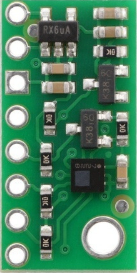
The LPS25HB is a digital barometer and pressure sensor manufactured by STMicroelectronics. It is designed to provide high-resolution pressure measurements with excellent accuracy and stability. The sensor operates over a wide range of pressures (260 hPa to 1260 hPa) and temperatures (-30°C to +105°C), making it ideal for a variety of applications.
Explore Projects Built with LPS25HB
 Open Project in Cirkit Designer
 Open Project in Cirkit Designer
 Open Project in Cirkit Designer
 Open Project in Cirkit Designer
Explore Projects Built with LPS25HB
Open Project in Cirkit DesignerOpen Project in Cirkit DesignerOpen Project in Cirkit DesignerOpen Project in Cirkit DesignerCommon Applications and Use Cases
- Weather monitoring and forecasting
- Altitude measurement for drones and aviation
- Environmental sensing in IoT devices
- Indoor navigation and floor detection
- Wearable devices for fitness and health tracking
Technical Specifications
The following table summarizes the key technical details of the LPS25HB:
| Parameter | Value |
|---|---|
| Pressure Range | 260 hPa to 1260 hPa |
| Temperature Range | -30°C to +105°C |
| Pressure Resolution | 0.01 hPa |
| Output Data Rate (ODR) | 1 Hz to 25 Hz |
| Supply Voltage | 1.7 V to 3.6 V |
| Communication Interfaces | I²C, SPI |
| Power Consumption (typical) | 4 µA (low-power mode) |
| Package Type | HLGA-10L (2.5 mm x 2.5 mm x 0.76 mm) |
Pin Configuration and Descriptions
The LPS25HB is available in a 10-pin HLGA package. The pinout is as follows:
| Pin Number | Pin Name | Description |
|---|---|---|
| 1 | VDD | Power supply (1.7 V to 3.6 V) |
| 2 | GND | Ground |
| 3 | SCL/SPC | I²C clock line / SPI serial port clock |
| 4 | SDA/SDI/SDO | I²C data line / SPI data input/output |
| 5 | CS | SPI chip select (active low) |
| 6 | INT1 | Interrupt 1 output |
| 7 | INT2 | Interrupt 2 output |
| 8 | RES | Reserved (leave unconnected) |
| 9 | RES | Reserved (leave unconnected) |
| 10 | RES | Reserved (leave unconnected) |
Usage Instructions
How to Use the LPS25HB in a Circuit
- Power Supply: Connect the VDD pin to a regulated power supply (1.7 V to 3.6 V) and the GND pin to ground.
- Communication Interface: Choose between I²C or SPI for communication:
- For I²C, connect the SCL and SDA pins to the corresponding lines on the microcontroller.
- For SPI, connect the SPC, SDI/SDO, and CS pins to the SPI interface of the microcontroller.
- Pull-Up Resistors: If using I²C, add pull-up resistors (typically 4.7 kΩ) to the SCL and SDA lines.
- Interrupts: Optionally, connect the INT1 and/or INT2 pins to the microcontroller for event-driven operation.
- Reserved Pins: Leave the reserved pins (8, 9, 10) unconnected.
Important Considerations and Best Practices
- Ensure the supply voltage is within the specified range to avoid damage to the sensor.
- Use decoupling capacitors (e.g., 0.1 µF) near the VDD pin to reduce noise.
- Avoid exposing the sensor to extreme environmental conditions beyond its operating range.
- When using SPI, ensure the CS pin is properly toggled to select the device.
Example Code for Arduino UNO
The following example demonstrates how to interface the LPS25HB with an Arduino UNO using the I²C protocol:
#include <Wire.h>

// LPS25HB I2C address
#define LPS25HB_ADDRESS 0x5C

// Register addresses
#define LPS25HB_WHO_AM_I 0x0F
#define LPS25HB_PRESS_OUT_XL 0x28
#define LPS25HB_CTRL_REG1 0x20

void setup() {
  Wire.begin(); // Initialize I2C communication
  Serial.begin(9600); // Initialize serial communication for debugging

  // Check sensor identity
  Wire.beginTransmission(LPS25HB_ADDRESS);
  Wire.write(LPS25HB_WHO_AM_I);
  Wire.endTransmission();
  Wire.requestFrom(LPS25HB_ADDRESS, 1);
  if (Wire.available()) {
    byte whoAmI = Wire.read();
    if (whoAmI == 0xBD) { // Expected WHO_AM_I value for LPS25HB
      Serial.println("LPS25HB detected!");
    } else {
      Serial.println("Sensor not detected. Check connections.");
      while (1); // Halt execution
    }
  }

  // Configure the sensor (enable and set output data rate)
  Wire.beginTransmission(LPS25HB_ADDRESS);
  Wire.write(LPS25HB_CTRL_REG1);
  Wire.write(0x90); // Power on, ODR = 1 Hz
  Wire.endTransmission();
}

void loop() {
  // Read pressure data
  Wire.beginTransmission(LPS25HB_ADDRESS);
  Wire.write(LPS25HB_PRESS_OUT_XL | 0x80); // Auto-increment address
  Wire.endTransmission();
  Wire.requestFrom(LPS25HB_ADDRESS, 3);

  if (Wire.available() == 3) {
    uint8_t xl = Wire.read();
    uint8_t l = Wire.read();
    uint8_t h = Wire.read();
    int32_t pressure_raw = (int32_t)((h << 16) | (l << 8) | xl);
    float pressure_hPa = pressure_raw / 4096.0; // Convert to hPa
    Serial.print("Pressure: ");
    Serial.print(pressure_hPa);
    Serial.println(" hPa");
  }

  delay(1000); // Wait 1 second before next reading
}
Troubleshooting and FAQs
Common Issues and Solutions
Sensor Not Detected
- Cause: Incorrect I²C address or wiring.
- Solution: Verify the I²C address (default is 0x5C) and check the connections.
No Pressure Readings
- Cause: Sensor not powered or misconfigured.
- Solution: Ensure the VDD pin is connected to a proper power supply and the CTRL_REG1 register is configured correctly.
Inaccurate Measurements
- Cause: Environmental interference or improper calibration.
- Solution: Avoid placing the sensor near heat sources or strong air currents. Perform calibration if necessary.
FAQs
Q: Can the LPS25HB measure altitude?
A: Yes, the sensor can calculate altitude based on pressure readings using the barometric formula.Q: What is the maximum cable length for I²C communication?
A: The maximum length depends on the pull-up resistor values and the capacitance of the cable. Typically, it is limited to a few meters.Q: Is the LPS25HB waterproof?
A: No, the sensor is not waterproof. Use a protective enclosure if operating in humid or wet environments.