
How to Use 556 Timer IC: Examples, Pinouts, and Specs
 Design with 556 Timer IC in Cirkit Designer
Introduction
The 556 Timer IC, manufactured by Texas Instruments (Part ID: NE556), is a dual-timer integrated circuit that combines two independent 555 timer circuits in a single 14-pin package. This versatile component is widely used in applications such as pulse generation, time delay, frequency modulation, and oscillation. Its dual-timer design allows for compact and efficient circuit designs, making it a popular choice for hobbyists and professionals alike.
Explore Projects Built with 556 Timer IC
 Open Project in Cirkit Designer
 Open Project in Cirkit Designer
 Open Project in Cirkit Designer
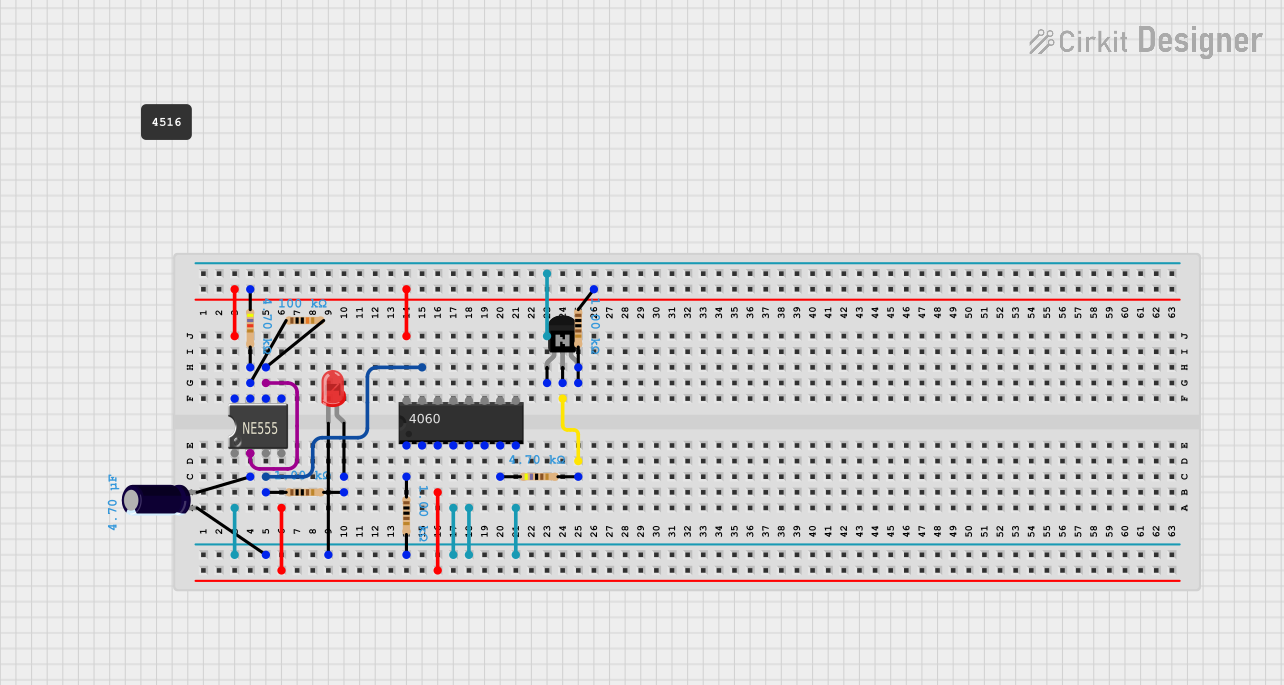 Open Project in Cirkit Designer
Explore Projects Built with 556 Timer IC
Open Project in Cirkit DesignerOpen Project in Cirkit DesignerOpen Project in Cirkit DesignerOpen Project in Cirkit DesignerCommon Applications
- Monostable (one-shot) and astable (oscillator) multivibrator circuits
- Pulse-width modulation (PWM) and frequency generation
- Time delay circuits
- LED and motor control
- Signal generation and waveform shaping
Technical Specifications
The following table outlines the key technical specifications of the NE556 Timer IC:
| Parameter | Value |
|---|---|
| Supply Voltage (Vcc) | 4.5V to 16V |
| Supply Current (per timer) | 10mA (typical) |
| Output Current (per timer) | 200mA (maximum) |
| Operating Temperature Range | 0°C to 70°C |
| Timing Capacitor Range | 0.001µF to 100µF |
| Timing Resistor Range | 1kΩ to 10MΩ |
| Package Type | 14-pin Dual In-line Package (DIP) |
Pin Configuration and Descriptions
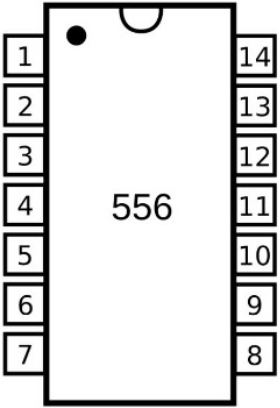
The NE556 Timer IC has 14 pins, with each timer circuit having its own set of control pins. The pin configuration is as follows:
| Pin Number | Pin Name | Description |
|---|---|---|
| 1 | GND | Ground (0V reference) |
| 2 | TRIG (Timer 1) | Trigger input for Timer 1; starts timing cycle when voltage drops below 1/3 Vcc |
| 3 | OUT (Timer 1) | Output of Timer 1 |
| 4 | RESET (Timer 1) | Resets Timer 1 when pulled low |
| 5 | CTRL (Timer 1) | Control voltage for Timer 1; adjusts threshold voltage |
| 6 | THRS (Timer 1) | Threshold input for Timer 1; ends timing cycle when voltage exceeds 2/3 Vcc |
| 7 | DISCH (Timer 1) | Discharge pin for Timer 1; discharges timing capacitor |
| 8 | Vcc | Positive supply voltage |
| 9 | DISCH (Timer 2) | Discharge pin for Timer 2; discharges timing capacitor |
| 10 | THRS (Timer 2) | Threshold input for Timer 2; ends timing cycle when voltage exceeds 2/3 Vcc |
| 11 | CTRL (Timer 2) | Control voltage for Timer 2; adjusts threshold voltage |
| 12 | RESET (Timer 2) | Resets Timer 2 when pulled low |
| 13 | OUT (Timer 2) | Output of Timer 2 |
| 14 | TRIG (Timer 2) | Trigger input for Timer 2; starts timing cycle when voltage drops below 1/3 Vcc |
Usage Instructions
The NE556 Timer IC can be used in a variety of circuit configurations. Below are general steps and considerations for using the component:
Using the NE556 in a Circuit
- Power Supply: Connect pin 8 (Vcc) to the positive supply voltage (4.5V to 16V) and pin 1 (GND) to ground.
- Timer Configuration:
- For monostable mode, connect the TRIG pin to a trigger signal and use a resistor-capacitor (RC) network between the THRS and DISCH pins to set the timing interval.
- For astable mode, connect the TRIG and THRS pins together and use an RC network to set the oscillation frequency.
- Output: The OUT pin provides the timer's output signal. It can drive LEDs, relays, or other components directly (up to 200mA).
- Reset: The RESET pin can be used to terminate the timing cycle prematurely. If unused, connect it to Vcc to avoid accidental resets.
- Control Voltage: The CTRL pin can be used to adjust the threshold voltage. If unused, connect it to ground via a 0.01µF capacitor for stability.
Example: Astable Mode with Arduino UNO
The following example demonstrates how to use the NE556 Timer IC in astable mode to generate a square wave, which is then read by an Arduino UNO.
Circuit Connections
- Connect pin 8 (Vcc) to 5V and pin 1 (GND) to ground.
- Connect a 10kΩ resistor between pin 7 (DISCH) and pin 8 (Vcc).
- Connect a 100kΩ resistor between pin 7 (DISCH) and pin 6 (THRS).
- Connect a 10µF capacitor between pin 6 (THRS) and ground.
- Connect pin 6 (THRS) to pin 2 (TRIG).
- Connect pin 3 (OUT) to an Arduino UNO digital input pin (e.g., pin 2).
Arduino Code
// This code reads the square wave output from the NE556 Timer IC
// and toggles an LED connected to pin 13 based on the signal.

const int timerOutputPin = 2; // NE556 output connected to Arduino pin 2
const int ledPin = 13;        // LED connected to pin 13

void setup() {
  pinMode(timerOutputPin, INPUT); // Set timer output pin as input
  pinMode(ledPin, OUTPUT);        // Set LED pin as output
}

void loop() {
  int timerState = digitalRead(timerOutputPin); // Read the timer output
  digitalWrite(ledPin, timerState);             // Set LED state to match timer output
}
Best Practices
- Use decoupling capacitors (e.g., 0.1µF) near the Vcc pin to reduce noise and improve stability.
- Ensure the timing capacitor and resistor values are within the recommended range for accurate operation.
- Avoid leaving unused pins floating; connect them to appropriate voltage levels.
Troubleshooting and FAQs
Common Issues
No Output Signal:
- Verify that the power supply voltage is within the specified range (4.5V to 16V).
- Check all connections, especially the RC network and trigger input.
- Ensure the RESET pin is connected to Vcc if not in use.
Unstable Timing:
- Use high-quality capacitors with low leakage for the timing circuit.
- Add a decoupling capacitor (0.1µF) near the Vcc pin to reduce noise.
Output Voltage Too Low:
- Ensure the load connected to the output pin does not exceed the maximum current rating (200mA).
- Check for short circuits or incorrect wiring.
FAQs
Q: Can the NE556 Timer IC operate with a 3.3V power supply?
A: No, the minimum supply voltage for the NE556 is 4.5V. For 3.3V applications, consider using a low-voltage timer IC.
Q: How do I calculate the frequency in astable mode?
A: The frequency is given by the formula:
[
f = \frac{1.44}{(R1 + 2R2) \cdot C}
]
where ( R1 ) and ( R2 ) are the resistors, and ( C ) is the capacitor in the RC network.
Q: Can I use both timers independently?
A: Yes, the NE556 contains two independent 555 timers that can be configured separately for different applications.