
How to Use Elechouse ST25R3916: Examples, Pinouts, and Specs
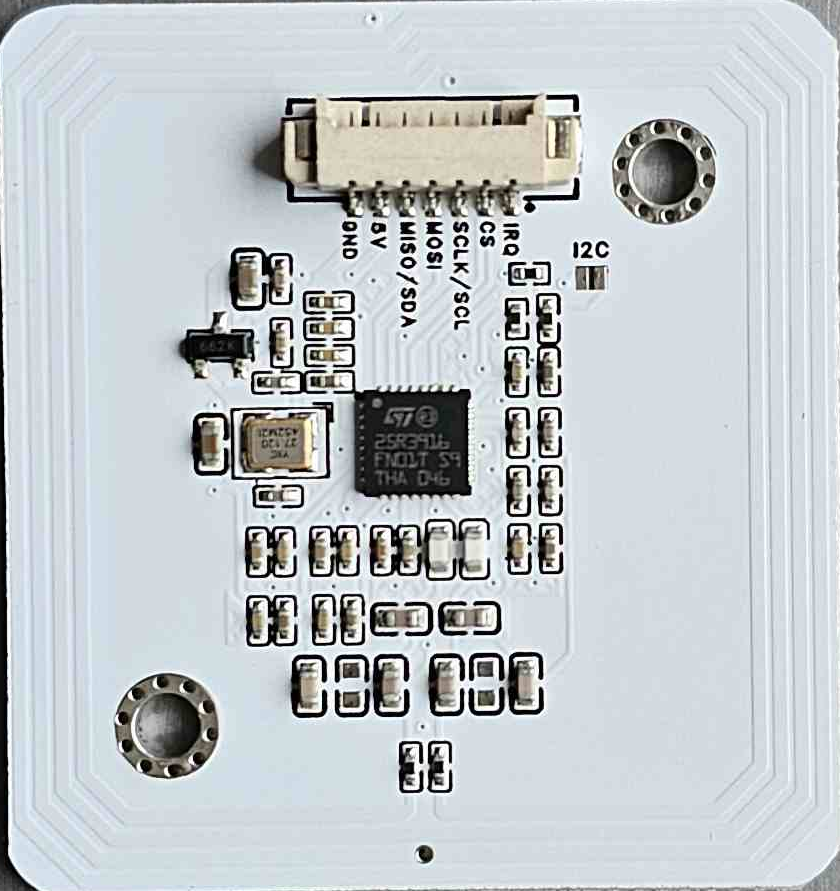
 Design with Elechouse ST25R3916 in Cirkit Designer
Introduction
The Elechouse ST25R3916 is a high-performance RFID/NFC reader and writer module designed for contactless data transfer applications. It supports multiple communication protocols, including ISO 14443A/B, ISO 15693, FeliCa, and NFC Forum standards. This versatile module can operate in various modes, such as reader/writer, card emulation, and peer-to-peer communication, making it suitable for a wide range of use cases.
Explore Projects Built with Elechouse ST25R3916
 Open Project in Cirkit Designer
 Open Project in Cirkit Designer
 Open Project in Cirkit Designer
 Open Project in Cirkit Designer
Explore Projects Built with Elechouse ST25R3916
Open Project in Cirkit DesignerOpen Project in Cirkit DesignerOpen Project in Cirkit DesignerOpen Project in Cirkit DesignerCommon Applications and Use Cases
- Access control systems
- Contactless payment terminals
- Inventory and asset tracking
- NFC-enabled device communication
- Smart home and IoT applications
- Data exchange in industrial environments
Technical Specifications
The Elechouse ST25R3916 module is packed with advanced features and specifications to ensure reliable and efficient operation.
Key Technical Details
- Operating Voltage: 3.3V to 5V
- Current Consumption: 10mA (idle), up to 150mA (active)
- Operating Frequency: 13.56 MHz
- Supported Protocols: ISO 14443A/B, ISO 15693, FeliCa, NFC Forum Type 1-5
- Communication Interface: SPI
- Operating Modes: Reader/Writer, Card Emulation, Peer-to-Peer
- Antenna: External antenna required (included with the module)
- Operating Temperature: -40°C to +85°C
- Dimensions: 40mm x 40mm
Pin Configuration and Descriptions
The ST25R3916 module has a standard pinout for easy integration into your projects. Below is the pin configuration:
| Pin | Name | Description |
|---|---|---|
| 1 | VCC | Power supply input (3.3V to 5V). |
| 2 | GND | Ground connection. |
| 3 | MOSI | SPI Master Out Slave In (data input to the module). |
| 4 | MISO | SPI Master In Slave Out (data output from the module). |
| 5 | SCK | SPI Clock signal. |
| 6 | NSS | SPI Chip Select (active low). |
| 7 | IRQ | Interrupt request output (used to signal events to the microcontroller). |
| 8 | RST | Reset pin (active low, used to reset the module). |
| 9 | ANT1 | Antenna connection point 1. |
| 10 | ANT2 | Antenna connection point 2. |
Usage Instructions
The Elechouse ST25R3916 is straightforward to use in RFID/NFC applications. Below are the steps and best practices for integrating it into your project.
How to Use the Component in a Circuit
- Power the Module: Connect the VCC pin to a 3.3V or 5V power source and the GND pin to ground.
- Connect to a Microcontroller: Use the SPI interface (MOSI, MISO, SCK, NSS) to connect the module to your microcontroller. Ensure proper voltage levels for SPI communication.
- Attach the Antenna: Connect the external antenna to the ANT1 and ANT2 pins. Ensure the antenna is properly tuned for optimal performance.
- Reset the Module: Use the RST pin to reset the module during initialization.
- Handle Interrupts: Connect the IRQ pin to a GPIO pin on your microcontroller to handle events such as tag detection or communication errors.
Important Considerations and Best Practices
- Antenna Placement: Place the antenna away from metal surfaces to avoid interference and ensure maximum range.
- Power Supply: Use a stable power supply to avoid communication errors caused by voltage fluctuations.
- SPI Configuration: Configure the SPI interface on your microcontroller with the correct settings (e.g., clock polarity and phase) as specified in the ST25R3916 datasheet.
- Firmware Updates: Check for firmware updates from Elechouse to ensure compatibility with the latest NFC standards.
Example Code for Arduino UNO
Below is an example of how to use the ST25R3916 module with an Arduino UNO:
#include <SPI.h>

// Pin definitions
#define NSS_PIN 10  // SPI Chip Select
#define RST_PIN 9   // Reset pin
#define IRQ_PIN 2   // Interrupt pin

void setup() {
  // Initialize serial communication
  Serial.begin(9600);
  Serial.println("Initializing ST25R3916...");

  // Initialize SPI
  SPI.begin();
  pinMode(NSS_PIN, OUTPUT);
  pinMode(RST_PIN, OUTPUT);
  pinMode(IRQ_PIN, INPUT);

  // Reset the module
  digitalWrite(RST_PIN, LOW);
  delay(10);  // Hold reset for 10ms
  digitalWrite(RST_PIN, HIGH);
  delay(10);

  Serial.println("ST25R3916 initialized successfully.");
}

void loop() {
  // Example: Check for an interrupt signal
  if (digitalRead(IRQ_PIN) == HIGH) {
    Serial.println("Interrupt detected! Processing event...");
    // Add your event handling code here
  }

  delay(100);  // Small delay to avoid spamming the serial monitor
}
Troubleshooting and FAQs
Common Issues and Solutions
Module Not Responding
- Cause: Incorrect wiring or power supply issues.
- Solution: Double-check all connections and ensure the module is powered with the correct voltage.
Poor Communication Range
- Cause: Antenna placement or tuning issues.
- Solution: Ensure the antenna is placed away from metal objects and is properly tuned.
SPI Communication Errors
- Cause: Incorrect SPI settings or loose connections.
- Solution: Verify the SPI clock polarity, phase, and wiring. Ensure the NSS pin is properly controlled.
Interrupts Not Triggering
- Cause: IRQ pin not connected or misconfigured.
- Solution: Ensure the IRQ pin is connected to a GPIO pin on the microcontroller and configured as an input.
FAQs
Q: Can the ST25R3916 read multiple tags simultaneously?
A: Yes, the module supports anti-collision protocols, allowing it to read multiple tags in a single session.Q: What is the maximum communication range?
A: The range depends on the antenna design and environment but typically ranges from 5cm to 10cm.Q: Is the module compatible with 5V logic?
A: Yes, the ST25R3916 supports both 3.3V and 5V logic levels.Q: Can I use this module for NFC peer-to-peer communication?
A: Yes, the ST25R3916 supports peer-to-peer communication as per the NFC Forum standards.
This documentation provides a comprehensive guide to using the Elechouse ST25R3916 module effectively. For further details, refer to the official datasheet and application notes from Elechouse.