
How to Use DM542Y Driver: Examples, Pinouts, and Specs
 Design with DM542Y Driver in Cirkit Designer
Introduction
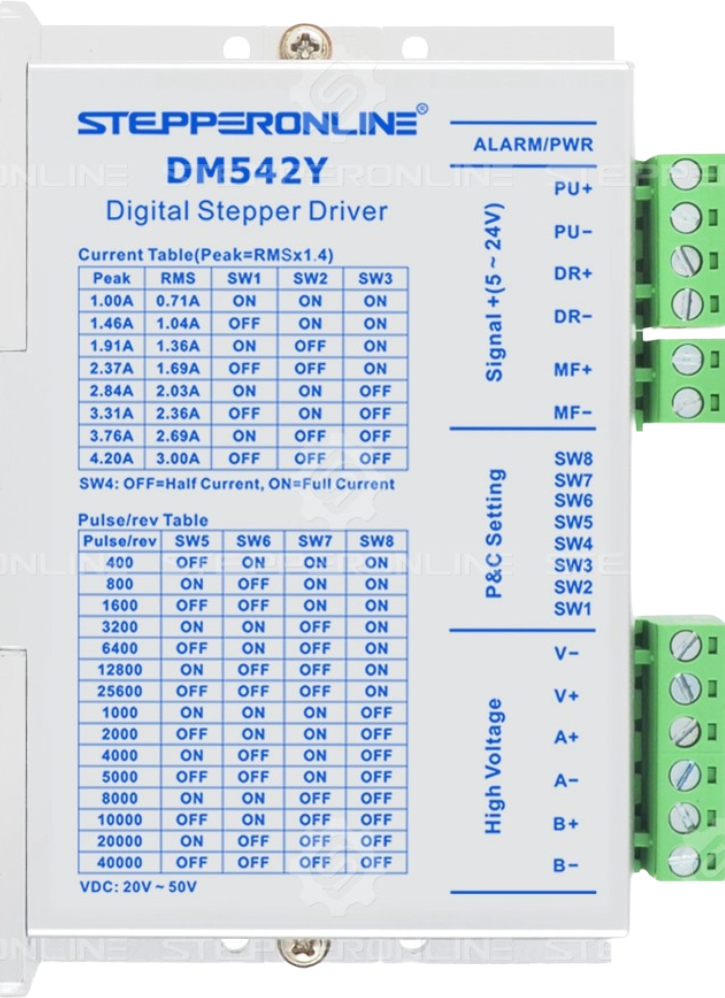
The DM542Y is a digital stepper motor driver manufactured by Stepper Online. It is designed to provide precise control of bipolar stepper motors, offering microstepping capabilities for smoother operation and higher resolution. This driver is widely used in applications such as robotics, CNC machines, 3D printers, and other automation systems where accurate motor control is essential.
Explore Projects Built with DM542Y Driver
 Open Project in Cirkit Designer
 Open Project in Cirkit Designer
 Open Project in Cirkit Designer
 Open Project in Cirkit Designer
Explore Projects Built with DM542Y Driver
Open Project in Cirkit DesignerOpen Project in Cirkit DesignerOpen Project in Cirkit DesignerOpen Project in Cirkit DesignerCommon Applications
- CNC machines for precise cutting and milling
- 3D printers for accurate layer deposition
- Robotics for smooth and controlled motion
- Conveyor systems in industrial automation
- Laser engraving machines
Technical Specifications
Key Technical Details
| Parameter | Value |
|---|---|
| Supply Voltage | 20V to 50V DC |
| Output Current | 1.0A to 4.2A (adjustable) |
| Microstepping Resolution | Up to 1/128 steps |
| Input Signal Voltage | 5V to 24V (logic signal) |
| Control Signal Frequency | 0 to 200 kHz |
| Motor Type Supported | Bipolar stepper motors |
| Operating Temperature | -10°C to +45°C |
| Dimensions | 118mm x 75.5mm x 34mm |
Pin Configuration and Descriptions
The DM542Y driver has two main connectors: one for motor connections and another for control signals. Below is the pin configuration:
Motor Connector
| Pin Name | Description |
|---|---|
| A+ | Positive terminal of phase A |
| A- | Negative terminal of phase A |
| B+ | Positive terminal of phase B |
| B- | Negative terminal of phase B |
Control Signal Connector
| Pin Name | Description |
|---|---|
| PUL+ | Pulse signal input (positive) |
| PUL- | Pulse signal input (negative) |
| DIR+ | Direction signal input (positive) |
| DIR- | Direction signal input (negative) |
| ENA+ | Enable signal input (positive, optional) |
| ENA- | Enable signal input (negative, optional) |
Usage Instructions
How to Use the DM542Y in a Circuit
- Power Supply: Connect a DC power supply (20V to 50V) to the power input terminals of the DM542Y. Ensure the power supply can provide sufficient current for the stepper motor.
- Motor Connection: Connect the stepper motor wires to the motor connector terminals (A+, A-, B+, B-). Refer to the motor datasheet to identify the correct wiring.
- Control Signals: Connect the PUL, DIR, and ENA pins to a microcontroller or control board (e.g., Arduino UNO). Use appropriate resistors if the control signal voltage exceeds 5V.
- Microstepping and Current Settings: Use the DIP switches on the driver to configure the microstepping resolution and output current. Refer to the DM542Y datasheet for DIP switch settings.
- Testing: Power on the system and send pulse and direction signals from the controller to test motor movement.
Important Considerations
- Signal Voltage: Ensure the control signal voltage is within the range of 5V to 24V to avoid damage.
- Heat Dissipation: Mount the driver on a heat sink or ensure proper ventilation to prevent overheating.
- Wiring: Double-check all connections before powering on to avoid short circuits or incorrect operation.
- Microstepping: Higher microstepping resolutions provide smoother motion but may reduce torque.
Example Code for Arduino UNO
Below is an example of how to control the DM542Y driver using an Arduino UNO:
// Define pin connections
const int pulsePin = 2; // Pin for PUL+ (Pulse signal)
const int dirPin = 3;   // Pin for DIR+ (Direction signal)
const int enablePin = 4; // Pin for ENA+ (Enable signal, optional)

void setup() {
  // Set pin modes
  pinMode(pulsePin, OUTPUT);
  pinMode(dirPin, OUTPUT);
  pinMode(enablePin, OUTPUT);

  // Enable the driver
  digitalWrite(enablePin, LOW); // LOW enables the driver
}

void loop() {
  // Set direction
  digitalWrite(dirPin, HIGH); // HIGH for one direction, LOW for the other

  // Generate pulses to move the motor
  for (int i = 0; i < 200; i++) { // 200 pulses for one revolution (example)
    digitalWrite(pulsePin, HIGH);
    delayMicroseconds(500); // Adjust for speed (500 µs pulse width)
    digitalWrite(pulsePin, LOW);
    delayMicroseconds(500);
  }

  delay(1000); // Wait 1 second before reversing direction

  // Reverse direction
  digitalWrite(dirPin, LOW);
  for (int i = 0; i < 200; i++) {
    digitalWrite(pulsePin, HIGH);
    delayMicroseconds(500);
    digitalWrite(pulsePin, LOW);
    delayMicroseconds(500);
  }

  delay(1000); // Wait 1 second before repeating
}
Troubleshooting and FAQs
Common Issues and Solutions
Motor Not Moving:
- Check the power supply voltage and ensure it is within the specified range.
- Verify the motor wiring (A+, A-, B+, B-) and ensure it matches the motor datasheet.
- Ensure the PUL and DIR signals are being sent correctly from the controller.
Overheating:
- Ensure the driver is mounted on a heat sink or has adequate ventilation.
- Check the current settings on the DIP switches and reduce if necessary.
Erratic Motor Movement:
- Verify the microstepping and current settings on the DIP switches.
- Check for loose or incorrect wiring connections.
No Response to Control Signals:
- Ensure the control signal voltage is within the range of 5V to 24V.
- Check the enable signal (ENA+ and ENA-) and ensure the driver is enabled.
FAQs
Q: Can the DM542Y drive unipolar stepper motors?
A: No, the DM542Y is designed specifically for bipolar stepper motors.
Q: What is the maximum pulse frequency supported?
A: The DM542Y supports a maximum control signal frequency of 200 kHz.
Q: How do I select the microstepping resolution?
A: Use the DIP switches on the driver to configure the microstepping resolution. Refer to the DM542Y datasheet for detailed settings.
Q: Is the enable signal (ENA) mandatory?
A: No, the enable signal is optional. If not used, the driver will remain enabled by default.