
How to Use 801350 LiPo 500mAh Battery: Examples, Pinouts, and Specs
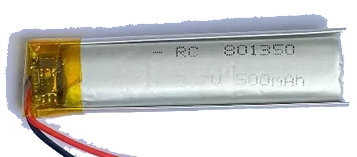
 Design with 801350 LiPo 500mAh Battery in Cirkit Designer
Introduction
The 801350 LiPo 500mAh Battery is a compact lithium polymer battery designed for applications requiring lightweight and high energy density power sources. With a capacity of 500mAh, it is ideal for powering small electronic devices, drones, wearable technology, and portable gadgets. Its slim form factor and reliable performance make it a popular choice for projects where space and weight are critical considerations.
Explore Projects Built with 801350 LiPo 500mAh Battery
 Open Project in Cirkit Designer
 Open Project in Cirkit Designer
 Open Project in Cirkit Designer
 Open Project in Cirkit Designer
Explore Projects Built with 801350 LiPo 500mAh Battery
Open Project in Cirkit DesignerOpen Project in Cirkit DesignerOpen Project in Cirkit DesignerOpen Project in Cirkit DesignerCommon Applications:
- Drones and quadcopters
- Wearable devices (e.g., fitness trackers, smartwatches)
- Portable electronic gadgets
- IoT devices and sensors
- RC toys and small robotics
Technical Specifications
The following table outlines the key technical details of the 801350 LiPo 500mAh Battery:
| Parameter | Specification |
|---|---|
| Nominal Voltage | 3.7V |
| Capacity | 500mAh |
| Maximum Discharge Rate | 1C (500mA) |
| Charging Voltage | 4.2V ± 0.05V |
| Charging Current | Standard: 0.2C (100mA), Max: 0.5C (250mA) |
| Dimensions | 8mm (thickness) x 13mm (width) x 50mm (length) |
| Weight | ~12g |
| Connector Type | JST-PH 2.0 (commonly used) |
| Protection Circuit | Built-in overcharge and over-discharge protection |
Pin Configuration
The 801350 LiPo battery typically comes with a JST-PH 2.0 connector. The pinout is as follows:
| Pin | Description |
|---|---|
| Red | Positive terminal (+) |
| Black | Negative terminal (-) |
Usage Instructions
How to Use the 801350 LiPo Battery in a Circuit
- Connection: Connect the battery to your circuit using the JST-PH 2.0 connector. Ensure the polarity matches the circuit's power input (red to positive, black to negative).
- Charging: Use a LiPo-compatible charger to charge the battery. Ensure the charger outputs a constant voltage of 4.2V and does not exceed the maximum charging current of 250mA.
- Discharge: Avoid discharging the battery below 3.0V to prevent damage. Most devices with LiPo batteries include a low-voltage cutoff to protect the battery.
- Mounting: Secure the battery in your device using double-sided tape or a battery holder. Avoid puncturing or bending the battery.
Important Considerations and Best Practices
- Safety: Never short-circuit the battery terminals, as this can cause overheating or damage.
- Storage: Store the battery at room temperature and at a charge level of around 50% for long-term storage.
- Handling: Avoid exposing the battery to water, fire, or extreme temperatures.
- Charging: Always use a charger specifically designed for LiPo batteries to prevent overcharging or overheating.
Example: Using the Battery with an Arduino UNO
To power an Arduino UNO with the 801350 LiPo battery, you can use a DC-DC boost converter to step up the 3.7V to 5V. Below is an example circuit and code to read the battery voltage using the Arduino's analog input:
Circuit:
- Connect the battery to the input of the DC-DC boost converter.
- Connect the output of the boost converter to the Arduino's 5V and GND pins.
- Use a voltage divider circuit to measure the battery voltage and connect it to an analog pin (e.g., A0).
Code:
// Define the analog pin connected to the voltage divider
const int batteryPin = A0;

// Voltage divider resistor values (in ohms)
const float R1 = 10000.0; // Resistor connected to battery positive
const float R2 = 10000.0; // Resistor connected to ground

void setup() {
  Serial.begin(9600); // Initialize serial communication
}

void loop() {
  int rawValue = analogRead(batteryPin); // Read the analog value
  float voltage = (rawValue / 1023.0) * 5.0; // Convert to voltage (Arduino 5V ADC)

  // Calculate the actual battery voltage using the voltage divider formula
  float batteryVoltage = voltage * (R1 + R2) / R2;

  // Print the battery voltage to the Serial Monitor
  Serial.print("Battery Voltage: ");
  Serial.print(batteryVoltage);
  Serial.println(" V");

  delay(1000); // Wait for 1 second before the next reading
}
Troubleshooting and FAQs
Common Issues
Battery Not Charging:
- Cause: Charger not compatible or faulty.
- Solution: Ensure the charger is designed for LiPo batteries and outputs 4.2V.
Battery Drains Quickly:
- Cause: Excessive current draw or aging battery.
- Solution: Check the current draw of your circuit and ensure it does not exceed 500mA. Replace the battery if it is old or damaged.
Battery Swells or Overheats:
- Cause: Overcharging, over-discharging, or physical damage.
- Solution: Stop using the battery immediately and dispose of it safely.
Arduino Not Powering On:
- Cause: Insufficient voltage from the battery.
- Solution: Use a DC-DC boost converter to step up the voltage to 5V.
FAQs
Can I use this battery for high-current applications?
- No, the maximum discharge rate is 1C (500mA). For higher currents, consider a battery with a higher capacity or discharge rating.
How long does it take to charge the battery?
- At the standard charging current of 100mA, it takes approximately 5 hours to fully charge. At the maximum charging current of 250mA, it takes about 2 hours.
Is the battery safe to use in outdoor environments?
- The battery is not waterproof or weatherproof. Use it in a protective enclosure if exposed to outdoor conditions.
Can I connect multiple batteries in series or parallel?
- Yes, but ensure proper balancing and protection circuits are used to avoid overcharging or over-discharging.
By following this documentation, you can safely and effectively use the 801350 LiPo 500mAh Battery in your projects.