
How to Use 150W INVERTER: Examples, Pinouts, and Specs
 Design with 150W INVERTER in Cirkit Designer
Introduction
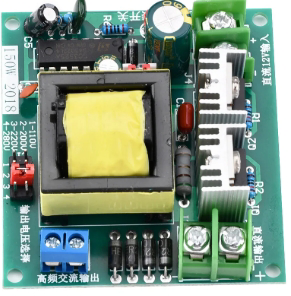
The 150W Inverter by KOSUN (Manufacturer Part ID: Sine Wave Inverter) is a compact and efficient device designed to convert DC (direct current) power from sources such as batteries or solar panels into AC (alternating current) power. This allows users to power household appliances, electronic devices, and other equipment that require AC electricity. The inverter is particularly useful in off-grid systems, portable power setups, and emergency backup power solutions.
Explore Projects Built with 150W INVERTER
 Open Project in Cirkit Designer
 Open Project in Cirkit Designer
 Open Project in Cirkit Designer
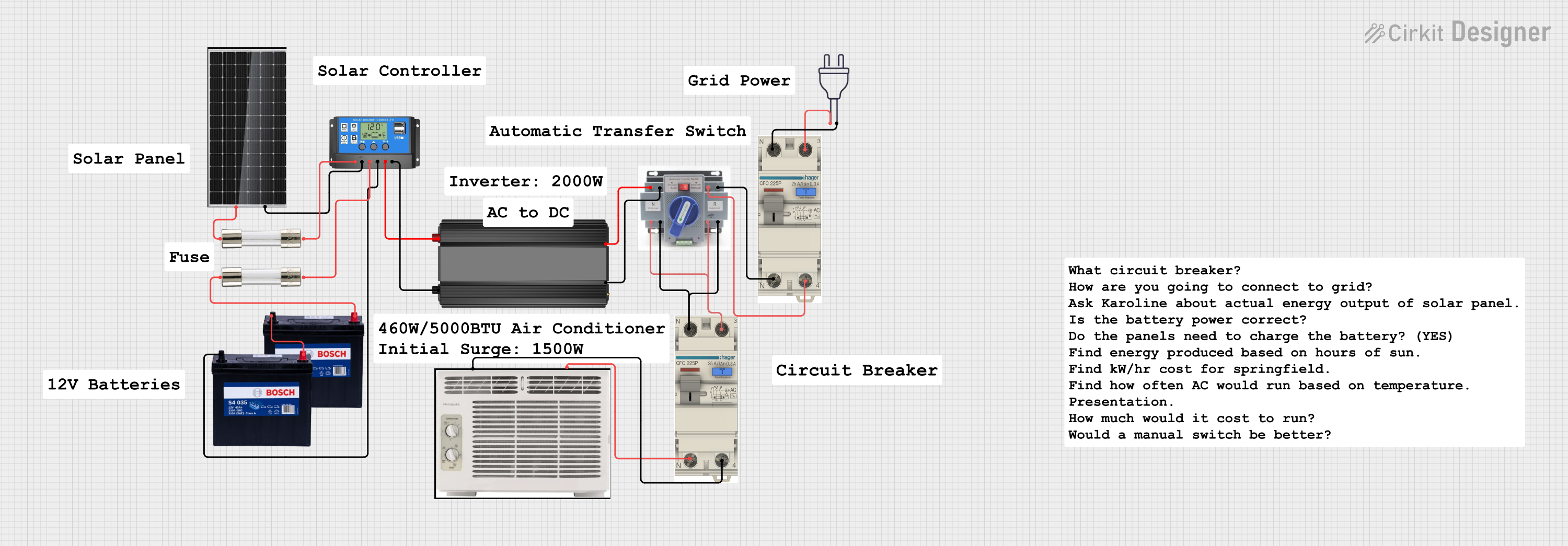 Open Project in Cirkit Designer
Explore Projects Built with 150W INVERTER
Open Project in Cirkit DesignerOpen Project in Cirkit DesignerOpen Project in Cirkit DesignerOpen Project in Cirkit DesignerCommon Applications and Use Cases
- Powering small household appliances (e.g., fans, lights, and chargers)
- Off-grid solar power systems
- Emergency backup power during outages
- Portable power solutions for camping or outdoor activities
- Running low-power electronic devices in vehicles or boats
Technical Specifications
The following table outlines the key technical details of the KOSUN 150W Sine Wave Inverter:
| Parameter | Specification |
|---|---|
| Input Voltage Range | 12V DC |
| Output Voltage | 110V AC ± 5% (or 220V AC ± 5%, model-dependent) |
| Output Power | 150W (continuous) |
| Peak Power | 300W |
| Output Waveform | Pure Sine Wave |
| Efficiency | ≥ 90% |
| Frequency | 50Hz ± 1Hz / 60Hz ± 1Hz (switchable) |
| No-Load Current Draw | < 0.5A |
| Protection Features | Overload, short circuit, over-temperature, low/high voltage |
| Operating Temperature | -10°C to 40°C |
| Dimensions | 150mm x 100mm x 50mm |
| Weight | 0.8 kg |
Pin Configuration and Descriptions
The inverter typically has the following input and output connections:
| Pin/Port | Description |
|---|---|
| DC Input Terminals | Connect to a 12V DC power source (e.g., battery) |
| AC Output Socket | Provides 110V or 220V AC output for appliances |
| Grounding Terminal | Ensures safety by grounding the inverter |
| Power Switch | Turns the inverter ON or OFF |
| Cooling Fan | Built-in fan for thermal management |
| LED Indicators | Displays operational status (e.g., power, fault) |
Usage Instructions
How to Use the 150W Inverter in a Circuit
Connect the DC Input:
- Ensure the DC power source (e.g., a 12V battery) is fully charged.
- Connect the positive (+) and negative (-) terminals of the inverter to the corresponding terminals of the battery using appropriate cables.
- Ensure the connections are secure and free of corrosion.
Connect the Load:
- Plug the AC appliance or device into the inverter's AC output socket.
- Ensure the total power consumption of the connected devices does not exceed 150W.
Power On the Inverter:
- Turn on the inverter using the power switch.
- Verify that the LED indicators show normal operation (e.g., power ON, no fault).
Monitor Operation:
- During operation, ensure the inverter is placed in a well-ventilated area to prevent overheating.
- Avoid placing the inverter near flammable materials.
Important Considerations and Best Practices
- Voltage Compatibility: Ensure the input voltage matches the inverter's specifications (12V DC).
- Load Limit: Do not exceed the 150W continuous power rating to avoid damage.
- Cooling: Keep the cooling fan unobstructed and maintain proper airflow around the inverter.
- Grounding: Always connect the grounding terminal to reduce the risk of electric shock.
- Battery Protection: Use a fuse or circuit breaker between the battery and inverter to protect against overcurrent.
Example: Using the Inverter with an Arduino UNO
The 150W inverter can power an Arduino UNO and other small electronics. Below is an example of powering an Arduino UNO using the inverter:
- Connect the inverter to a 12V battery.
- Plug a 5V USB adapter into the inverter's AC output socket.
- Use a USB cable to connect the Arduino UNO to the USB adapter.
// Example Arduino Code: Blink an LED
// This code blinks an LED connected to pin 13 of the Arduino UNO

void setup() {
  pinMode(13, OUTPUT); // Set pin 13 as an output
}

void loop() {
  digitalWrite(13, HIGH); // Turn the LED on
  delay(1000);            // Wait for 1 second
  digitalWrite(13, LOW);  // Turn the LED off
  delay(1000);            // Wait for 1 second
}
Troubleshooting and FAQs
Common Issues and Solutions
| Issue | Possible Cause | Solution |
|---|---|---|
| Inverter does not turn on | Loose or incorrect DC input connection | Check and secure the DC input connections |
| No AC output | Overload or short circuit | Reduce the load or check for short circuits |
| Overheating | Poor ventilation or excessive load | Ensure proper airflow and reduce the load |
| Low battery warning | Battery voltage is too low | Recharge or replace the battery |
| LED indicates fault | Overload, over-temperature, or input voltage issue | Check load, temperature, and input voltage |
FAQs
Can I use this inverter with a solar panel?
- Yes, but you must connect the solar panel to a charge controller and battery before connecting the inverter.
What happens if I exceed the 150W power limit?
- The inverter will trigger overload protection and shut down to prevent damage.
Can I use this inverter to power sensitive electronics?
- Yes, the pure sine wave output is suitable for sensitive devices like laptops and medical equipment.
Is the inverter compatible with 24V batteries?
- No, this model is designed for 12V DC input only. Using a 24V battery may damage the inverter.
By following this documentation, users can safely and effectively utilize the KOSUN 150W Sine Wave Inverter for a variety of applications.