
How to Use 74HC4051 CD4051 8-Channel Multiplexer: Examples, Pinouts, and Specs
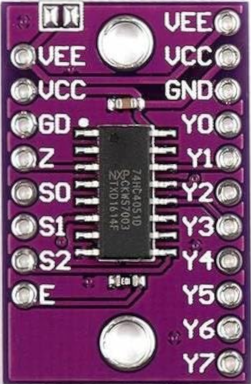
 Design with 74HC4051 CD4051 8-Channel Multiplexer in Cirkit Designer
Introduction
The 74HC4051 CD4051 is a high-speed CMOS 8-channel analog multiplexer/demultiplexer. It allows a single input/output line to be connected to one of eight independent channels, making it ideal for applications requiring signal routing, data acquisition, or analog signal selection. This component is manufactured by various generic manufacturers and is widely used due to its versatility and low cost.
Explore Projects Built with 74HC4051 CD4051 8-Channel Multiplexer
 Open Project in Cirkit Designer
 Open Project in Cirkit Designer
 Open Project in Cirkit Designer
 Open Project in Cirkit Designer
Explore Projects Built with 74HC4051 CD4051 8-Channel Multiplexer
Open Project in Cirkit DesignerOpen Project in Cirkit DesignerOpen Project in Cirkit DesignerOpen Project in Cirkit DesignerCommon Applications
- Analog signal multiplexing and demultiplexing
- Data acquisition systems
- Audio signal routing
- Sensor signal selection
- Microcontroller interfacing for expanding I/O capabilities
Technical Specifications
Key Technical Details
| Parameter | Value |
|---|---|
| Supply Voltage (Vcc) | 2V to 10V (CD4051), 2V to 6V (74HC4051) |
| Input Voltage Range | 0V to Vcc |
| Maximum Current per Pin | ±10mA |
| On-Resistance (Ron) | ~70Ω (at Vcc = 5V) |
| Propagation Delay | ~10ns (74HC4051) |
| Operating Temperature | -40°C to +125°C |
| Package Types | DIP, SOIC, TSSOP |
Pin Configuration and Descriptions
The 74HC4051 CD4051 has 16 pins, as described in the table below:
| Pin No. | Name | Description |
|---|---|---|
| 1 | X0 | Channel 0 input/output |
| 2 | X1 | Channel 1 input/output |
| 3 | X2 | Channel 2 input/output |
| 4 | X3 | Channel 3 input/output |
| 5 | X4 | Channel 4 input/output |
| 6 | X5 | Channel 5 input/output |
| 7 | X6 | Channel 6 input/output |
| 8 | X7 | Channel 7 input/output |
| 9 | VEE | Negative supply voltage (connect to GND for single-supply operation) |
| 10 | E (EN) | Enable pin (active LOW, enables the multiplexer when LOW) |
| 11 | S0 | Select line 0 (LSB) |
| 12 | S1 | Select line 1 |
| 13 | S2 | Select line 2 (MSB) |
| 14 | VCC | Positive supply voltage |
| 15 | Z | Common input/output (connected to one of X0-X7 based on select lines) |
| 16 | GND | Ground |
Usage Instructions
How to Use the Component in a Circuit
- Power Supply: Connect the VCC pin to a positive voltage source (e.g., 5V for 74HC4051) and GND to ground. For single-supply operation, connect VEE to GND.
- Enable Pin: Ensure the enable pin (E) is pulled LOW to activate the multiplexer. If HIGH, the multiplexer is disabled, and all channels are disconnected.
- Select Lines: Use the S0, S1, and S2 pins to select one of the eight channels (X0-X7). The binary value on these pins determines the active channel:
- S2 S1 S0 = 000 → X0 is connected to Z
- S2 S1 S0 = 001 → X1 is connected to Z
- ...
- S2 S1 S0 = 111 → X7 is connected to Z
- Signal Routing: Connect the signal source or destination to the Z pin. The selected channel (X0-X7) will be routed to Z.
Important Considerations and Best Practices
- Voltage Levels: Ensure that the input signal voltage does not exceed the supply voltage (VCC) to avoid damaging the component.
- Decoupling Capacitor: Place a 0.1µF decoupling capacitor near the VCC pin to stabilize the power supply.
- Unused Pins: Tie unused select lines (S0-S2) and enable pin (E) to a defined logic level (HIGH or LOW) to prevent floating inputs.
- Signal Integrity: Be mindful of the on-resistance (Ron) and propagation delay, especially in high-frequency applications.
Example: Connecting to an Arduino UNO
The following example demonstrates how to use the 74HC4051 CD4051 with an Arduino UNO to read analog signals from multiple sensors.
Circuit Connections
- Connect VCC to the Arduino's 5V pin and GND to the Arduino's GND.
- Connect the Z pin to the Arduino's A0 analog input.
- Connect S0, S1, and S2 to Arduino digital pins 2, 3, and 4, respectively.
- Connect the enable pin (E) to GND to activate the multiplexer.
- Connect sensors to X0-X7.
Arduino Code
// Define select pins
const int S0 = 2; // Select line 0
const int S1 = 3; // Select line 1
const int S2 = 4; // Select line 2

// Define analog input pin
const int Z = A0; // Common input/output pin

void setup() {
  // Set select pins as outputs
  pinMode(S0, OUTPUT);
  pinMode(S1, OUTPUT);
  pinMode(S2, OUTPUT);

  // Initialize serial communication
  Serial.begin(9600);
}

void loop() {
  for (int channel = 0; channel < 8; channel++) {
    // Set select lines to choose the channel
    digitalWrite(S0, channel & 0x01); // LSB
    digitalWrite(S1, (channel >> 1) & 0x01);
    digitalWrite(S2, (channel >> 2) & 0x01); // MSB

    // Read the analog value from the selected channel
    int sensorValue = analogRead(Z);

    // Print the channel number and sensor value
    Serial.print("Channel ");
    Serial.print(channel);
    Serial.print(": ");
    Serial.println(sensorValue);

    delay(500); // Wait for 500ms before reading the next channel
  }
}
Troubleshooting and FAQs
Common Issues
No Signal Output:
- Ensure the enable pin (E) is LOW.
- Verify that the select lines (S0-S2) are correctly configured.
- Check the power supply connections (VCC and GND).
Incorrect Channel Selection:
- Double-check the binary values on the select lines.
- Ensure there are no loose or floating connections.
Signal Distortion:
- Verify that the input signal voltage is within the specified range (0V to VCC).
- Check for excessive load on the Z pin, which may affect signal quality.
FAQs
Q1: Can the 74HC4051 CD4051 handle digital signals?
Yes, it can route both analog and digital signals, provided the voltage levels are within the specified range.
Q2: What is the difference between 74HC4051 and CD4051?
The 74HC4051 operates at higher speeds and lower voltages (2V-6V), while the CD4051 supports a wider voltage range (2V-10V) but is slower.
Q3: Can I use this component for bidirectional signal routing?
Yes, the multiplexer supports bidirectional operation, allowing signals to flow in either direction between Z and the selected channel.
Q4: How do I use multiple 74HC4051 CD4051 chips in a single circuit?
You can cascade multiple chips by connecting their enable pins (E) to separate control signals and sharing the select lines (S0-S2).