
How to Use STC-1000: Examples, Pinouts, and Specs
 Design with STC-1000 in Cirkit Designer
Introduction
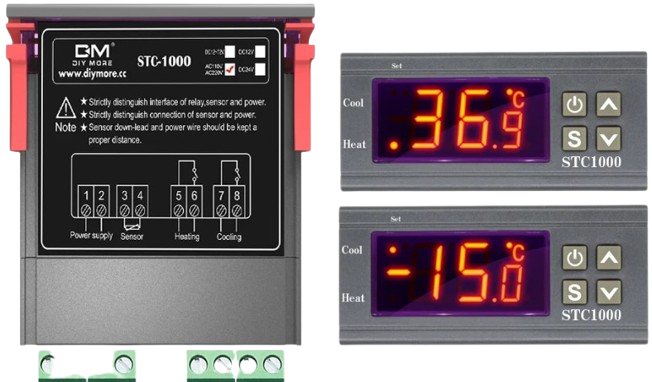
The STC-1000 is a versatile digital temperature controller manufactured by SMKN 1 Lmg (Part ID: 02). It is widely used for regulating temperature in a variety of applications, such as incubators, refrigerators, aquariums, and fermentation chambers. The device features a dual relay output, enabling simultaneous control of heating and cooling systems. It also includes a temperature sensor for precise monitoring and control.
Explore Projects Built with STC-1000
 Open Project in Cirkit Designer
 Open Project in Cirkit Designer
 Open Project in Cirkit Designer
 Open Project in Cirkit Designer
Explore Projects Built with STC-1000
Open Project in Cirkit DesignerOpen Project in Cirkit DesignerOpen Project in Cirkit DesignerOpen Project in Cirkit DesignerCommon Applications
- Incubators for hatching eggs
- Temperature regulation in refrigerators and freezers
- Aquariums and terrariums
- Home brewing and fermentation processes
- HVAC systems
Technical Specifications
Key Technical Details
| Parameter | Specification |
|---|---|
| Operating Voltage | 110V AC or 220V AC (±10%) |
| Temperature Range | -50°C to 99°C |
| Temperature Accuracy | ±1°C |
| Sensor Type | NTC (10kΩ) temperature sensor |
| Relay Output Capacity | 10A at 220V AC (per relay) |
| Power Consumption | ≤3W |
| Display Type | LED digital display |
| Dimensions | 75mm x 34.5mm x 85mm |
| Operating Temperature | -10°C to 60°C |
| Storage Temperature | -20°C to 75°C |
Pin Configuration and Descriptions
The STC-1000 has a total of 8 terminals for wiring connections. Below is the pin configuration:
| Terminal Number | Description |
|---|---|
| 1 | Power input (Live wire, L) |
| 2 | Power input (Neutral wire, N) |
| 3 | Cooling relay output (Live wire, L) |
| 4 | Cooling relay output (Neutral wire, N) |
| 5 | Heating relay output (Live wire, L) |
| 6 | Heating relay output (Neutral wire, N) |
| 7 | Temperature sensor input (Sensor wire) |
| 8 | Temperature sensor input (Sensor wire) |
Usage Instructions
How to Use the STC-1000 in a Circuit
- Power Connection: Connect terminals 1 and 2 to the AC power supply (110V or 220V, depending on your model).
- Sensor Connection: Attach the NTC temperature sensor to terminals 7 and 8. Ensure the sensor is placed in the environment where temperature regulation is required.
- Relay Outputs:
- Connect the cooling device (e.g., a fan or refrigeration unit) to terminals 3 and 4.
- Connect the heating device (e.g., a heater or heating pad) to terminals 5 and 6.
- Configuration:
- Power on the device. Use the buttons on the front panel to set the desired temperature range and hysteresis (difference between the activation and deactivation temperatures).
- Refer to the user manual for detailed programming instructions.
Important Considerations and Best Practices
- Ensure the total current drawn by the connected devices does not exceed the relay output capacity (10A at 220V AC).
- Place the temperature sensor in a location that accurately represents the environment's temperature.
- Avoid exposing the STC-1000 to moisture or extreme temperatures beyond its operating range.
- Use proper insulation and secure connections to prevent electrical hazards.
Example: Using the STC-1000 with an Arduino UNO
While the STC-1000 is a standalone device, it can be integrated with an Arduino UNO for advanced automation. Below is an example code snippet to read the temperature data from the STC-1000's sensor (if accessible) and display it on the Arduino's serial monitor.
// Example code for interfacing an NTC sensor with Arduino UNO
// Note: This assumes the NTC sensor is connected to an analog pin on the Arduino.

const int sensorPin = A0; // Analog pin connected to the NTC sensor
float voltage, resistance, temperature;

void setup() {
  Serial.begin(9600); // Initialize serial communication
}

void loop() {
  int sensorValue = analogRead(sensorPin); // Read the analog value
  voltage = sensorValue * (5.0 / 1023.0); // Convert to voltage
  resistance = (10000 * voltage) / (5.0 - voltage); // Calculate resistance
  temperature = 1 / (0.003354 + 0.000256985 * log(resistance / 10000));
  temperature -= 273.15; // Convert Kelvin to Celsius

  Serial.print("Temperature: ");
  Serial.print(temperature);
  Serial.println(" °C");

  delay(1000); // Wait 1 second before the next reading
}
Note: The above code assumes direct access to the NTC sensor. If the STC-1000 is used as a standalone controller, this code may not apply.
Troubleshooting and FAQs
Common Issues and Solutions
Display Shows "EE" or Error Code:
- Cause: Faulty or disconnected temperature sensor.
- Solution: Check the sensor connection to terminals 7 and 8. Replace the sensor if necessary.
Relay Does Not Activate:
- Cause: Incorrect wiring or configuration.
- Solution: Verify the wiring connections and ensure the set temperature range is correct.
Temperature Readings Are Inaccurate:
- Cause: Sensor placement or faulty sensor.
- Solution: Ensure the sensor is placed in an appropriate location. Replace the sensor if needed.
Device Does Not Power On:
- Cause: No power supply or incorrect voltage.
- Solution: Check the power supply and ensure it matches the device's operating voltage.
FAQs
Q: Can the STC-1000 control both heating and cooling simultaneously?
A: Yes, the STC-1000 has dual relay outputs, allowing it to control heating and cooling devices independently.Q: Is the STC-1000 waterproof?
A: No, the STC-1000 is not waterproof. Avoid exposing it to moisture or liquids.Q: Can I extend the length of the temperature sensor cable?
A: Yes, but ensure the extension does not introduce significant resistance, which could affect accuracy.Q: What happens if the power supply is interrupted?
A: The STC-1000 will retain its settings and resume operation once power is restored.
This concludes the documentation for the STC-1000. For further assistance, refer to the manufacturer's user manual or contact technical support.