
How to Use JST XH 5A Male: Examples, Pinouts, and Specs
 Design with JST XH 5A Male in Cirkit Designer
Introduction
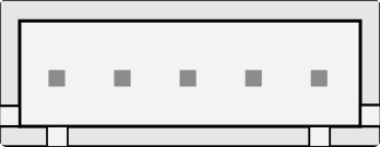
The JST XH 5A Male connector is a widely used electrical connector designed for reliable and secure connections in electronic circuits. With a 2.5mm pitch and a current handling capacity of up to 5A, this connector is ideal for applications requiring compact, high-current connections. It is commonly used in battery packs, PCBs, and other electronic devices where robust and efficient connections are essential.
Explore Projects Built with JST XH 5A Male
 Open Project in Cirkit Designer
 Open Project in Cirkit Designer
 Open Project in Cirkit Designer
 Open Project in Cirkit Designer
Explore Projects Built with JST XH 5A Male
Open Project in Cirkit DesignerOpen Project in Cirkit DesignerOpen Project in Cirkit DesignerOpen Project in Cirkit DesignerCommon Applications and Use Cases
- Battery connections in RC vehicles, drones, and robotics
- Power delivery in small electronic devices
- PCB connections for sensors, motors, and other peripherals
- LED lighting systems and power distribution
Technical Specifications
Below are the key technical details of the JST XH 5A Male connector:
| Parameter | Specification |
|---|---|
| Pitch | 2.5mm |
| Current Rating | Up to 5A |
| Voltage Rating | 250V AC/DC |
| Contact Resistance | ≤ 10mΩ |
| Insulation Resistance | ≥ 1000MΩ |
| Operating Temperature | -25°C to +85°C |
| Material (Housing) | Nylon 66 (UL94V-0 rated) |
| Material (Contacts) | Tin-plated copper alloy |
Pin Configuration and Descriptions
The JST XH 5A Male connector typically comes in multiple pin configurations (e.g., 2-pin, 3-pin, 4-pin, etc.). Below is an example of a 3-pin configuration:
| Pin Number | Description | Typical Use |
|---|---|---|
| 1 | Positive (+) Terminal | Power supply or signal input |
| 2 | Ground (GND) | Common ground connection |
| 3 | Signal/Negative (-) | Signal output or return path |
Usage Instructions
How to Use the JST XH 5A Male Connector in a Circuit
- Prepare the Wires: Strip the insulation from the wires to expose approximately 3-5mm of the conductor.
- Crimp the Contacts: Use a crimping tool to attach the metal contacts to the exposed wire ends. Ensure a secure and firm crimp for reliable connections.
- Insert Contacts into the Housing: Push the crimped contacts into the connector housing until they click into place. Verify that the contacts are properly seated.
- Connect to the Female Counterpart: Align the JST XH Male connector with its female counterpart and gently push them together until they lock securely.
- Verify the Connection: Check the connection for stability and ensure there is no loose wiring.
Important Considerations and Best Practices
- Wire Gauge: Use wires with an appropriate gauge (e.g., 20-24 AWG) to handle the current without overheating.
- Crimping Tool: Always use a compatible crimping tool for precise and reliable crimps.
- Polarity: Double-check the polarity of the connections to avoid damage to the circuit.
- Insertion Force: Avoid excessive force when connecting or disconnecting to prevent damage to the housing or contacts.
- Environmental Conditions: Ensure the connector is not exposed to extreme temperatures or moisture beyond its rated limits.
Example: Connecting to an Arduino UNO
The JST XH 5A Male connector can be used to power an Arduino UNO or connect peripherals. Below is an example of connecting a 3-pin JST XH connector to an Arduino UNO for powering an LED:
Circuit Diagram
- Pin 1 (Positive) → Arduino 5V
- Pin 2 (Ground) → Arduino GND
- Pin 3 (Signal) → Arduino Digital Pin 9 (for LED control)
Arduino Code Example
// Example code to control an LED connected via a JST XH 5A Male connector
// Pin 9 is used as the output pin for the LED

const int ledPin = 9; // Define the digital pin connected to the LED

void setup() {
  pinMode(ledPin, OUTPUT); // Set the LED pin as an output
}

void loop() {
  digitalWrite(ledPin, HIGH); // Turn the LED on
  delay(1000);                // Wait for 1 second
  digitalWrite(ledPin, LOW);  // Turn the LED off
  delay(1000);                // Wait for 1 second
}
Troubleshooting and FAQs
Common Issues and Solutions
Loose Connections:
- Issue: The connector feels loose or disconnects easily.
- Solution: Ensure the contacts are fully inserted into the housing and the crimping is secure.
Overheating:
- Issue: The connector becomes hot during operation.
- Solution: Check the current rating of the wires and ensure they match the connector's specifications. Avoid exceeding the 5A current limit.
Polarity Reversal:
- Issue: The circuit does not work or components are damaged.
- Solution: Verify the polarity of the connections before powering the circuit.
Difficulty in Crimping:
- Issue: The crimped contacts do not fit into the housing.
- Solution: Use a compatible crimping tool and ensure the wire gauge matches the connector's specifications.
FAQs
Q1: Can the JST XH 5A Male connector handle more than 5A?
A1: No, exceeding the 5A current rating may cause overheating and damage to the connector.
Q2: Is the JST XH 5A Male connector waterproof?
A2: No, this connector is not waterproof. Use additional protection if operating in wet environments.
Q3: Can I solder wires directly to the contacts instead of crimping?
A3: While possible, crimping is recommended for a more reliable and durable connection.
Q4: What is the maximum wire length I can use with this connector?
A4: The maximum wire length depends on the current and voltage drop requirements of your application. Use thicker wires for longer distances to minimize resistance.
By following this documentation, you can effectively use the JST XH 5A Male connector in your electronic projects with confidence and reliability.