Cirkit Designer Logo
Cirkit Designer
Your all-in-one circuit design IDE
Home / 
Component Documentation

How to Use Sensor SHT113 Flame: Examples, Pinouts, and Specs
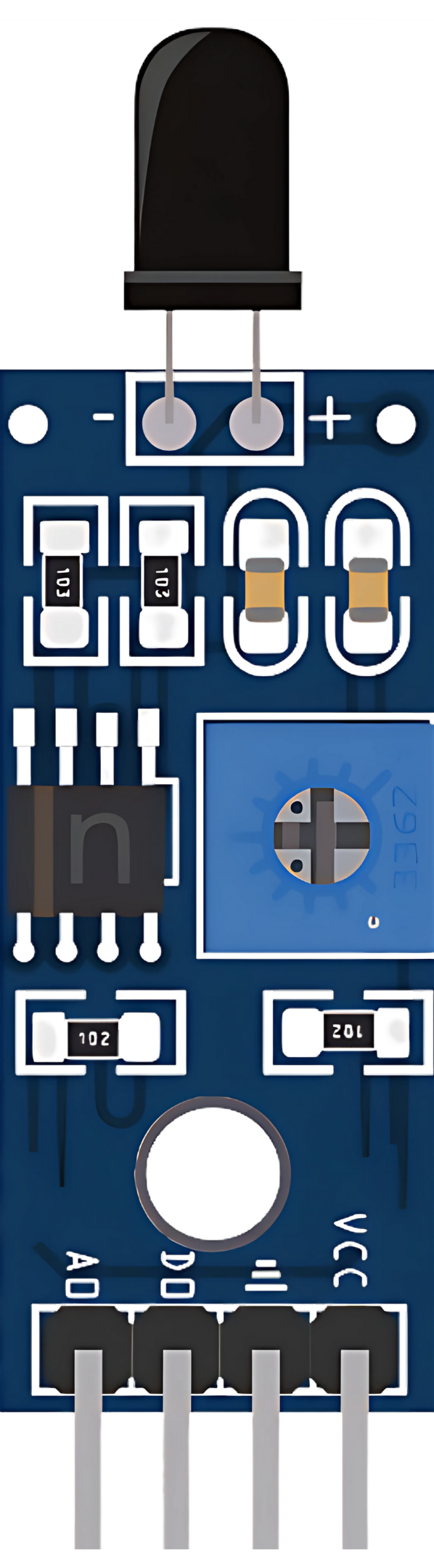

Image of Sensor SHT113 Flame
Cirkit Designer LogoDesign with Sensor SHT113 Flame in Cirkit Designer

Introduction

The SHT113 Flame Sensor is an electronic device designed to detect the presence of fire or other sources of heat. It is commonly used in safety systems for homes, offices, and industrial environments to trigger alarms or other safety measures when flames are detected. The sensor operates by detecting infrared (IR) radiation typically emitted by flames, allowing for quick and reliable fire detection.

Explore Projects Built with Sensor SHT113 Flame
Use Cirkit Designer to design, explore, and prototype these projects online. Some projects support real-time simulation. Click "Open Project" to start designing instantly!
ESP32-Based Flame Detection System
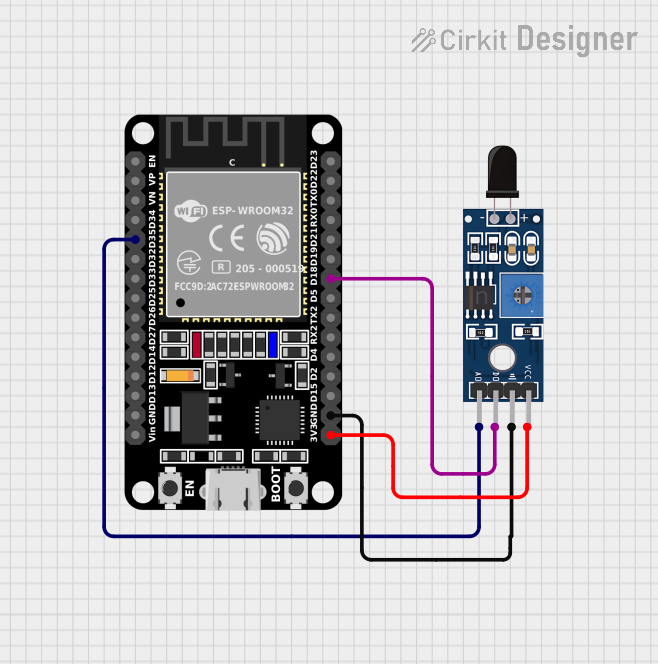
Image of esp32_with_flame_sensor: A project utilizing Sensor SHT113 Flame in a practical application
This circuit connects an ESP32 microcontroller to a Sensor SHT113 Flame sensor. The ESP32's digital pin D35 is connected to the sensor's analog output (A0), and digital pin D18 is connected to the sensor's digital output (D0), allowing the microcontroller to read both analog and digital signals from the flame sensor. The ESP32 and the flame sensor share a common ground (GND), and the sensor is powered by the ESP32's 3.3V output (3V3).
Cirkit Designer LogoOpen Project in Cirkit Designer
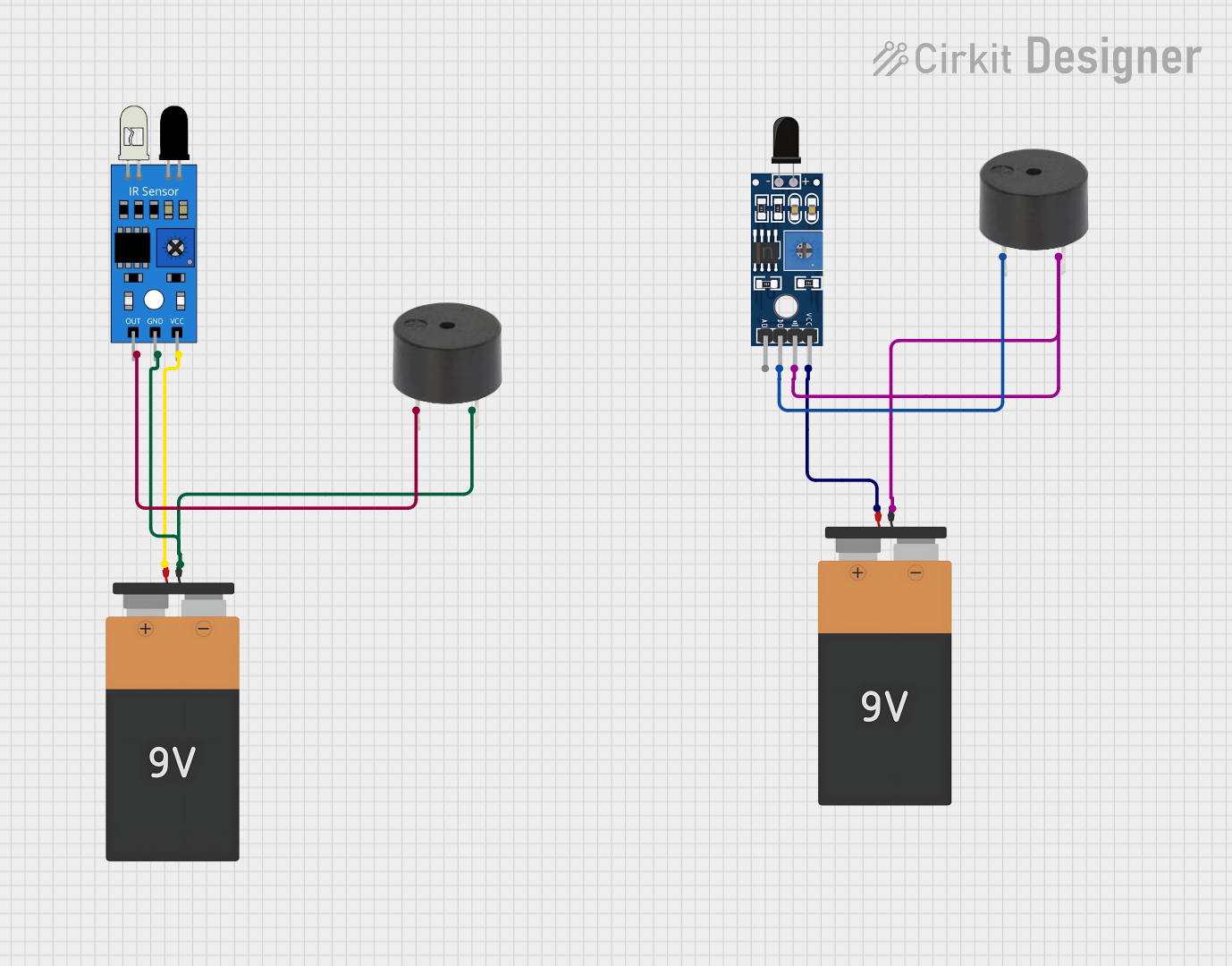
Flame Detection and Intrusion Alert System with Dual Buzzers
Image of flame detector: A project utilizing Sensor SHT113 Flame in a practical application
This circuit consists of two sensor-triggered buzzer systems. One buzzer is activated by a flame sensor, and the other by an IR sensor. Both systems are independently powered by separate 9V batteries and are designed to sound an alarm when their respective sensors detect a flame or an IR signal.
Cirkit Designer LogoOpen Project in Cirkit Designer
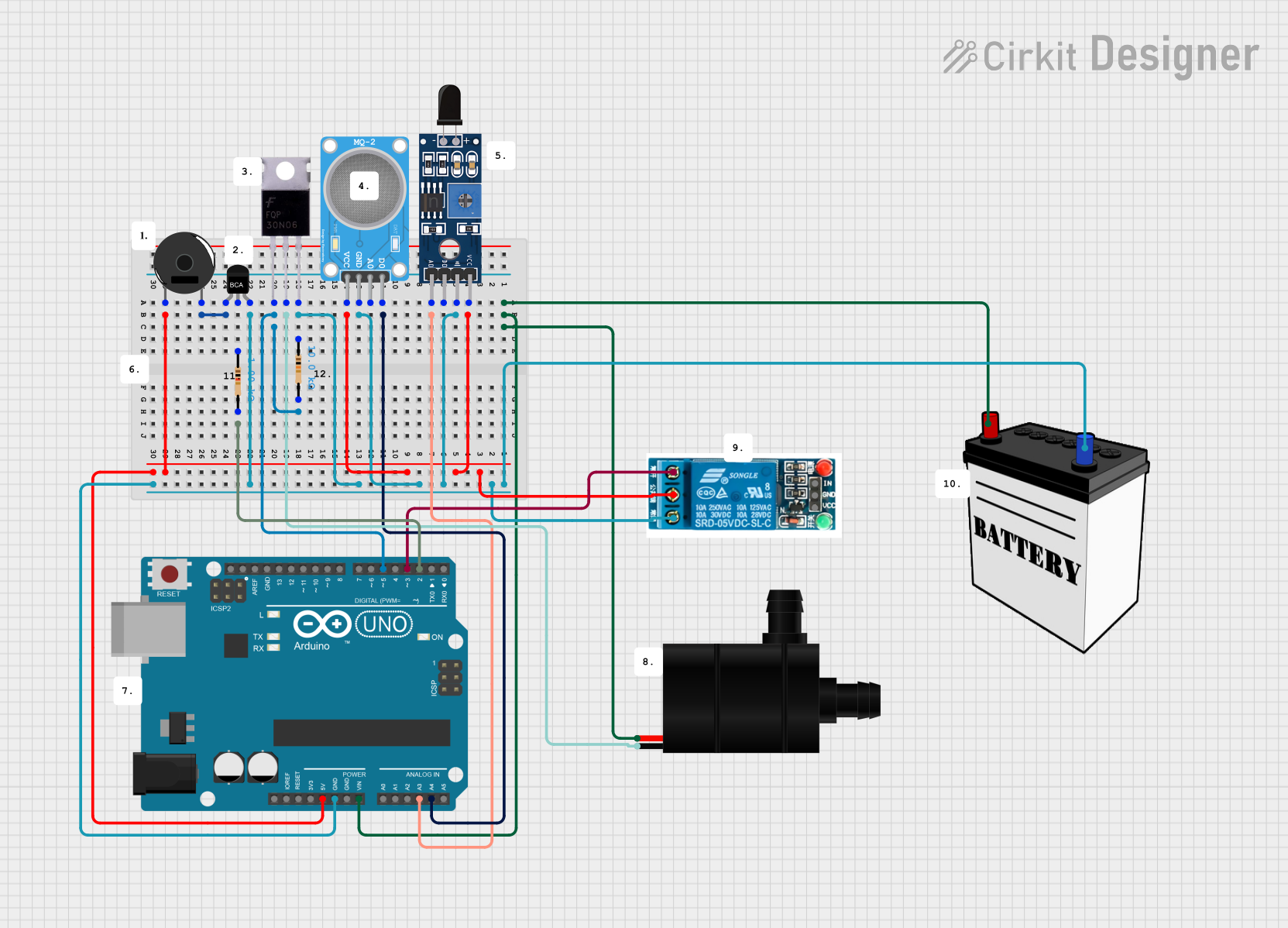
Arduino UNO-Based Fire and Gas Detection Safety System with Automated Water Pump Response
Image of FIRE: A project utilizing Sensor SHT113 Flame in a practical application
This circuit is designed for environmental monitoring and automated response, featuring an Arduino UNO interfaced with an MQ-2 gas sensor and an SHT113 flame sensor. It includes a piezo buzzer for alerts and a water pump for automated actions, with power control facilitated by a MOSFET, an NPN transistor, and a 5V relay. The system is powered by a 12V battery.
Cirkit Designer LogoOpen Project in Cirkit Designer
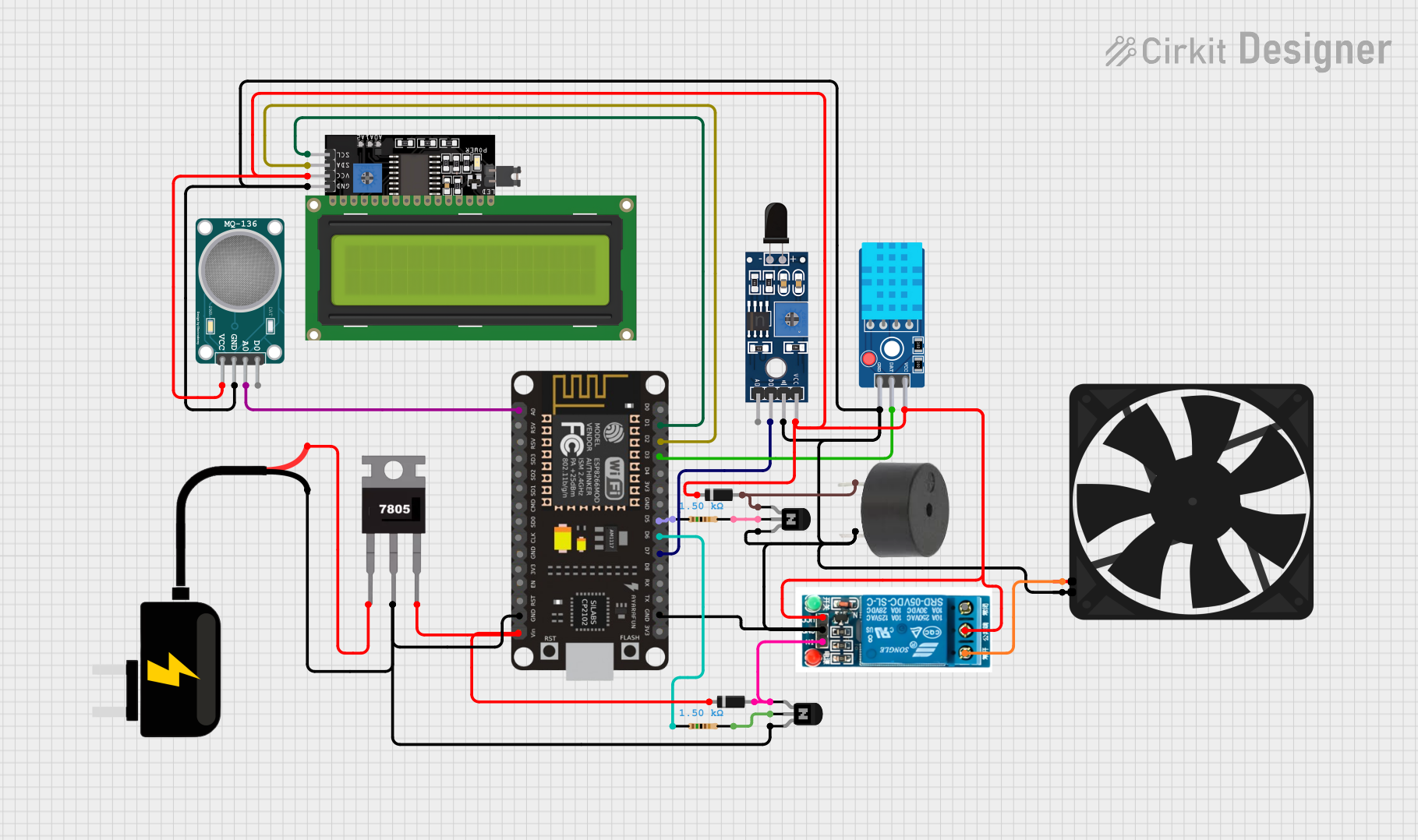
Multi-Sensor Environmental Monitoring System with Wi-Fi Connectivity
Image of Project 2. Kitchen : A project utilizing Sensor SHT113 Flame in a practical application
This circuit features an ESP8266 NodeMCU microcontroller interfaced with various sensors including a flame sensor (SHT113), a hydrogen sulfide gas sensor (MQ-136), and a temperature and humidity sensor (DHT11). The microcontroller also controls an LCD display via I2C, a buzzer, and a relay which in turn controls a fan. A 7805 voltage regulator is used to step down the 9V DC source to 5V required by the microcontroller and other components, with diodes and transistors for protection and switching purposes.
Cirkit Designer LogoOpen Project in Cirkit Designer

Explore Projects Built with Sensor SHT113 Flame

Use Cirkit Designer to design, explore, and prototype these projects online. Some projects support real-time simulation. Click "Open Project" to start designing instantly!
Image of esp32_with_flame_sensor: A project utilizing Sensor SHT113 Flame in a practical application
ESP32-Based Flame Detection System
This circuit connects an ESP32 microcontroller to a Sensor SHT113 Flame sensor. The ESP32's digital pin D35 is connected to the sensor's analog output (A0), and digital pin D18 is connected to the sensor's digital output (D0), allowing the microcontroller to read both analog and digital signals from the flame sensor. The ESP32 and the flame sensor share a common ground (GND), and the sensor is powered by the ESP32's 3.3V output (3V3).
Cirkit Designer LogoOpen Project in Cirkit Designer
Image of flame detector: A project utilizing Sensor SHT113 Flame in a practical application
Flame Detection and Intrusion Alert System with Dual Buzzers
This circuit consists of two sensor-triggered buzzer systems. One buzzer is activated by a flame sensor, and the other by an IR sensor. Both systems are independently powered by separate 9V batteries and are designed to sound an alarm when their respective sensors detect a flame or an IR signal.
Cirkit Designer LogoOpen Project in Cirkit Designer
Image of FIRE: A project utilizing Sensor SHT113 Flame in a practical application
Arduino UNO-Based Fire and Gas Detection Safety System with Automated Water Pump Response
This circuit is designed for environmental monitoring and automated response, featuring an Arduino UNO interfaced with an MQ-2 gas sensor and an SHT113 flame sensor. It includes a piezo buzzer for alerts and a water pump for automated actions, with power control facilitated by a MOSFET, an NPN transistor, and a 5V relay. The system is powered by a 12V battery.
Cirkit Designer LogoOpen Project in Cirkit Designer
Image of Project 2. Kitchen : A project utilizing Sensor SHT113 Flame in a practical application
Multi-Sensor Environmental Monitoring System with Wi-Fi Connectivity
This circuit features an ESP8266 NodeMCU microcontroller interfaced with various sensors including a flame sensor (SHT113), a hydrogen sulfide gas sensor (MQ-136), and a temperature and humidity sensor (DHT11). The microcontroller also controls an LCD display via I2C, a buzzer, and a relay which in turn controls a fan. A 7805 voltage regulator is used to step down the 9V DC source to 5V required by the microcontroller and other components, with diodes and transistors for protection and switching purposes.
Cirkit Designer LogoOpen Project in Cirkit Designer

Common Applications and Use Cases

  • Fire alarms
  • Firefighting robots
  • Flame monitoring systems in industrial settings
  • Safety systems for gas-powered appliances

Technical Specifications

Key Technical Details

  • Operating Voltage: 3.3V to 5V DC
  • Output Type: Digital and Analog
  • Sensitivity: Adjustable via onboard potentiometer
  • Detection Angle: Approximately 60 degrees
  • Detection Distance: Up to 100cm (depending on the flame size and sensitivity setting)

Pin Configuration and Descriptions

Pin Number Pin Name Description
1 VCC Power supply (3.3V to 5V DC)
2 GND Ground
3 D0 Digital output (0 or 1)
4 A0 Analog output (0V to VCC, proportional to flame intensity)

Usage Instructions

How to Use the Component in a Circuit

  1. Connect the VCC pin to the power supply (3.3V to 5V).
  2. Connect the GND pin to the ground of the power supply.
  3. Connect the D0 pin to a digital input pin on a microcontroller if you wish to use the digital output.
  4. Connect the A0 pin to an analog input pin on a microcontroller if you wish to use the analog output.

Important Considerations and Best Practices

  • Ensure that the sensor is placed away from direct sunlight or other IR sources to avoid false alarms.
  • Adjust the sensitivity using the onboard potentiometer to suit the specific application.
  • Use a pull-up or pull-down resistor on the digital output if required by the microcontroller.
  • Test the sensor with actual flames to calibrate the sensitivity properly.

Example Code for Arduino UNO

// Define the digital and analog pins connected to the sensor
const int flameSensorDigitalPin = 2;
const int flameSensorAnalogPin = A0;

void setup() {
  pinMode(flameSensorDigitalPin, INPUT);
  Serial.begin(9600);
}

void loop() {
  int flameDetected = digitalRead(flameSensorDigitalPin);
  int flameIntensity = analogRead(flameSensorAnalogPin);

  if (flameDetected == LOW) { // Assuming active-low signal
    Serial.println("Flame detected!");
  } else {
    Serial.println("No flame detected.");
  }

  // Print the flame intensity value
  Serial.print("Flame intensity: ");
  Serial.println(flameIntensity);

  delay(500); // Delay for half a second
}

Troubleshooting and FAQs

Common Issues Users Might Face

  • False Alarms: Adjust the sensitivity potentiometer to reduce false positives.
  • No Response: Ensure that the sensor is connected correctly and that the power supply is within the specified voltage range.
  • Inconsistent Readings: Avoid placing the sensor in environments with rapid temperature changes or near other sources of IR radiation.

Solutions and Tips for Troubleshooting

  • Double-check wiring and connections.
  • Use a multimeter to verify the power supply voltage.
  • Test the sensor output with a simple LED circuit before connecting it to a microcontroller.
  • Replace the sensor if it appears to be damaged or non-functional after testing.

FAQs

Q: Can the SHT113 Flame Sensor detect smoke? A: No, the sensor is designed to detect IR radiation from flames, not smoke particles.

Q: What is the maximum detection distance of the sensor? A: The maximum detection distance can be up to 100cm, but it depends on the flame size and the sensitivity setting.

Q: How do I adjust the sensitivity of the sensor? A: Turn the onboard potentiometer clockwise or counterclockwise to increase or decrease the sensitivity, respectively.

Q: Can the sensor differentiate between different types of flames? A: The sensor does not differentiate between flame types; it detects the presence of IR radiation characteristic of flames.

Remember, this documentation is a starting point for using the SHT113 Flame Sensor. Always conduct thorough testing in the intended application environment to ensure proper operation and safety.