Cirkit Designer Logo
Cirkit Designer
Your all-in-one circuit design IDE
Home / 
Component Documentation

How to Use current sensor: Examples, Pinouts, and Specs
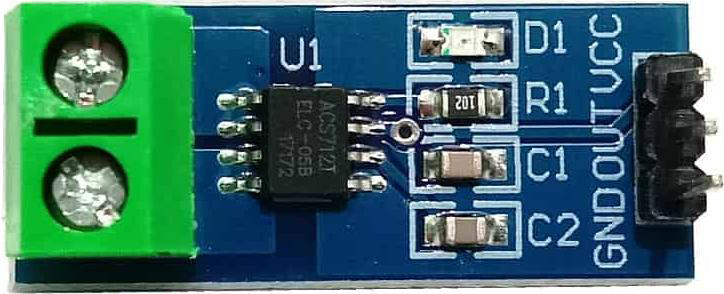

Image of current sensor
Cirkit Designer LogoDesign with current sensor in Cirkit Designer

Introduction

The Shay Current Sensor (Part ID: 1234543235436545654) is a device designed to measure the flow of electric current in a circuit. It provides real-time data for monitoring and control, making it an essential component in various electronic and electrical systems. This sensor is capable of detecting both AC and DC currents, offering high accuracy and reliability.

Explore Projects Built with current sensor
Use Cirkit Designer to design, explore, and prototype these projects online. Some projects support real-time simulation. Click "Open Project" to start designing instantly!
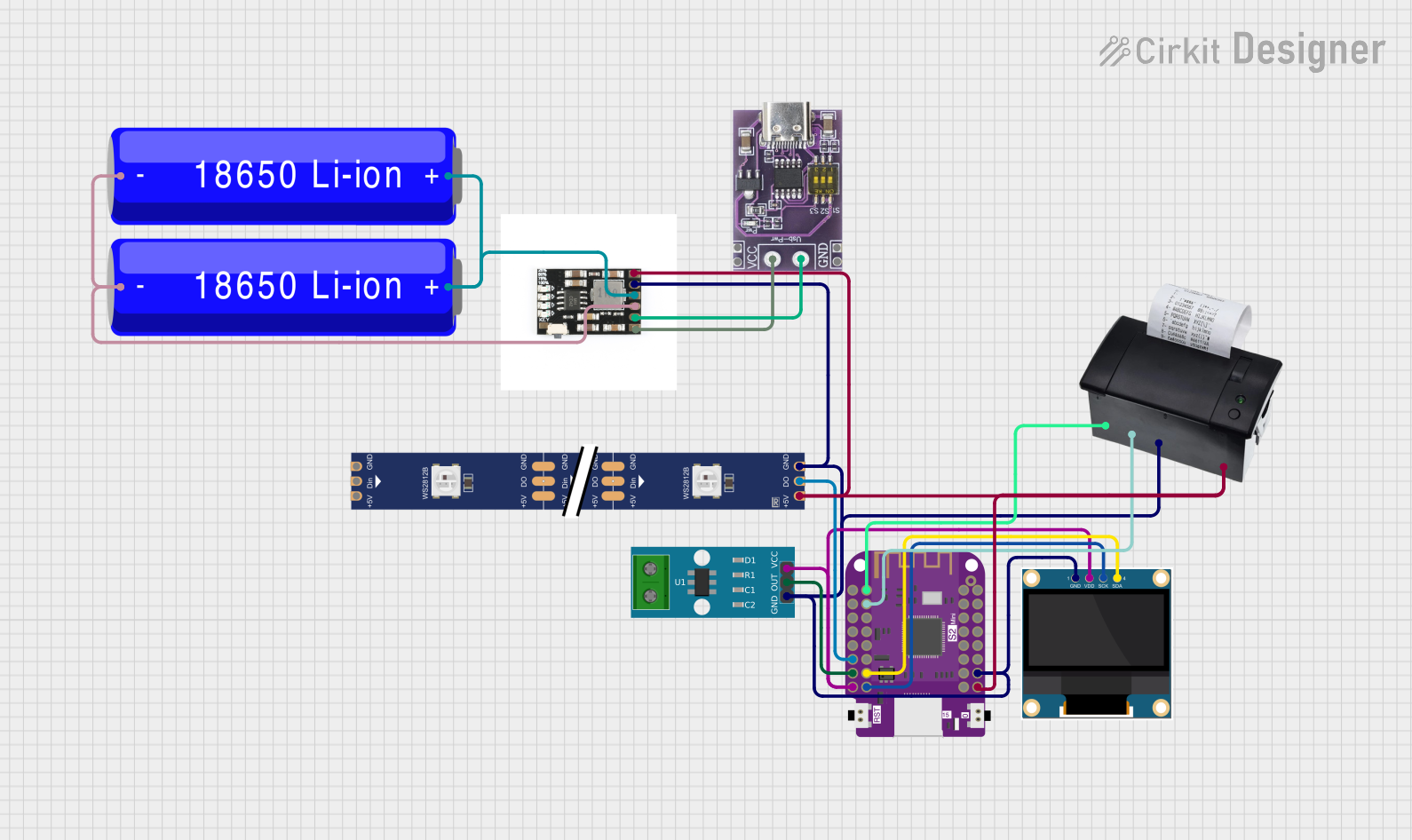
Wemos S2 Mini Controlled Smart Device with OLED Display, Thermal Printing, and RGB LED Strip
Image of DT NEA - Noah Patel: A project utilizing current sensor in a practical application
This circuit features a Wemos S2 Mini microcontroller that controls a WS2812 RGB LED strip and communicates with a 0.96" OLED display and a 58mm mini thermal printer. The ACS712 Current Sensor is interfaced with the microcontroller to monitor current, and power is managed by a CD42 BMS connected to two 18650 Li-ion batteries, with a USB-C PD Trigger Board for power delivery. The circuit is designed for visual output (LED strip, OLED display), printing capabilities, and current sensing, likely for a portable, battery-powered monitoring and display device.
Cirkit Designer LogoOpen Project in Cirkit Designer
ESP32-Based Current Monitoring and Temperature Sensing System
Image of SISTEMA DE MONITOREO: A project utilizing current sensor in a practical application
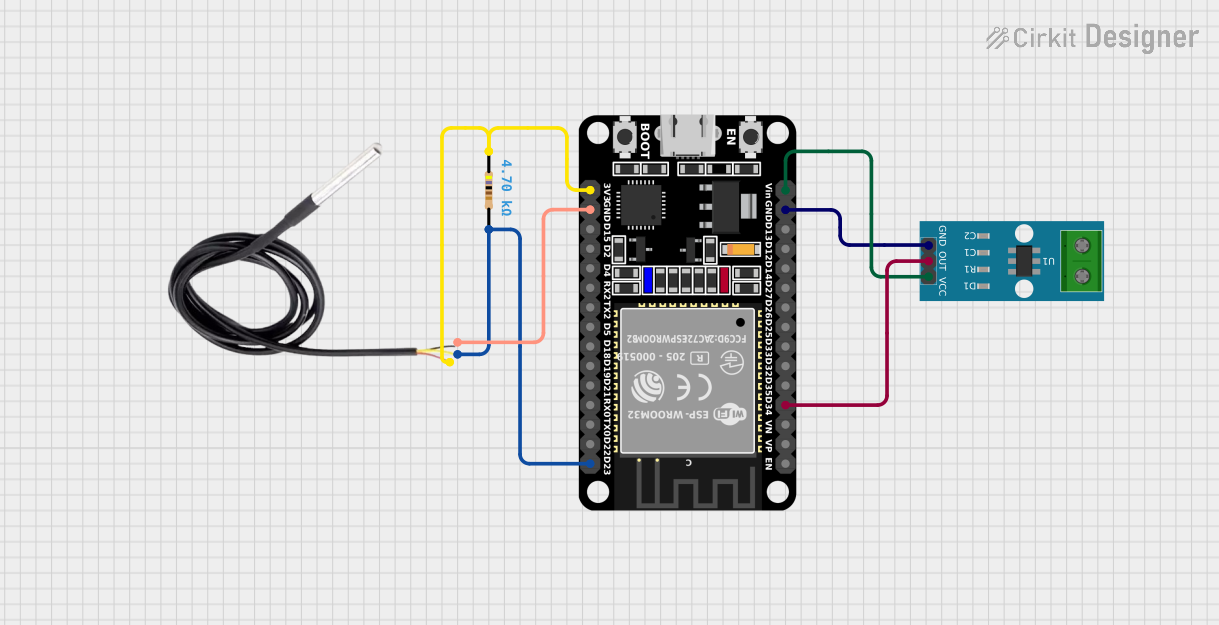
This circuit is designed to measure current using an ACS712 Current Sensor and temperature using a DS18B20 sensor, with an ESP32 microcontroller to process and possibly communicate the sensor data. The ACS712 sensor output is connected to one of the ESP32's analog input pins (D34), while the DS18B20's signal line is interfaced with a digital input pin (D23) through a pull-up resistor (4.7k Ohms). The ESP32 is powered through its Vin pin, and both sensors share a common ground with the ESP32.
Cirkit Designer LogoOpen Project in Cirkit Designer
Arduino UNO Based Ammeter with LCD Display
Image of ammeter: A project utilizing current sensor in a practical application
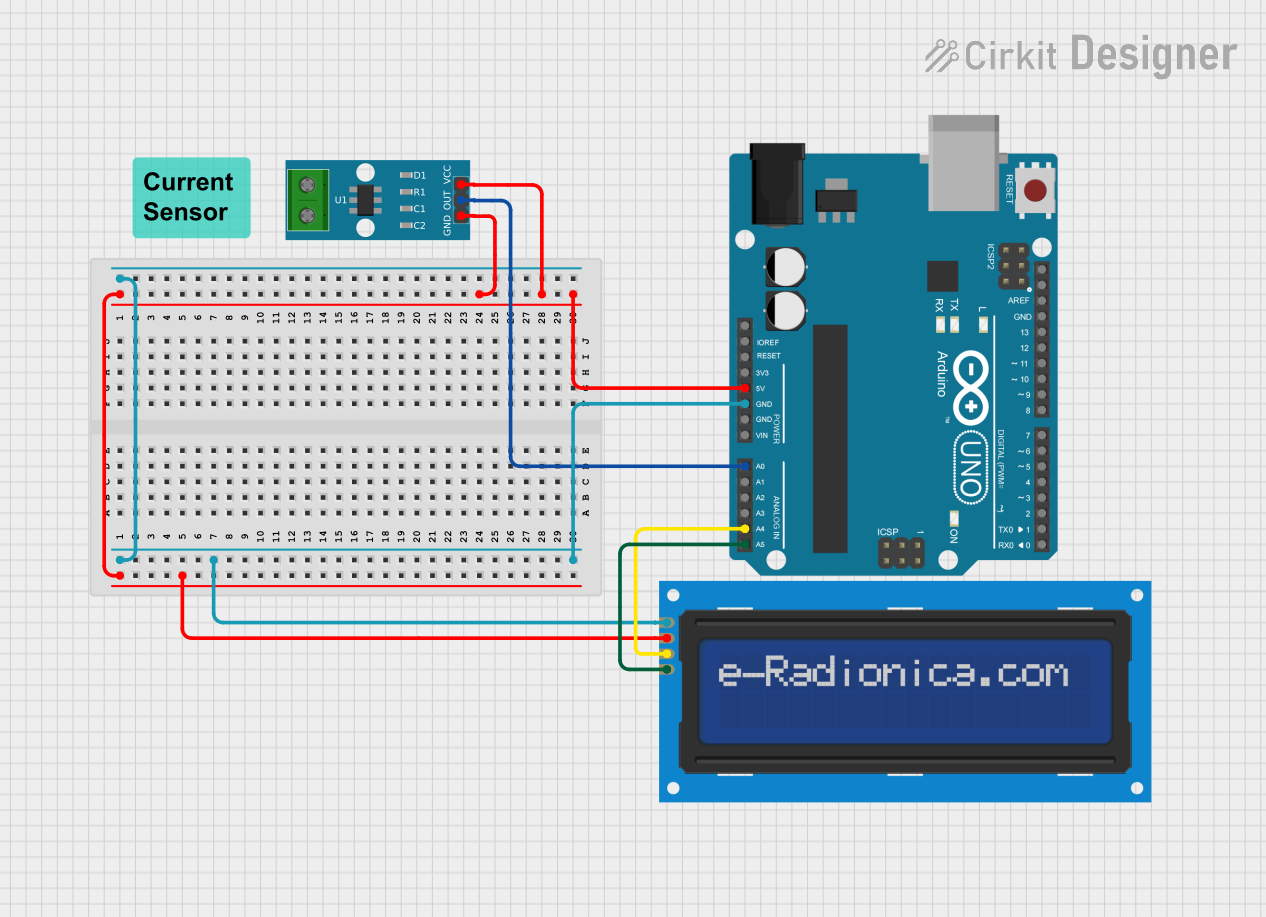
This circuit features an Arduino UNO microcontroller interfaced with an ACS712 current sensor and a 16x2 LCD screen using I2C communication. The Arduino reads the current value from the sensor and displays it on the LCD screen, also sending the data to the serial monitor. It is designed to function as an ammeter, measuring and displaying the current flowing through the sensor.
Cirkit Designer LogoOpen Project in Cirkit Designer
ESP32-Controlled Smart Lighting System with Power Monitoring
Image of Energy Monitoring System: A project utilizing current sensor in a practical application
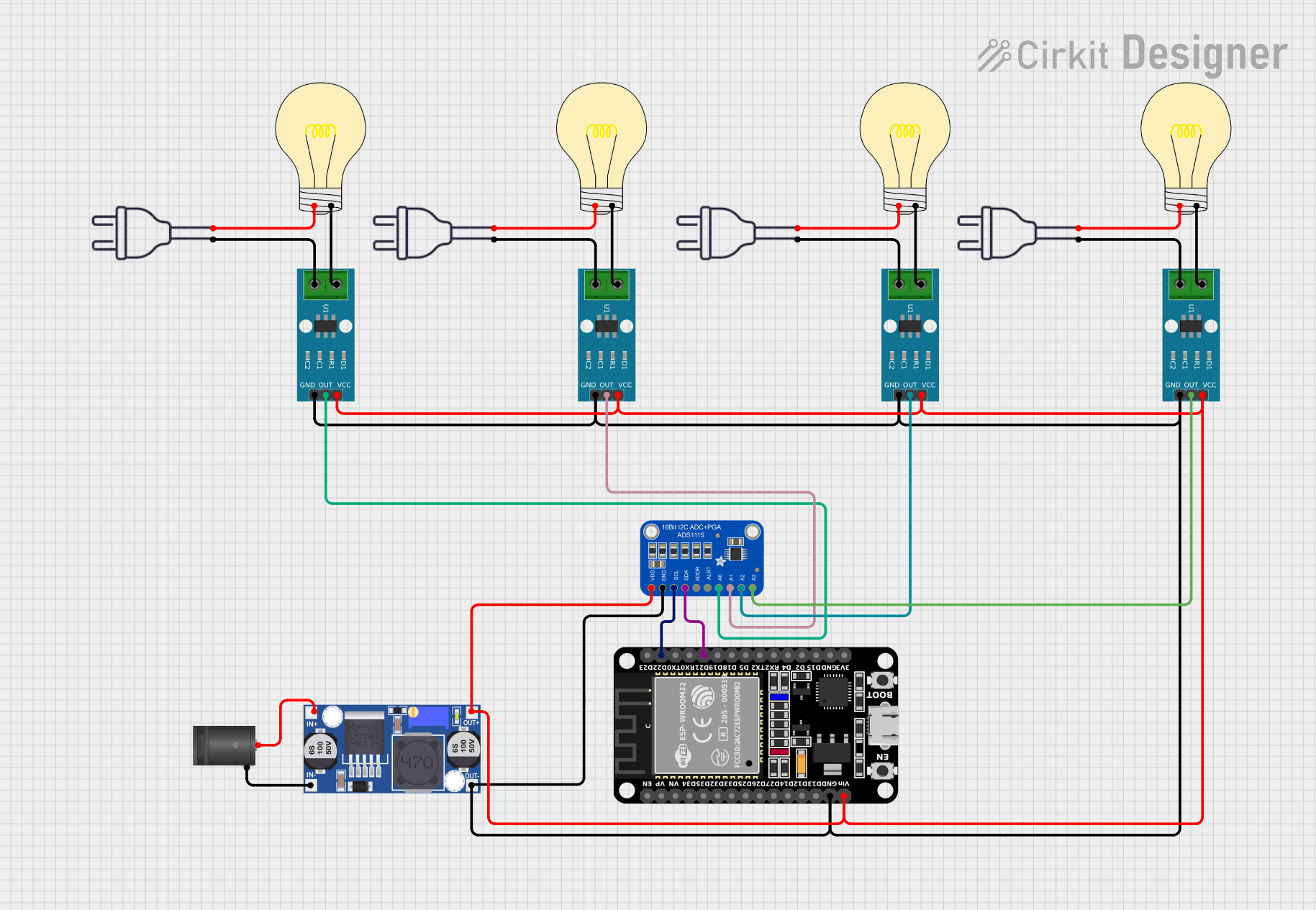
This circuit appears to be a multi-channel current monitoring system using several ACS712 current sensors to measure the current through different loads, likely bulbs connected to a 220V power source. The current readings from the sensors are digitized by an Adafruit ADS1115 16-bit ADC, which interfaces with an ESP32 microcontroller via I2C communication for further processing or telemetry. A buck converter is used to step down the voltage to power the ESP32 and the sensors, and the system is powered through a 2.1mm DC barrel jack, indicating it is designed for external power supply.
Cirkit Designer LogoOpen Project in Cirkit Designer

Explore Projects Built with current sensor

Use Cirkit Designer to design, explore, and prototype these projects online. Some projects support real-time simulation. Click "Open Project" to start designing instantly!
Image of DT NEA - Noah Patel: A project utilizing current sensor in a practical application
Wemos S2 Mini Controlled Smart Device with OLED Display, Thermal Printing, and RGB LED Strip
This circuit features a Wemos S2 Mini microcontroller that controls a WS2812 RGB LED strip and communicates with a 0.96" OLED display and a 58mm mini thermal printer. The ACS712 Current Sensor is interfaced with the microcontroller to monitor current, and power is managed by a CD42 BMS connected to two 18650 Li-ion batteries, with a USB-C PD Trigger Board for power delivery. The circuit is designed for visual output (LED strip, OLED display), printing capabilities, and current sensing, likely for a portable, battery-powered monitoring and display device.
Cirkit Designer LogoOpen Project in Cirkit Designer
Image of SISTEMA DE MONITOREO: A project utilizing current sensor in a practical application
ESP32-Based Current Monitoring and Temperature Sensing System
This circuit is designed to measure current using an ACS712 Current Sensor and temperature using a DS18B20 sensor, with an ESP32 microcontroller to process and possibly communicate the sensor data. The ACS712 sensor output is connected to one of the ESP32's analog input pins (D34), while the DS18B20's signal line is interfaced with a digital input pin (D23) through a pull-up resistor (4.7k Ohms). The ESP32 is powered through its Vin pin, and both sensors share a common ground with the ESP32.
Cirkit Designer LogoOpen Project in Cirkit Designer
Image of ammeter: A project utilizing current sensor in a practical application
Arduino UNO Based Ammeter with LCD Display
This circuit features an Arduino UNO microcontroller interfaced with an ACS712 current sensor and a 16x2 LCD screen using I2C communication. The Arduino reads the current value from the sensor and displays it on the LCD screen, also sending the data to the serial monitor. It is designed to function as an ammeter, measuring and displaying the current flowing through the sensor.
Cirkit Designer LogoOpen Project in Cirkit Designer
Image of Energy Monitoring System: A project utilizing current sensor in a practical application
ESP32-Controlled Smart Lighting System with Power Monitoring
This circuit appears to be a multi-channel current monitoring system using several ACS712 current sensors to measure the current through different loads, likely bulbs connected to a 220V power source. The current readings from the sensors are digitized by an Adafruit ADS1115 16-bit ADC, which interfaces with an ESP32 microcontroller via I2C communication for further processing or telemetry. A buck converter is used to step down the voltage to power the ESP32 and the sensors, and the system is powered through a 2.1mm DC barrel jack, indicating it is designed for external power supply.
Cirkit Designer LogoOpen Project in Cirkit Designer

Common Applications and Use Cases

  • Power monitoring in industrial and residential systems
  • Battery management systems (BMS) in electric vehicles
  • Overcurrent protection in circuits
  • Energy metering and load analysis
  • IoT-based current monitoring solutions
  • Integration with microcontrollers like Arduino for real-time data logging

Technical Specifications

The Shay Current Sensor is designed to operate efficiently in a wide range of applications. Below are its key technical details:

Parameter Value
Operating Voltage 3.3V to 5V
Current Measurement Range ±30A (AC/DC)
Output Signal Analog Voltage (proportional to current)
Accuracy ±1%
Response Time < 5 µs
Operating Temperature -40°C to +85°C
Isolation Voltage 2.5 kV
Dimensions 25mm x 20mm x 15mm

Pin Configuration and Descriptions

The Shay Current Sensor has a simple pinout for easy integration into circuits:

Pin Name Description
1 VCC Power supply input (3.3V to 5V)
2 GND Ground connection
3 OUT Analog output signal (proportional to current flow)

Usage Instructions

How to Use the Component in a Circuit

  1. Power the Sensor: Connect the VCC pin to a 3.3V or 5V power supply and the GND pin to the ground of your circuit.
  2. Connect the Load: Pass the wire carrying the current to be measured through the sensor's sensing loop (if applicable) or connect the sensor in series with the load.
  3. Read the Output: The OUT pin provides an analog voltage proportional to the current flowing through the sensor. This output can be read using an ADC (Analog-to-Digital Converter) on a microcontroller like Arduino.

Important Considerations and Best Practices

  • Ensure the current being measured does not exceed the sensor's maximum range (±30A).
  • Use proper isolation techniques if measuring high voltages or currents.
  • Avoid placing the sensor near strong magnetic fields, as they may interfere with its accuracy.
  • Calibrate the sensor if precise measurements are required for your application.
  • Use decoupling capacitors near the VCC pin to reduce noise in the power supply.

Example: Connecting to an Arduino UNO

Below is an example of how to use the Shay Current Sensor with an Arduino UNO to measure current and display the value on the Serial Monitor.

// Define the analog pin connected to the sensor's OUT pin
const int currentSensorPin = A0;

// Define the sensor's sensitivity (e.g., 66mV/A for a ±30A sensor)
const float sensitivity = 0.066; // Sensitivity in volts per ampere

// Define the Arduino's reference voltage (typically 5V)
const float referenceVoltage = 5.0;

void setup() {
  Serial.begin(9600); // Initialize Serial communication at 9600 baud
}

void loop() {
  // Read the analog value from the sensor
  int sensorValue = analogRead(currentSensorPin);

  // Convert the analog value to voltage
  float sensorVoltage = (sensorValue / 1023.0) * referenceVoltage;

  // Calculate the current (in amperes) using the sensor's sensitivity
  float current = (sensorVoltage - (referenceVoltage / 2)) / sensitivity;

  // Print the current value to the Serial Monitor
  Serial.print("Current: ");
  Serial.print(current);
  Serial.println(" A");

  delay(500); // Wait for 500ms before the next reading
}

Troubleshooting and FAQs

Common Issues and Solutions

  1. No Output Signal

    • Cause: Incorrect wiring or no current flowing through the sensor.
    • Solution: Double-check the connections and ensure the load is active.
  2. Inaccurate Readings

    • Cause: External magnetic interference or improper calibration.
    • Solution: Move the sensor away from magnetic sources and recalibrate if necessary.
  3. Output Signal Saturation

    • Cause: Current exceeds the sensor's maximum range.
    • Solution: Use a sensor with a higher current range or reduce the load current.
  4. Fluctuating Output

    • Cause: Noise in the power supply or unstable load current.
    • Solution: Add decoupling capacitors near the sensor and stabilize the load.

FAQs

Q1: Can this sensor measure both AC and DC currents?
A1: Yes, the Shay Current Sensor can measure both AC and DC currents within its specified range.

Q2: How do I calibrate the sensor?
A2: To calibrate, measure the sensor's output voltage with no current flowing (should be half of the reference voltage) and adjust your calculations accordingly.

Q3: Is the sensor compatible with 3.3V microcontrollers?
A3: Yes, the sensor operates on 3.3V to 5V, making it compatible with most microcontrollers, including 3.3V systems.

Q4: Can I use this sensor for high-voltage applications?
A4: Yes, but ensure proper isolation and safety precautions are in place, as the sensor has an isolation voltage of 2.5 kV.