
How to Use Microlgix 1200: Examples, Pinouts, and Specs
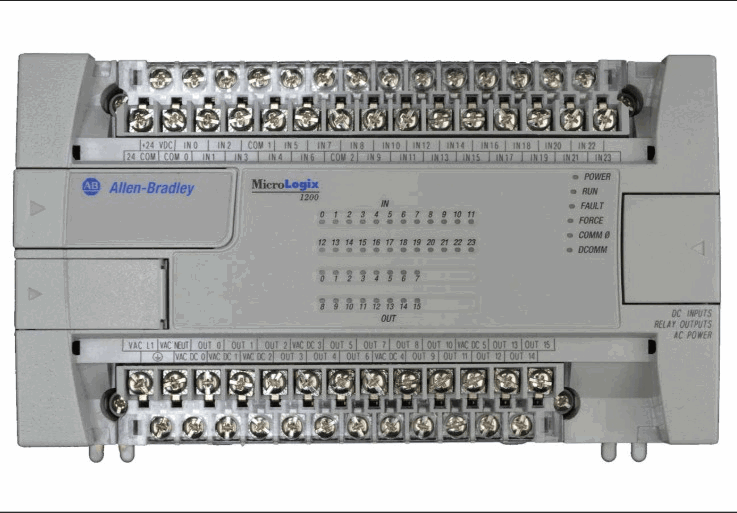
 Design with Microlgix 1200 in Cirkit Designer
Introduction
The Micrologix 1200, manufactured by Allen Bradley (Part ID: UNO), is a compact programmable logic controller (PLC) designed for small to medium automation applications. It offers a modular design, enabling users to expand and customize the system with additional input/output (I/O) modules as needed. The Micrologix 1200 supports a variety of communication protocols, making it highly versatile for industrial and commercial automation tasks.
Explore Projects Built with Microlgix 1200
 Open Project in Cirkit Designer
 Open Project in Cirkit Designer
 Open Project in Cirkit Designer
 Open Project in Cirkit Designer
Explore Projects Built with Microlgix 1200
Open Project in Cirkit DesignerOpen Project in Cirkit DesignerOpen Project in Cirkit DesignerOpen Project in Cirkit DesignerCommon Applications and Use Cases
- Industrial automation and process control
- Machine control and monitoring
- Building automation systems
- Data acquisition and logging
- Integration with SCADA (Supervisory Control and Data Acquisition) systems
- Small-scale manufacturing and assembly line automation
Technical Specifications
Key Technical Details
| Parameter | Specification |
|---|---|
| Manufacturer | Allen Bradley |
| Part ID | UNO |
| Power Supply Voltage | 24V DC or 120/240V AC (model-specific) |
| Input Voltage Range | 12-24V DC (digital inputs) |
| Output Voltage Range | 24V DC or 120/240V AC (model-specific) |
| Maximum I/O Points | 40 (with expansion modules) |
| Communication Protocols | RS-232, RS-485, DF1, Modbus RTU |
| Programming Software | RSLogix 500 |
| Memory Capacity | 4 KB (user program and data) |
| Operating Temperature Range | 0°C to 55°C (32°F to 131°F) |
| Dimensions (Base Unit) | 90 x 110 x 87 mm (H x W x D) |
Pin Configuration and Descriptions
Digital Inputs
| Pin Number | Description | Voltage Range | Notes |
|---|---|---|---|
| 1-10 | Digital Input Channels (DI) | 12-24V DC | For connecting sensors |
| COM | Common Ground for Inputs | - | Shared ground for inputs |
Digital Outputs
| Pin Number | Description | Voltage Range | Notes |
|---|---|---|---|
| 11-20 | Digital Output Channels (DO) | 24V DC or AC | For driving actuators |
| COM | Common Ground for Outputs | - | Shared ground for outputs |
Communication Ports
| Port | Description | Protocols Supported | Notes |
|---|---|---|---|
| Port 1 | RS-232/RS-485 Communication | DF1, Modbus RTU | For PC or HMI interface |
| Port 2 | Expansion Communication Port | - | For additional modules |
Usage Instructions
How to Use the Micrologix 1200 in a Circuit
Power Supply Connection:
- Connect a 24V DC or 120/240V AC power supply to the designated power input terminals, depending on the model.
- Ensure proper grounding to avoid electrical noise or damage.
Input Connections:
- Connect sensors (e.g., proximity switches, push buttons) to the digital input pins.
- Use the common ground (COM) terminal for all input devices.
Output Connections:
- Connect actuators (e.g., relays, solenoids, motors) to the digital output pins.
- Ensure the output voltage matches the actuator's requirements.
Programming:
- Use RSLogix 500 software to create and upload ladder logic programs to the Micrologix 1200.
- Connect your PC to the PLC via the RS-232 or RS-485 communication port.
Communication Setup:
- Configure communication settings (e.g., baud rate, parity) in RSLogix 500 to match the connected devices.
- Use Modbus RTU or DF1 protocols for integration with SCADA or HMI systems.
Important Considerations and Best Practices
- Always verify the power supply voltage and polarity before powering the PLC.
- Use proper shielding and grounding for communication cables to minimize interference.
- Avoid exceeding the maximum current rating of the output channels to prevent damage.
- Regularly back up your PLC programs to avoid data loss.
- Ensure the operating environment is within the specified temperature range (0°C to 55°C).
Example Code for Arduino UNO Integration
Although the Micrologix 1200 is a standalone PLC, it can communicate with an Arduino UNO via Modbus RTU. Below is an example Arduino sketch for reading data from the PLC:
#include <ModbusMaster.h>

// Instantiate ModbusMaster object
ModbusMaster node;

void setup() {
  Serial.begin(9600); // Initialize serial communication
  node.begin(1, Serial); // Set Modbus slave ID to 1
}

void loop() {
  uint8_t result;
  uint16_t data;

  // Read holding register 40001 from the PLC
  result = node.readHoldingRegisters(0x0000, 1);

  if (result == node.ku8MBSuccess) {
    data = node.getResponseBuffer(0); // Get the data from the response buffer
    Serial.print("PLC Data: ");
    Serial.println(data); // Print the data to the serial monitor
  } else {
    Serial.println("Communication Error"); // Print error message
  }

  delay(1000); // Wait 1 second before the next request
}
Note: Ensure the PLC is configured as a Modbus RTU slave and the communication parameters (baud rate, parity, etc.) match those in the Arduino sketch.
Troubleshooting and FAQs
Common Issues and Solutions
PLC Not Powering On:
- Cause: Incorrect power supply voltage or loose connections.
- Solution: Verify the power supply voltage and ensure all connections are secure.
Inputs Not Responding:
- Cause: Faulty sensors or incorrect wiring.
- Solution: Check sensor functionality and wiring connections.
Outputs Not Activating:
- Cause: Overloaded output channels or incorrect wiring.
- Solution: Verify the load does not exceed the output channel's current rating and check wiring.
Communication Failure:
- Cause: Incorrect communication settings or damaged cables.
- Solution: Ensure the baud rate, parity, and other settings match between devices. Replace damaged cables if necessary.
Program Upload Fails:
- Cause: Incorrect COM port selection or driver issues.
- Solution: Verify the correct COM port is selected in RSLogix 500 and update the USB-to-serial driver if needed.
FAQs
Q: Can the Micrologix 1200 be used with wireless communication modules?
A: Yes, third-party wireless communication modules can be integrated via the RS-232 or RS-485 ports.Q: How many expansion modules can be added?
A: Up to six expansion modules can be added, depending on the model.Q: Is the Micrologix 1200 compatible with Ethernet?
A: Ethernet connectivity is not built-in but can be achieved using an external Ethernet-to-serial converter.Q: What is the maximum program size?
A: The Micrologix 1200 has a memory capacity of 4 KB for user programs and data.Q: Can the PLC operate in hazardous environments?
A: The Micrologix 1200 is not rated for hazardous environments. Use appropriate enclosures for such applications.