
How to Use Cytron Maker Feather AIoT S3: Examples, Pinouts, and Specs
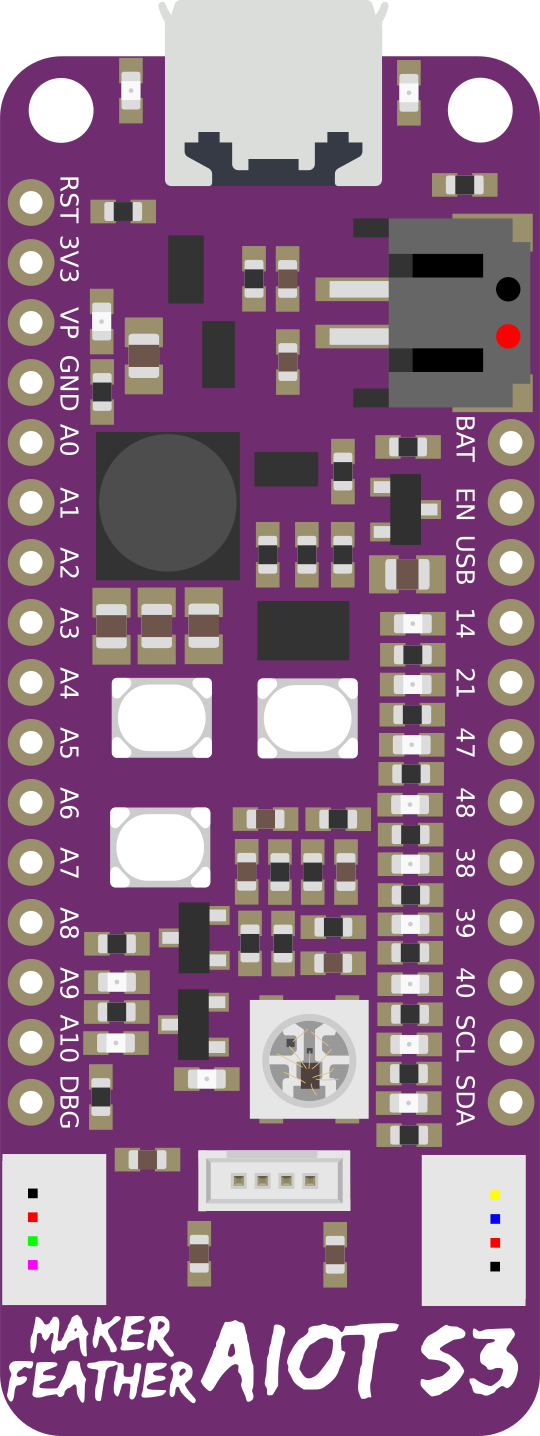
 Design with Cytron Maker Feather AIoT S3 in Cirkit Designer
Introduction
The Cytron Maker Feather AIoT S3 is a versatile development board designed for Internet of Things (IoT) applications. It is powered by the ESP32-S3 microcontroller, which features dual-core processing, built-in Wi-Fi, and Bluetooth Low Energy (BLE) capabilities. This board is compatible with a wide range of sensors and peripherals, making it an excellent choice for prototyping and building smart devices.
Explore Projects Built with Cytron Maker Feather AIoT S3
 Open Project in Cirkit Designer
 Open Project in Cirkit Designer
 Open Project in Cirkit Designer
 Open Project in Cirkit Designer
Explore Projects Built with Cytron Maker Feather AIoT S3
Open Project in Cirkit DesignerOpen Project in Cirkit DesignerOpen Project in Cirkit DesignerOpen Project in Cirkit DesignerCommon Applications and Use Cases
- Smart home automation systems
- Environmental monitoring and data logging
- Wearable devices with BLE connectivity
- IoT-enabled industrial automation
- Robotics and sensor-based projects
- Prototyping AI and machine learning applications
Technical Specifications
Key Technical Details
- Microcontroller: ESP32-S3 (dual-core, 32-bit Xtensa LX7)
- Clock Speed: Up to 240 MHz
- Flash Memory: 8 MB
- PSRAM: 8 MB
- Connectivity: Wi-Fi 802.11 b/g/n, Bluetooth 5.0 (LE)
- Operating Voltage: 3.3V
- Input Voltage Range: 5V (via USB-C) or 3.7V (via LiPo battery)
- GPIO Pins: 21 (including ADC, DAC, I2C, SPI, UART, PWM)
- USB Interface: USB-C (supports programming and power supply)
- Dimensions: 51mm x 23mm
- Weight: ~6g
Pin Configuration and Descriptions
The Cytron Maker Feather AIoT S3 features a standard Feather form factor with the following pinout:
| Pin | Label | Description |
|---|---|---|
| 1 | 3V3 | 3.3V power output |
| 2 | GND | Ground |
| 3 | GPIO0 | General-purpose I/O, supports ADC, PWM |
| 4 | GPIO1 | General-purpose I/O, supports ADC, PWM |
| 5 | GPIO2 | General-purpose I/O, supports ADC, PWM |
| 6 | GPIO3 | General-purpose I/O, supports ADC, PWM |
| 7 | SDA | I2C data line |
| 8 | SCL | I2C clock line |
| 9 | RX | UART receive |
| 10 | TX | UART transmit |
| 11 | VIN | Power input (5V via USB-C or 3.7V via LiPo battery) |
| 12 | EN | Enable pin (used to reset the board) |
| 13 | A0 - A5 | Analog input pins (ADC capable) |
| 14 | DAC1, DAC2 | Digital-to-analog converter pins |
| 15 | SPI (MOSI, MISO, SCK) | SPI communication pins |
Usage Instructions
How to Use the Component in a Circuit
Powering the Board:
- Connect the board to a USB-C cable for power and programming.
- Alternatively, connect a 3.7V LiPo battery to the JST connector for portable applications.
Programming the Board:
- Install the ESP32 board package in the Arduino IDE or use the ESP-IDF framework.
- Select "ESP32-S3" as the board type in your development environment.
- Connect the board to your computer via USB-C and upload your code.
Connecting Peripherals:
- Use the GPIO pins to connect sensors, actuators, or other peripherals.
- For I2C devices, connect to the SDA and SCL pins.
- For SPI devices, use the MOSI, MISO, and SCK pins.
Important Considerations and Best Practices
- Ensure the input voltage does not exceed the specified range to avoid damaging the board.
- Use level shifters if interfacing with 5V logic devices, as the board operates at 3.3V logic.
- Avoid shorting the GPIO pins to ground or power to prevent damage.
- Use appropriate pull-up or pull-down resistors for I2C or other communication protocols.
Example Code for Arduino UNO Integration
Below is an example of how to use the Cytron Maker Feather AIoT S3 to read data from a DHT11 temperature and humidity sensor:
#include <Adafruit_Sensor.h>
#include <DHT.h>
#include <DHT_U.h>

// Define the DHT sensor type and pin
#define DHTPIN 4  // GPIO4 is connected to the DHT11 data pin
#define DHTTYPE DHT11  // DHT11 sensor type

DHT dht(DHTPIN, DHTTYPE);

void setup() {
  Serial.begin(115200);  // Initialize serial communication
  dht.begin();  // Initialize the DHT sensor
  Serial.println("DHT11 Sensor Example");
}

void loop() {
  // Read temperature and humidity values
  float humidity = dht.readHumidity();
  float temperature = dht.readTemperature();

  // Check if the readings are valid
  if (isnan(humidity) || isnan(temperature)) {
    Serial.println("Failed to read from DHT sensor!");
    return;
  }

  // Print the readings to the Serial Monitor
  Serial.print("Humidity: ");
  Serial.print(humidity);
  Serial.print("%  Temperature: ");
  Serial.print(temperature);
  Serial.println("°C");

  delay(2000);  // Wait 2 seconds before the next reading
}
Troubleshooting and FAQs
Common Issues Users Might Face
Board Not Detected by Computer:
- Ensure the USB-C cable is a data cable, not just a charging cable.
- Check that the correct COM port is selected in your development environment.
Code Upload Fails:
- Verify that the correct board type (ESP32-S3) is selected in the IDE.
- Press and hold the "BOOT" button on the board while uploading the code.
Wi-Fi or Bluetooth Not Working:
- Ensure the correct credentials or pairing settings are used in your code.
- Check for interference or weak signal strength in your environment.
Solutions and Tips for Troubleshooting
- Reset the Board: Press the "EN" button to reset the board if it becomes unresponsive.
- Check Power Supply: Ensure the board is receiving sufficient power, especially when using peripherals.
- Update Firmware: Install the latest ESP32 board package in your IDE to ensure compatibility.
- Debugging: Use the Serial Monitor to print debug messages and identify issues in your code.
By following this documentation, you can effectively use the Cytron Maker Feather AIoT S3 for a wide range of IoT and smart device applications.