
How to Use 18650 4s holder: Examples, Pinouts, and Specs
 Design with 18650 4s holder in Cirkit Designer
Introduction
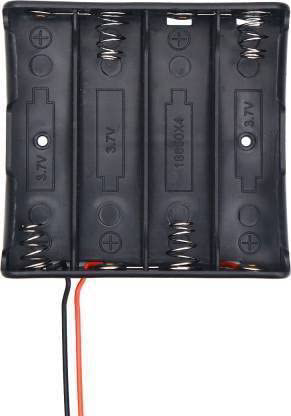
The 18650 4S holder is a battery holder designed to securely house four 18650 lithium-ion cells in a series configuration. This configuration allows the batteries to provide a combined voltage suitable for high-power applications. The holder simplifies the process of connecting and replacing batteries, making it an essential component for DIY electronics, robotics, and portable power systems.
Explore Projects Built with 18650 4s holder
 Open Project in Cirkit Designer
 Open Project in Cirkit Designer
 Open Project in Cirkit Designer
 Open Project in Cirkit Designer
Explore Projects Built with 18650 4s holder
Open Project in Cirkit DesignerOpen Project in Cirkit DesignerOpen Project in Cirkit DesignerOpen Project in Cirkit DesignerCommon Applications and Use Cases
- Power supply for DIY electronics and robotics projects
- Portable power banks and energy storage systems
- Solar-powered devices
- Electric vehicles and e-bikes
- Backup power systems for microcontrollers and sensors
Technical Specifications
The 18650 4S holder is designed to accommodate four 18650 lithium-ion cells in a series configuration. Below are the key technical details:
Key Specifications
| Parameter | Value |
|---|---|
| Battery Type | 18650 Lithium-Ion Cells |
| Configuration | 4S (Series) |
| Nominal Voltage Output | 14.8V (3.7V per cell x 4) |
| Maximum Voltage Output | 16.8V (4.2V per cell x 4) |
| Current Rating | Depends on the battery used |
| Material | ABS Plastic (flame-retardant) |
| Dimensions | Varies by manufacturer |
| Connection Type | Solder tabs or wire leads |
Pin Configuration and Descriptions
The 18650 4S holder typically has two main terminals for connection: positive (+) and negative (-). Some holders may also include intermediate terminals for balancing or monitoring purposes.
| Pin/Terminal | Description |
|---|---|
| Positive (+) | Connects to the positive terminal of the series configuration. |
| Negative (-) | Connects to the negative terminal of the series configuration. |
| Balance Leads (optional) | Used for battery management systems (BMS) to monitor individual cell voltages. |
Usage Instructions
How to Use the 18650 4S Holder in a Circuit
- Insert Batteries: Place four 18650 lithium-ion cells into the holder, ensuring correct polarity. The positive and negative terminals of each cell should align with the markings on the holder.
- Connect to Circuit: Use the positive (+) and negative (-) terminals of the holder to connect to your circuit or load. Ensure proper soldering or secure connections if using wire leads.
- Optional BMS Connection: If your holder includes balance leads, connect them to a battery management system (BMS) to monitor and protect the cells from overcharging, over-discharging, and balancing issues.
Important Considerations and Best Practices
- Battery Compatibility: Ensure the 18650 cells used are of the same capacity, voltage, and charge level to avoid imbalances.
- Use a BMS: For safety and longevity, always use a battery management system when working with lithium-ion cells in series.
- Avoid Overloading: Do not exceed the current rating of the holder or the batteries.
- Secure Mounting: Mount the holder securely in your project to prevent movement or disconnection of the batteries.
- Polarity Check: Double-check the polarity of the batteries before powering the circuit to avoid damage.
Example: Connecting to an Arduino UNO
The 18650 4S holder can be used to power an Arduino UNO via its VIN pin. Below is an example of how to connect it:
- Connect the positive (+) terminal of the holder to the VIN pin of the Arduino.
- Connect the negative (-) terminal of the holder to the GND pin of the Arduino.
- Ensure the total voltage (14.8V nominal) is within the acceptable range for the Arduino's VIN pin (7-12V recommended, 20V max).
Note: Use a voltage regulator or step-down converter if the voltage exceeds the Arduino's recommended range.
// Example code for Arduino UNO powered by 18650 4S holder
// This code blinks an LED connected to pin 13

void setup() {
  pinMode(13, OUTPUT); // Set pin 13 as an output for the LED
}

void loop() {
  digitalWrite(13, HIGH); // Turn the LED on
  delay(1000);            // Wait for 1 second
  digitalWrite(13, LOW);  // Turn the LED off
  delay(1000);            // Wait for 1 second
}
Troubleshooting and FAQs
Common Issues and Solutions
| Issue | Possible Cause | Solution |
|---|---|---|
| Batteries not fitting properly | Incorrect battery size or orientation | Ensure batteries are 18650 type and aligned correctly. |
| No output voltage | Loose connections or dead batteries | Check connections and replace batteries if necessary. |
| Overheating | Overcurrent or short circuit | Use a BMS and ensure proper wiring. |
| Uneven battery discharge | Mismatched battery capacities | Use batteries with identical specifications. |
FAQs
Q: Can I use the 18650 4S holder without a BMS?
A: While it is possible, it is not recommended. A BMS ensures safety by preventing overcharging, over-discharging, and balancing issues.
Q: What is the maximum current the holder can handle?
A: The maximum current depends on the quality of the holder and the batteries used. Refer to the manufacturer's specifications for details.
Q: Can I use fewer than four batteries in the holder?
A: No, the 18650 4S holder is designed specifically for four cells in series. Using fewer cells may result in an incomplete circuit.
Q: How do I safely dispose of 18650 batteries?
A: Take used or damaged batteries to a certified recycling center. Do not dispose of them in regular trash.