The AM26LS31CN is a high-speed differential line driver manufactured by Texas Instruments. It is specifically designed for RS-422 applications, where it converts single-ended signals into differential signals. This conversion enhances noise immunity and allows for reliable data transmission over longer distances. The device is ideal for use in environments with high electrical noise or where long cable runs are required.
Explore Projects Built with AM26LS31CN RS422 Driver / transmitter
Use Cirkit Designer to design, explore, and prototype these projects online. Some projects support real-time simulation. Click "Open Project" to start designing instantly!
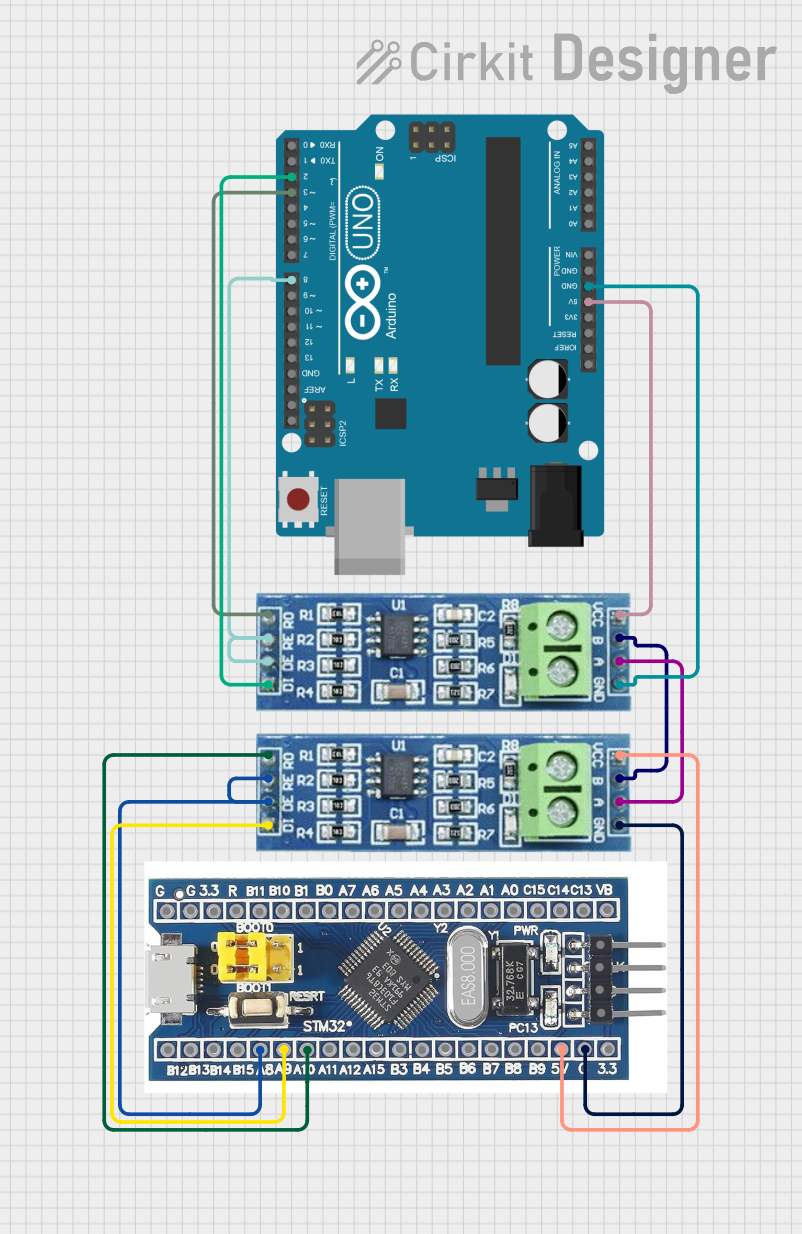
This circuit consists of two microcontrollers, an STM32F103C8T6 and an Arduino UNO, each interfaced with separate RS485 transceiver modules for serial communication. The STM32F103C8T6 controls the RE (Receiver Enable) and DE (Driver Enable) pins of one RS485 module to manage its operation, and communicates via the A9 and A10 pins for DI (Data Input) and RO (Receiver Output), respectively. The Arduino UNO is similarly connected to another RS485 module, with digital pins D2 and D3 interfacing with DI and RO, and D8 controlling both RE and DE. The RS485 modules are connected to each other through their A and B differential communication lines, enabling serial data exchange between the two microcontrollers over a robust and long-distance capable RS485 network.
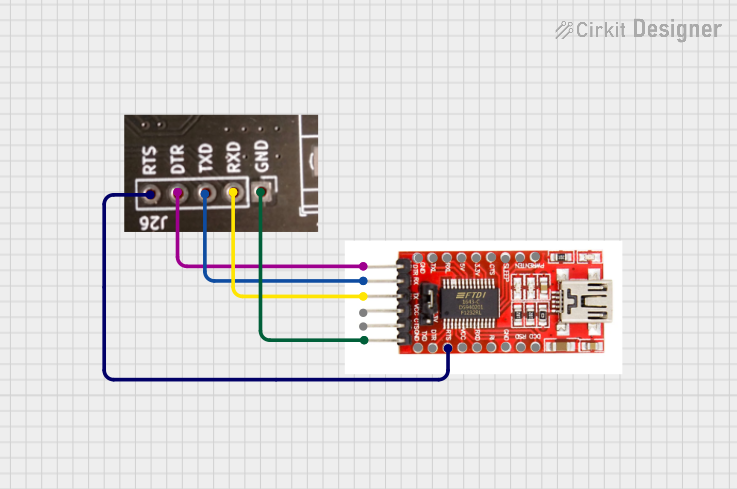
This circuit connects an FTDI USB-to-serial converter to a standard serial interface via a J26 connector. It facilitates serial communication by linking the ground, transmit, receive, data terminal ready, and request to send signals between the FTDI chip and the J26 connector.
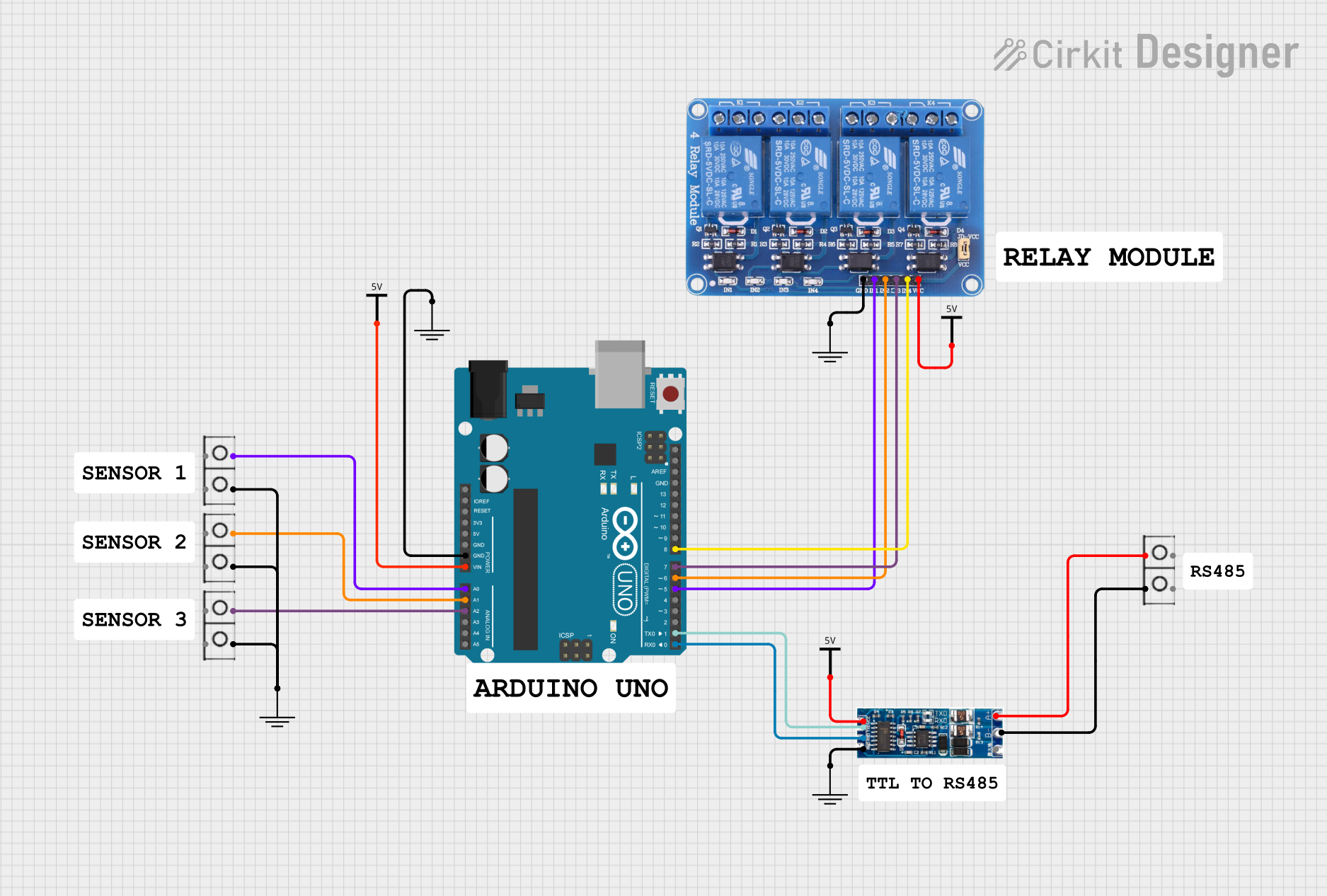
This circuit features an Arduino UNO microcontroller interfaced with a 4-channel relay module and a UART TTL to RS485 converter. The Arduino controls the relays via digital pins and communicates with the RS485 converter for serial communication, enabling control of external devices and communication over long distances.
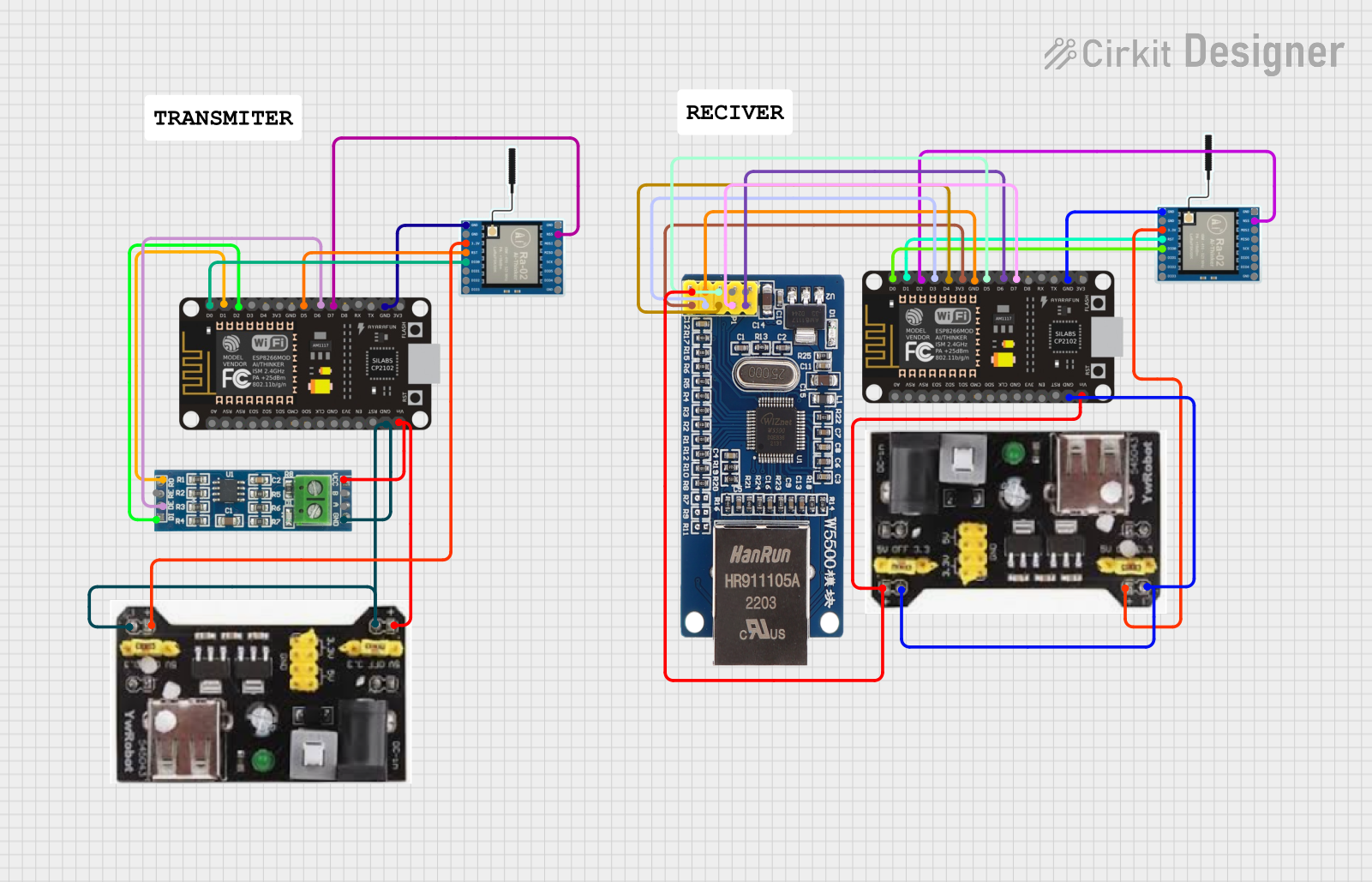
This circuit serves as a multi-protocol communication hub featuring two ESP8266 NodeMCUs for processing, each connected to a LoRa Ra-02 SX1278 for long-range wireless communication. One NodeMCU is also connected to an RS-485 module for serial communication and a W5500 Ethernet module for network connectivity, with MB102 modules supplying power.
The following table outlines the key technical specifications of the AM26LS31CN:
Parameter
Value
Supply Voltage (Vcc)
4.5V to 5.5V
Differential Output Voltage
±2V (minimum)
Input Voltage Range
0V to Vcc
Output Current
±20mA
Data Rate
Up to 10 Mbps
Operating Temperature Range
0°C to 70°C
Package Type
PDIP-16
Pin Configuration and Descriptions
The AM26LS31CN is housed in a 16-pin PDIP package. The pinout and descriptions are as follows:
Pin Number
Pin Name
Description
1
1A
Input for Driver 1
2
1Y
Non-Inverting Output for Driver 1
3
1Z
Inverting Output for Driver 1
4
GND
Ground
5
2A
Input for Driver 2
6
2Y
Non-Inverting Output for Driver 2
7
2Z
Inverting Output for Driver 2
8
GND
Ground
9
3A
Input for Driver 3
10
3Y
Non-Inverting Output for Driver 3
11
3Z
Inverting Output for Driver 3
12
Vcc
Positive Supply Voltage
13
4A
Input for Driver 4
14
4Y
Non-Inverting Output for Driver 4
15
4Z
Inverting Output for Driver 4
16
Vcc
Positive Supply Voltage
Usage Instructions
How to Use the AM26LS31CN in a Circuit
Power Supply: Connect the Vcc pins (12 and 16) to a regulated 5V power supply. Connect the GND pins (4 and 8) to the ground of the circuit.
Input Signals: Provide single-ended input signals to the input pins (1A, 2A, 3A, 4A). Ensure the input voltage is within the range of 0V to Vcc.
Differential Outputs: The corresponding differential outputs (e.g., 1Y/1Z, 2Y/2Z) will generate the RS-422 compliant signals. Connect these outputs to the differential receiver of the RS-422 system.
Termination Resistors: For long-distance communication, use a termination resistor (typically 100Ω to 120Ω) across the differential output lines to minimize signal reflections.
Important Considerations and Best Practices
Ensure the power supply is stable and within the specified range (4.5V to 5.5V).
Use decoupling capacitors (e.g., 0.1µF) close to the Vcc pins to filter out noise.
Avoid leaving unused input pins floating; connect them to GND or Vcc as needed.
For optimal performance, use twisted-pair cables for differential signal transmission.
Ensure proper grounding to minimize noise and interference.
Example: Connecting to an Arduino UNO
The AM26LS31CN can be used with an Arduino UNO to transmit data over an RS-422 interface. Below is an example of how to send data using the Arduino's digital pins:
Circuit Connections
Connect the Arduino's digital pin (e.g., D2) to the 1A input of the AM26LS31CN.
Connect the 1Y and 1Z outputs to the RS-422 receiver.
Power the AM26LS31CN with a 5V supply and connect the GND pins to the Arduino's ground.
Arduino Code Example
// Example code to send data using the AM26LS31CN with an Arduino UNO

const int driverInputPin = 2; // Pin connected to 1A input of AM26LS31CN

void setup() {
  pinMode(driverInputPin, OUTPUT); // Set the pin as an output
}

void loop() {
  digitalWrite(driverInputPin, HIGH); // Send a HIGH signal
  delay(1000); // Wait for 1 second
  digitalWrite(driverInputPin, LOW);  // Send a LOW signal
  delay(1000); // Wait for 1 second
}
Troubleshooting and FAQs
Common Issues and Solutions
No Output Signal:
Verify that the power supply is connected and within the specified range.
Check that the input signal is properly connected and within the voltage range.
Ensure the ground connections are secure.
Distorted Output Signal:
Use a termination resistor across the differential output lines.
Check for noise or interference in the power supply.
Ensure the cable used for transmission is a twisted-pair cable.
Overheating:
Ensure the output current does not exceed the maximum rating of ±20mA.
Verify that the device is not short-circuited.
FAQs
Q1: Can the AM26LS31CN be used for RS-485 communication?
A1: While the AM26LS31CN is designed for RS-422, it can be used in RS-485 systems with proper configuration. However, RS-485 typically requires bidirectional communication, which the AM26LS31CN does not support natively.
Q2: What is the maximum cable length supported?
A2: The maximum cable length depends on the data rate and cable quality. For lower data rates (e.g., 100 kbps), distances of up to 1,200 meters are achievable.
Q3: Can I leave unused outputs unconnected?
A3: Yes, unused outputs can be left unconnected, but ensure that the corresponding inputs are tied to a defined logic level (GND or Vcc).
Q4: Is the AM26LS31CN compatible with 3.3V systems?
A4: No, the AM26LS31CN requires a supply voltage of 4.5V to 5.5V. It is not compatible with 3.3V systems without level shifting.


 Open Project in Cirkit Designer