Introduction
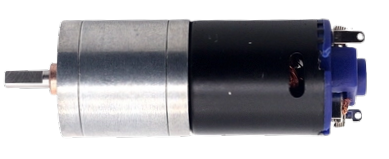
The GM-25 370, manufactured by Chihai Motor, is a gas meter designed for precise measurement of gas flow in residential and commercial applications. It utilizes a diaphragm mechanism to ensure accurate readings and is built to operate under a wide range of pressure conditions. This component is widely used in gas distribution systems, industrial gas monitoring, and utility metering.
Common Applications and Use Cases
- Residential gas consumption monitoring
- Commercial gas flow measurement
- Industrial gas distribution systems
- Utility billing systems
- Gas leak detection and monitoring
Technical Specifications
The GM-25 370 gas meter is engineered for reliability and accuracy. Below are its key technical specifications:
General Specifications
Pin Configuration and Descriptions
The GM-25 370 gas meter typically includes an electronic interface for data output. Below is the pin configuration for the electronic interface:
Usage Instructions
The GM-25 370 gas meter is straightforward to integrate into gas monitoring systems. Below are the steps and best practices for using this component:
How to Use the GM-25 370 in a Circuit
- Power Supply: Connect the VCC pin to a 3.3V or 5V DC power source and the GND pin to the ground of your circuit.
- Pulse Output: Connect the Pulse Output pin to a microcontroller or data acquisition system to count pulses and calculate gas flow.
- Data Communication (Optional): If your system supports advanced monitoring, connect the Data pin to the appropriate interface for real-time data transfer.
- Calibration: Ensure the meter is calibrated according to the manufacturer's guidelines for accurate measurements.
Important Considerations and Best Practices
- Pressure Compatibility: Verify that the operating pressure of the gas system is within the meter's specified range (0.5 kPa to 50 kPa).
- Pulse Counting: Use a microcontroller (e.g., Arduino UNO) to count pulses and calculate gas flow. Each pulse typically represents a fixed volume of gas (e.g., 0.01 m³).
- Environmental Conditions: Install the meter in a location protected from extreme temperatures, moisture, and physical damage.
- Safety: Ensure all connections are secure and comply with local safety regulations for gas systems.
Example Code for Arduino UNO
Below is an example of how to interface the GM-25 370 with an Arduino UNO to measure gas flow:
// GM-25 370 Gas Meter Example Code for Arduino UNO
// This code counts pulses from the gas meter and calculates the gas flow in m³.

const int pulsePin = 2;  // Pin connected to the Pulse Output of the GM-25 370
volatile int pulseCount = 0;  // Variable to store the pulse count
float gasFlow = 0.0;  // Variable to store the calculated gas flow in m³
const float pulseToVolume = 0.01;  // Volume of gas per pulse in m³

void setup() {
  pinMode(pulsePin, INPUT_PULLUP);  // Set the pulse pin as input with pull-up resistor
  attachInterrupt(digitalPinToInterrupt(pulsePin), countPulse, FALLING);
  // Attach an interrupt to count pulses on a falling edge
  Serial.begin(9600);  // Initialize serial communication for debugging
}

void loop() {
  noInterrupts();  // Disable interrupts to safely read pulseCount
  int currentPulseCount = pulseCount;
  interrupts();  // Re-enable interrupts

  // Calculate gas flow
  gasFlow = currentPulseCount * pulseToVolume;

  // Print the gas flow to the Serial Monitor
  Serial.print("Gas Flow: ");
  Serial.print(gasFlow);
  Serial.println(" m³");

  delay(1000);  // Wait for 1 second before updating
}

// Interrupt Service Routine (ISR) to count pulses
void countPulse() {
  pulseCount++;
}
Notes on the Code
- Ensure the
pulseToVolume constant matches the pulse-to-volume ratio of your specific GM-25 370 model.
- Use a pull-up resistor if the Pulse Output pin does not have an internal pull-up.
Troubleshooting and FAQs
Common Issues and Solutions
No Pulse Output Detected
- Cause: Incorrect wiring or insufficient power supply.
- Solution: Verify all connections and ensure the VCC pin is receiving 3.3V to 5V DC.
Inaccurate Gas Flow Readings
- Cause: Calibration error or incorrect pulse-to-volume ratio.
- Solution: Recalibrate the meter and confirm the correct pulse-to-volume ratio.
Intermittent Data Output
- Cause: Electrical noise or unstable power supply.
- Solution: Use decoupling capacitors near the power supply pins and ensure a stable power source.
Physical Damage to the Meter
- Cause: Exposure to harsh environmental conditions or improper installation.
- Solution: Inspect the meter for damage and replace if necessary. Install in a protected location.
FAQs
Q: Can the GM-25 370 be used for liquids?
A: No, the GM-25 370 is specifically designed for gas flow measurement and is not suitable for liquids.
Q: How do I reset the pulse count?
A: You can reset the pulse count in your microcontroller code by setting the pulseCount variable to 0.
Q: Is the GM-25 370 compatible with wireless monitoring systems?
A: Yes, the Data pin can be interfaced with wireless modules for remote monitoring, depending on your system's capabilities.
Q: What is the lifespan of the GM-25 370?
A: The lifespan depends on usage and environmental conditions but typically exceeds 10 years with proper maintenance.
This documentation provides a comprehensive guide to using the GM-25 370 gas meter effectively. For further assistance, refer to the manufacturer's manual or contact Chihai Motor support.

 Open Project in Cirkit Designer