
How to Use Power distribution block: Examples, Pinouts, and Specs
 Design with Power distribution block in Cirkit Designer
Introduction
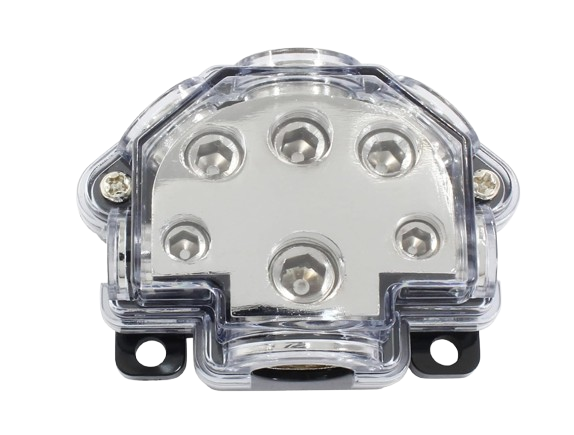
The Bonsicoky 5 Way Power Distribution Block is a versatile electrical component designed to distribute power from a single input source to multiple output circuits or devices. It ensures efficient and organized power management in various electrical systems. This component is ideal for applications requiring reliable power distribution, such as automotive systems, industrial machinery, and home electrical setups.
Explore Projects Built with Power distribution block
 Open Project in Cirkit Designer
 Open Project in Cirkit Designer
 Open Project in Cirkit Designer
 Open Project in Cirkit Designer
Explore Projects Built with Power distribution block
Open Project in Cirkit DesignerOpen Project in Cirkit DesignerOpen Project in Cirkit DesignerOpen Project in Cirkit DesignerCommon Applications and Use Cases
- Automotive wiring systems for distributing power to multiple devices.
- Industrial control panels for organized power management.
- Home electrical systems for connecting multiple circuits.
- Renewable energy systems, such as solar panel setups.
- Audio systems for distributing power to amplifiers and other components.
Technical Specifications
The following table outlines the key technical details of the Bonsicoky 5 Way Power Distribution Block:
| Parameter | Specification |
|---|---|
| Manufacturer | Bonsicoky |
| Part ID | 5 Way Power Distribution Block |
| Input Voltage Range | 12V to 48V DC |
| Maximum Current Rating | 150A (Input), 40A (per output terminal) |
| Number of Terminals | 1 input, 5 output terminals |
| Material | Flame-retardant plastic housing, copper |
| Operating Temperature | -40°C to 85°C |
| Mounting Type | Screw-mounted |
Pin Configuration and Descriptions
The Bonsicoky 5 Way Power Distribution Block features the following terminal configuration:
| Terminal | Description |
|---|---|
| Input | Single terminal for connecting the power source. |
| Output 1-5 | Five terminals for distributing power to devices. |
| Ground | Common ground connection for all circuits. |
Usage Instructions
How to Use the Component in a Circuit
- Mounting the Block: Secure the power distribution block to a stable surface using screws. Ensure it is mounted in a location that is easily accessible for wiring.
- Connecting the Input: Attach the power source (e.g., battery or power supply) to the input terminal. Use appropriately rated wires to handle the input current.
- Connecting the Outputs: Connect the devices or circuits to the output terminals. Ensure each output wire is securely fastened to avoid loose connections.
- Grounding: Connect the ground terminal to the common ground of your system to ensure proper operation and safety.
- Testing: After all connections are made, test the system to ensure power is distributed correctly to all devices.
Important Considerations and Best Practices
- Wire Selection: Use wires with appropriate gauge ratings to handle the current without overheating.
- Overcurrent Protection: Install fuses or circuit breakers on the input and output lines to protect the system from overcurrent conditions.
- Secure Connections: Ensure all screws and terminals are tightened properly to prevent loose connections, which can cause arcing or overheating.
- Environmental Conditions: Avoid exposing the block to moisture or extreme temperatures beyond its operating range.
- Polarity: Double-check the polarity of the input and output connections to prevent damage to connected devices.
Example: Connecting to an Arduino UNO
The power distribution block can be used to supply power to an Arduino UNO and other devices in a project. Below is an example of how to connect the block to an Arduino UNO:
- Connect a 12V DC power supply to the input terminal of the block.
- Use one of the output terminals to supply 5V to the Arduino UNO's VIN pin (via a voltage regulator if necessary).
- Connect the ground terminal of the block to the Arduino's GND pin.
// Example Arduino code to blink an LED
// Ensure the Arduino is powered via the power distribution block

int ledPin = 13; // Pin connected to the onboard LED

void setup() {
  pinMode(ledPin, OUTPUT); // Set the LED pin as an output
}

void loop() {
  digitalWrite(ledPin, HIGH); // Turn the LED on
  delay(1000);                // Wait for 1 second
  digitalWrite(ledPin, LOW);  // Turn the LED off
  delay(1000);                // Wait for 1 second
}
Troubleshooting and FAQs
Common Issues Users Might Face
Loose Connections:
- Problem: Devices are not receiving power or connections are intermittent.
- Solution: Check all terminal screws and ensure wires are securely fastened.
Overheating:
- Problem: The block or wires become excessively hot during operation.
- Solution: Verify that the wires are of the correct gauge and that the current does not exceed the block's rating.
No Power to Outputs:
- Problem: Devices connected to the output terminals are not powered.
- Solution: Check the input connection and ensure the power source is functioning. Verify the polarity of the connections.
Short Circuit:
- Problem: A short circuit occurs, causing the system to shut down.
- Solution: Inspect all connections for exposed wires or incorrect wiring. Use fuses or circuit breakers for protection.
FAQs
Can this block handle AC power?
- No, the Bonsicoky 5 Way Power Distribution Block is designed for DC power only.
What is the maximum wire size supported?
- The block supports wire sizes up to 4 AWG for the input and 8 AWG for the outputs.
Can I use this block in outdoor applications?
- The block is not weatherproof. If used outdoors, ensure it is housed in a weatherproof enclosure.
Is it safe to connect different devices with varying power requirements?
- Yes, as long as the total current does not exceed the block's maximum rating and each device is properly fused.
By following this documentation, users can effectively utilize the Bonsicoky 5 Way Power Distribution Block for safe and efficient power distribution in their projects.