Cirkit Designer Logo
Cirkit Designer
Your all-in-one circuit design IDE
Home / 
Component Documentation

How to Use disjonteur 10A: Examples, Pinouts, and Specs

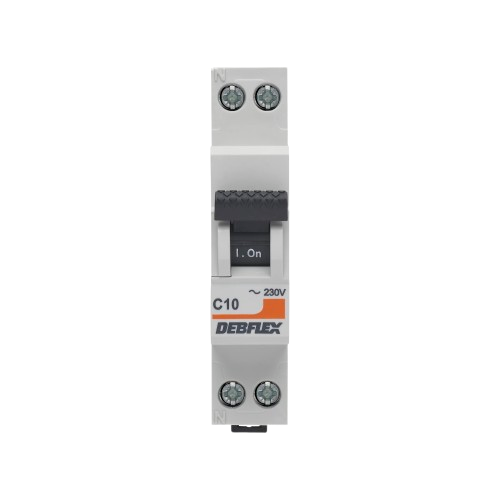
Image of disjonteur 10A
Cirkit Designer LogoDesign with disjonteur 10A in Cirkit Designer

Introduction

The Disjonteur 10A is a circuit breaker designed to protect electrical circuits from overloads and short circuits. It automatically interrupts the current flow when the current exceeds 10 amperes, preventing damage to connected devices and reducing the risk of electrical fires. This component is widely used in residential, commercial, and industrial electrical systems to ensure safety and reliability.

Explore Projects Built with disjonteur 10A

Use Cirkit Designer to design, explore, and prototype these projects online. Some projects support real-time simulation. Click "Open Project" to start designing instantly!
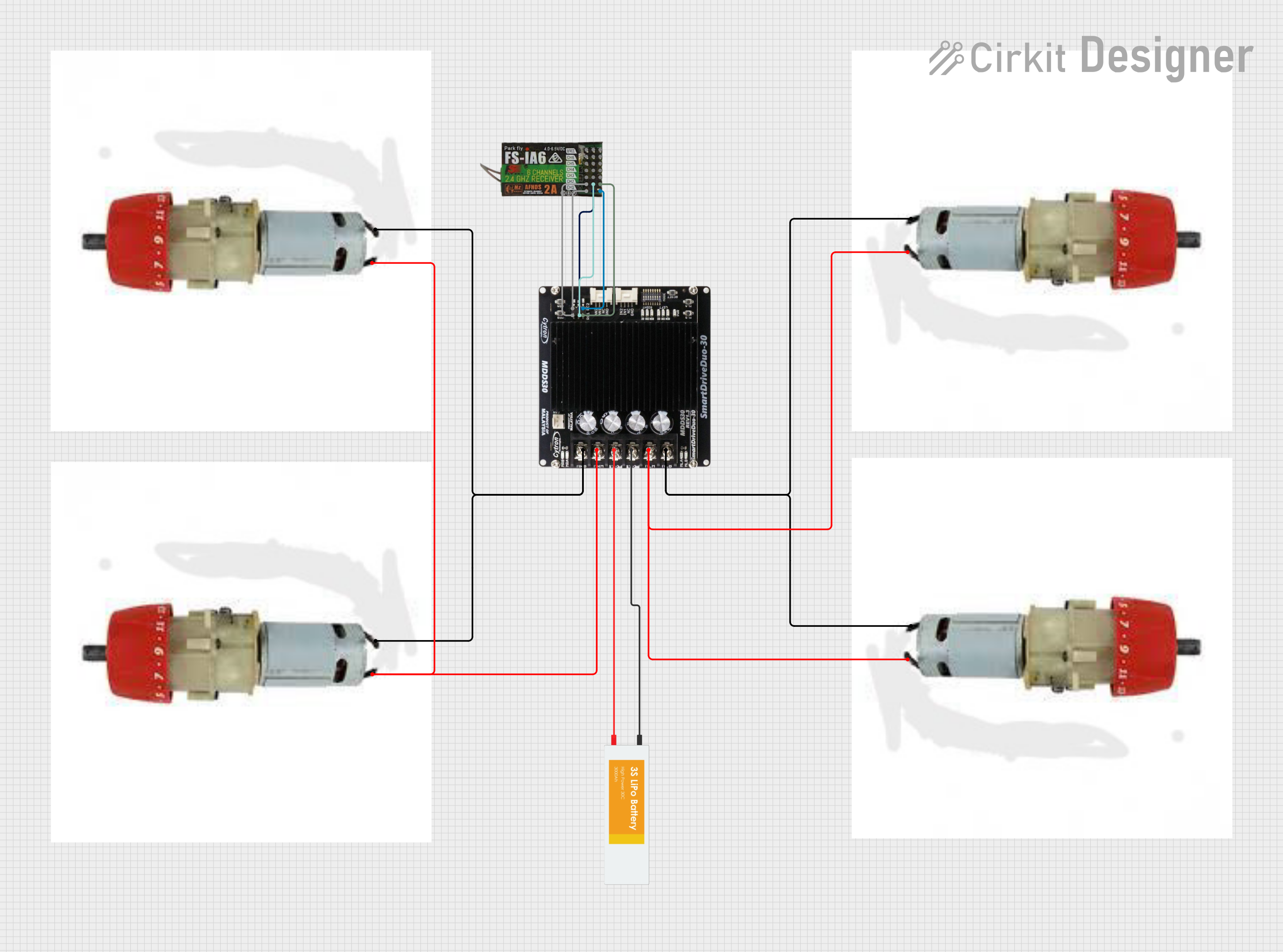
Battery-Powered Motor Control System with FlySky Receiver and Cytron Motor Driver
Image of Fighter: A project utilizing disjonteur 10A in a practical application
The circuit is a motor control system that uses a FlySky FS-IA6 receiver to control four motors via a Cytron MDDS30 motor driver. The system is powered by a LiPo battery, and the receiver sends control signals to the motor driver, which then drives the motors accordingly.
Cirkit Designer LogoOpen Project in Cirkit Designer
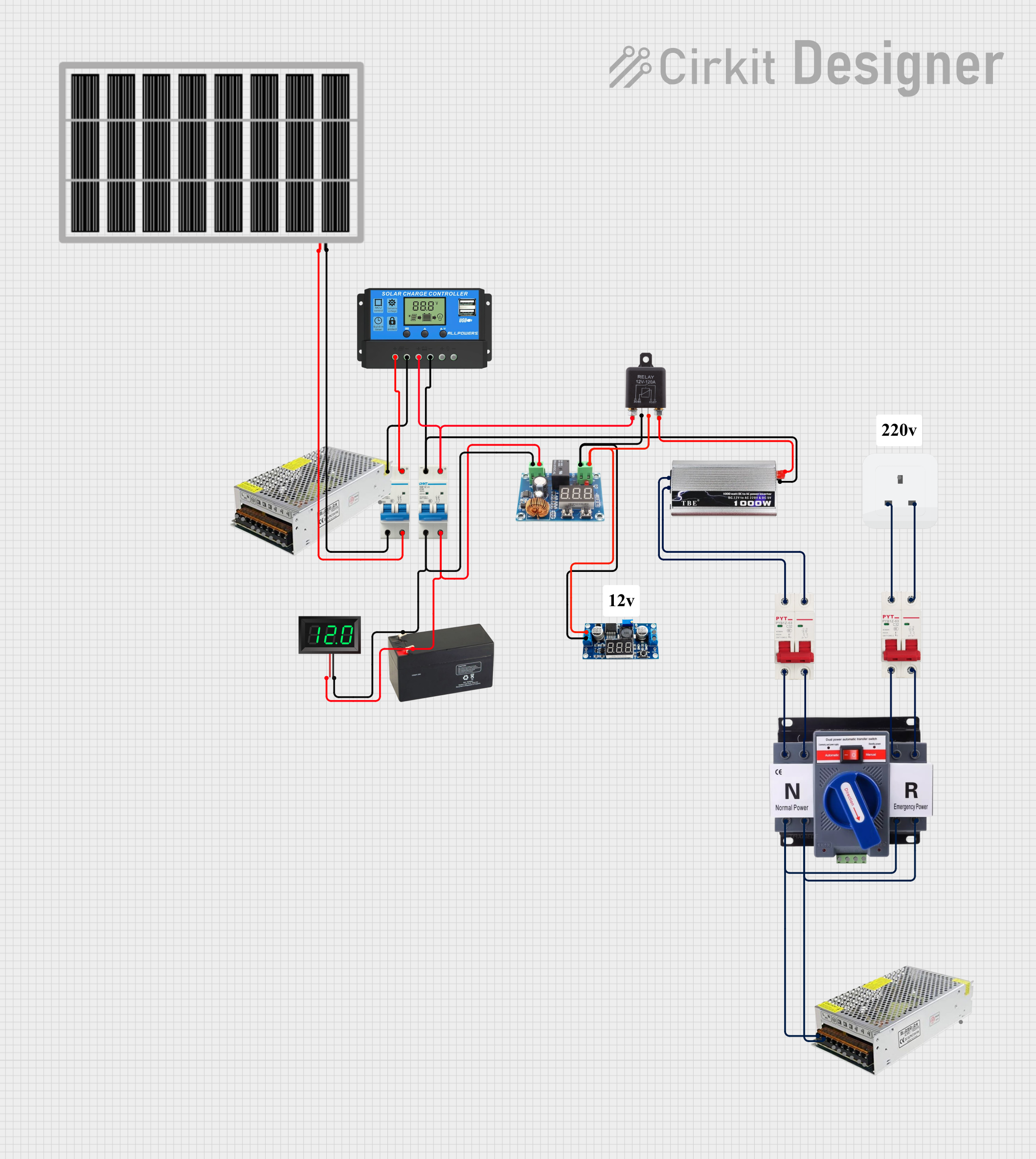
Solar-Powered Battery Backup System with Automatic Transfer Switch
Image of POWER SUPPLY: A project utilizing disjonteur 10A in a practical application
This circuit is a solar power management system that integrates a solar panel, battery, and inverter to provide a stable 12V DC and 220V AC output. It includes automatic transfer switches (ATS) and circuit breakers for safety and reliability, as well as a low voltage disconnect to protect the battery from deep discharge.
Cirkit Designer LogoOpen Project in Cirkit Designer
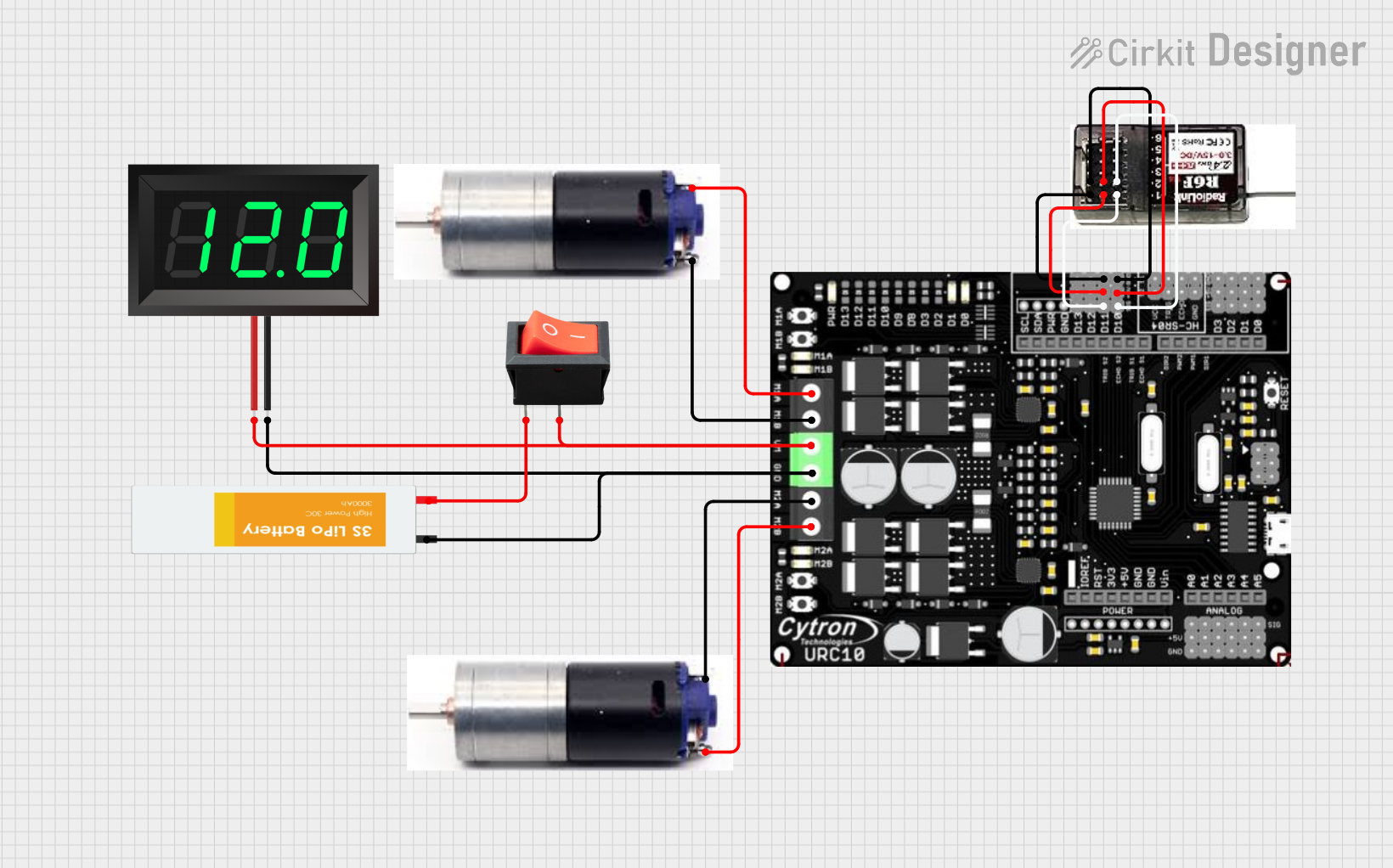
Battery-Powered Remote-Controlled Dual Motor System with Cytron URC10
Image of URC10 SUMO RC: A project utilizing disjonteur 10A in a practical application
This circuit is a remote-controlled dual DC motor driver system powered by a 3S LiPo battery. It uses a Cytron URC10 motor driver to control two GM25 DC motors based on signals received from an R6FG receiver, with a rocker switch for power control and a 7-segment panel voltmeter for monitoring the battery voltage.
Cirkit Designer LogoOpen Project in Cirkit Designer
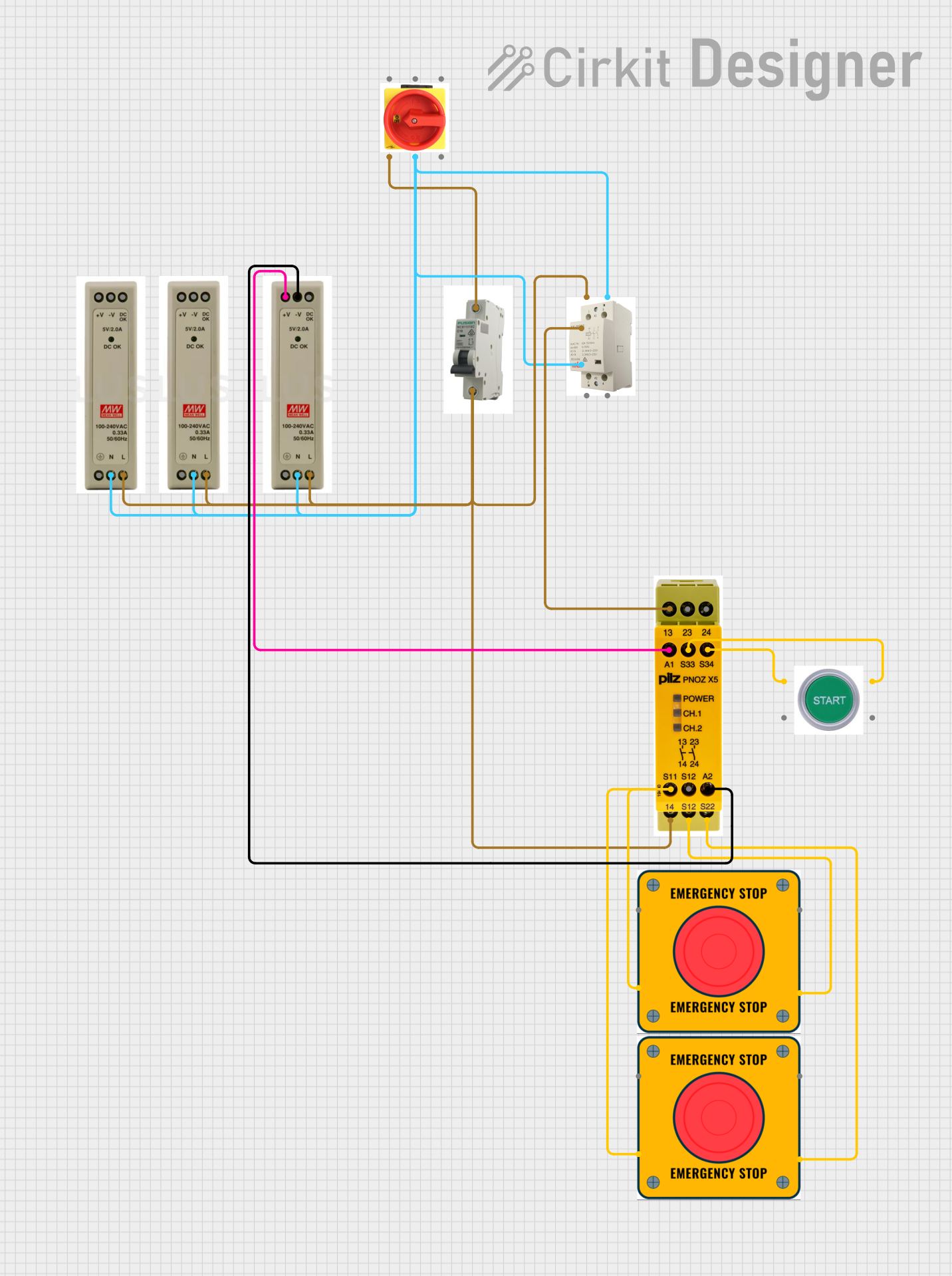
Industrial Power Distribution and Safety Control System
Image of Control Diagram: A project utilizing disjonteur 10A in a practical application
This circuit is designed for power distribution and safety control in an industrial setting. It features a main isolator and circuit breaker for power management, multiple PSUs for 5V, 12V, and 24V outputs, and a safety relay system that interfaces with E-stop buttons and a start switch to control a main contactor, ensuring safe operation and emergency power cut-off capabilities.
Cirkit Designer LogoOpen Project in Cirkit Designer

Explore Projects Built with disjonteur 10A

Use Cirkit Designer to design, explore, and prototype these projects online. Some projects support real-time simulation. Click "Open Project" to start designing instantly!
Image of Fighter: A project utilizing disjonteur 10A in a practical application
Battery-Powered Motor Control System with FlySky Receiver and Cytron Motor Driver
The circuit is a motor control system that uses a FlySky FS-IA6 receiver to control four motors via a Cytron MDDS30 motor driver. The system is powered by a LiPo battery, and the receiver sends control signals to the motor driver, which then drives the motors accordingly.
Cirkit Designer LogoOpen Project in Cirkit Designer
Image of POWER SUPPLY: A project utilizing disjonteur 10A in a practical application
Solar-Powered Battery Backup System with Automatic Transfer Switch
This circuit is a solar power management system that integrates a solar panel, battery, and inverter to provide a stable 12V DC and 220V AC output. It includes automatic transfer switches (ATS) and circuit breakers for safety and reliability, as well as a low voltage disconnect to protect the battery from deep discharge.
Cirkit Designer LogoOpen Project in Cirkit Designer
Image of URC10 SUMO RC: A project utilizing disjonteur 10A in a practical application
Battery-Powered Remote-Controlled Dual Motor System with Cytron URC10
This circuit is a remote-controlled dual DC motor driver system powered by a 3S LiPo battery. It uses a Cytron URC10 motor driver to control two GM25 DC motors based on signals received from an R6FG receiver, with a rocker switch for power control and a 7-segment panel voltmeter for monitoring the battery voltage.
Cirkit Designer LogoOpen Project in Cirkit Designer
Image of Control Diagram: A project utilizing disjonteur 10A in a practical application
Industrial Power Distribution and Safety Control System
This circuit is designed for power distribution and safety control in an industrial setting. It features a main isolator and circuit breaker for power management, multiple PSUs for 5V, 12V, and 24V outputs, and a safety relay system that interfaces with E-stop buttons and a start switch to control a main contactor, ensuring safe operation and emergency power cut-off capabilities.
Cirkit Designer LogoOpen Project in Cirkit Designer

Common Applications and Use Cases

  • Protection of household electrical circuits (e.g., lighting, outlets)
  • Safeguarding industrial equipment and machinery
  • Overload and short-circuit protection in power distribution systems
  • Integration into control panels for automated systems

Technical Specifications

The following table outlines the key technical details of the Disjonteur 10A:

Parameter Value
Rated Current 10A
Rated Voltage 230V AC (single-phase)
Breaking Capacity 6kA
Trip Curve Type C (moderate inrush current tolerance)
Operating Temperature -5°C to +40°C
Mounting Type DIN rail
Number of Poles 1P (single-pole)
Standards Compliance IEC 60898-1

Pin Configuration and Descriptions

The Disjonteur 10A does not have traditional pins like electronic components but instead features screw terminals for wire connections. The table below describes the terminal configuration:

Terminal Description
Line (Input) Connects to the incoming power supply (live wire).
Load (Output) Connects to the circuit or device being protected.

Usage Instructions

How to Use the Disjonteur 10A in a Circuit

  1. Mounting: Securely install the Disjonteur 10A onto a standard DIN rail in your distribution box or control panel.
  2. Wiring:
    • Connect the live wire from the power source to the Line (Input) terminal.
    • Connect the live wire leading to the load (e.g., circuit or device) to the Load (Output) terminal.
    • Ensure all connections are tight and secure to prevent arcing or loose contacts.
  3. Testing:
    • After installation, switch on the circuit breaker and verify that the connected circuit operates correctly.
    • Use the test button (if available) to simulate a fault and confirm proper tripping functionality.
  4. Operation:
    • In normal operation, the circuit breaker remains in the "ON" position.
    • If an overload or short circuit occurs, the breaker will trip to the "OFF" position, interrupting the current flow.

Important Considerations and Best Practices

  • Wire Sizing: Ensure that the wires connected to the circuit breaker are rated for at least 10A to prevent overheating.
  • Load Compatibility: Verify that the total load current does not exceed 10A.
  • Environmental Conditions: Avoid installing the breaker in areas with excessive moisture, dust, or extreme temperatures.
  • Resetting: After a trip, identify and resolve the cause of the fault before resetting the breaker to the "ON" position.
  • Periodic Testing: Regularly test the breaker to ensure it functions correctly.

Troubleshooting and FAQs

Common Issues and Solutions

Issue Possible Cause Solution
Breaker trips frequently Overload or short circuit in the circuit Reduce the load or fix the short circuit.
Breaker does not trip during a fault Faulty breaker or incorrect installation Replace the breaker or check wiring.
Breaker cannot be reset to "ON" position Persistent fault in the circuit Inspect and resolve the fault condition.
Loose connections causing arcing or heating Improperly tightened terminal screws Tighten all connections securely.

FAQs

  1. Can I use the Disjonteur 10A for DC circuits?

    • No, this breaker is designed for AC circuits only. For DC applications, use a breaker specifically rated for DC.
  2. What does the Type C trip curve mean?

    • A Type C breaker tolerates moderate inrush currents (5-10 times the rated current) before tripping, making it suitable for circuits with inductive loads like motors or transformers.
  3. How often should I test the breaker?

    • It is recommended to test the breaker at least once every six months to ensure proper functionality.
  4. Can I install the breaker horizontally?

    • Yes, the Disjonteur 10A can be installed in any orientation, but vertical installation is preferred for ease of operation and maintenance.

By following this documentation, you can safely and effectively use the Disjonteur 10A to protect your electrical circuits.