
How to Use SA868: Examples, Pinouts, and Specs
 Design with SA868 in Cirkit Designer
Introduction
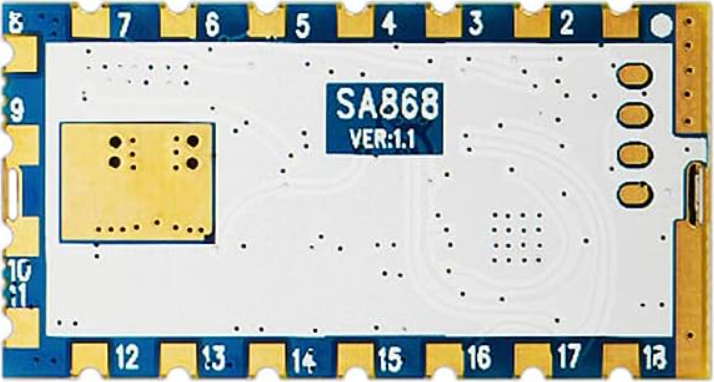
The SA868 is a low-power RF transmitter module designed for wireless communication applications. It operates in the 433 MHz frequency band, making it ideal for short-range communication tasks. This module is widely used in applications such as remote control systems, wireless sensor networks, and telemetry systems. Its compact design, low power consumption, and reliable performance make it a popular choice for developers and engineers.
Explore Projects Built with SA868
 Open Project in Cirkit Designer
 Open Project in Cirkit Designer
 Open Project in Cirkit Designer
 Open Project in Cirkit Designer
Explore Projects Built with SA868
Open Project in Cirkit DesignerOpen Project in Cirkit DesignerOpen Project in Cirkit DesignerOpen Project in Cirkit DesignerTechnical Specifications
The SA868 module is designed to provide efficient and reliable wireless communication. Below are its key technical specifications:
General Specifications
- Frequency Band: 433 MHz
- Operating Voltage: 3.3V to 5.0V
- Transmit Power: Up to 20 dBm (100 mW)
- Communication Range: Up to 1 km (line of sight)
- Modulation Type: FSK (Frequency Shift Keying)
- Current Consumption:
- Transmit Mode: ~100 mA
- Standby Mode: ~10 µA
- Operating Temperature: -40°C to +85°C
- Dimensions: 30 mm x 20 mm x 5 mm
Pin Configuration and Descriptions
The SA868 module has a simple pinout for easy integration into circuits. Below is the pin configuration:
| Pin Number | Pin Name | Description |
|---|---|---|
| 1 | VCC | Power supply input (3.3V to 5.0V). |
| 2 | GND | Ground connection. |
| 3 | TXD | UART Transmit pin for serial communication. |
| 4 | RXD | UART Receive pin for serial communication. |
| 5 | PTT | Push-to-Talk control pin (active low). |
| 6 | AUX | Auxiliary pin for status indication. |
| 7 | ANT | Antenna connection for RF signal transmission. |
Usage Instructions
The SA868 module is straightforward to use in wireless communication projects. Below are the steps and best practices for integrating it into your circuit:
Basic Circuit Connection
- Power Supply: Connect the VCC pin to a 3.3V or 5.0V power source and the GND pin to the ground.
- UART Communication: Connect the TXD pin of the SA868 to the RX pin of your microcontroller (e.g., Arduino UNO) and the RXD pin of the SA868 to the TX pin of the microcontroller.
- PTT Control: Use the PTT pin to enable or disable transmission. Pull the pin low to activate transmission.
- Antenna: Attach a suitable 433 MHz antenna to the ANT pin for optimal signal transmission.
Example: Using SA868 with Arduino UNO
Below is an example of how to use the SA868 module with an Arduino UNO for basic communication:
Circuit Diagram
- Connect the SA868's TXD to Arduino's RX (Pin 0).
- Connect the SA868's RXD to Arduino's TX (Pin 1).
- Connect the VCC and GND pins of the SA868 to the Arduino's 5V and GND, respectively.
- Connect the PTT pin to a digital pin on the Arduino (e.g., Pin 7).
Arduino Code
// Example code to send data using the SA868 module with Arduino UNO

#define PTT_PIN 7  // Define the PTT pin connected to the SA868 module

void setup() {
  pinMode(PTT_PIN, OUTPUT);  // Set PTT pin as output
  digitalWrite(PTT_PIN, HIGH);  // Set PTT to HIGH (idle state)

  Serial.begin(9600);  // Initialize UART communication at 9600 baud rate
}

void loop() {
  digitalWrite(PTT_PIN, LOW);  // Activate transmission mode
  delay(10);  // Small delay to ensure the module is ready

  Serial.println("Hello, SA868!");  // Send data to the SA868 module

  delay(100);  // Wait for data to be transmitted
  digitalWrite(PTT_PIN, HIGH);  // Deactivate transmission mode

  delay(1000);  // Wait before sending the next message
}
Best Practices
- Use a regulated power supply to avoid voltage fluctuations that may damage the module.
- Ensure proper antenna placement to maximize communication range and minimize interference.
- Avoid placing the module near high-frequency noise sources, such as switching power supplies.
Troubleshooting and FAQs
Common Issues and Solutions
No Communication Between Devices
- Cause: Incorrect UART connections or mismatched baud rates.
- Solution: Verify that the TXD and RXD pins are correctly connected and that the baud rate matches the module's default (9600 bps).
Short Communication Range
- Cause: Poor antenna connection or placement.
- Solution: Ensure the antenna is securely connected and positioned away from obstructions or interference sources.
High Power Consumption
- Cause: Module remains in transmit mode for extended periods.
- Solution: Use the PTT pin to control transmission and minimize active time.
Module Overheating
- Cause: Prolonged high-power transmission.
- Solution: Limit transmission duration and ensure adequate ventilation.
FAQs
Q: Can the SA868 operate at frequencies other than 433 MHz?
A: No, the SA868 is specifically designed for the 433 MHz frequency band.Q: What is the maximum communication range of the SA868?
A: The module can achieve up to 1 km range in line-of-sight conditions with a proper antenna.Q: Can I use the SA868 with a 3.3V microcontroller?
A: Yes, the SA868 supports an operating voltage range of 3.3V to 5.0V, making it compatible with 3.3V systems.Q: How do I change the module's settings (e.g., baud rate)?
A: The SA868 supports AT commands for configuration. Refer to the module's datasheet for detailed instructions.
By following this documentation, you can effectively integrate and use the SA868 module in your wireless communication projects.