The Gravity SEN0463 Geiger Counter Module is a highly sensitive electronic device designed to detect and measure ionizing radiation, including alpha, beta, and gamma rays. It utilizes a Geiger-Müller (GM) tube to detect radiation particles and convert them into electrical pulses, which can then be processed and displayed. This module is ideal for applications in environmental monitoring, educational experiments, and radiation safety.
Explore Projects Built with Geiger Counter Module Ionizing Radiation Detector
Use Cirkit Designer to design, explore, and prototype these projects online. Some projects support real-time simulation. Click "Open Project" to start designing instantly!
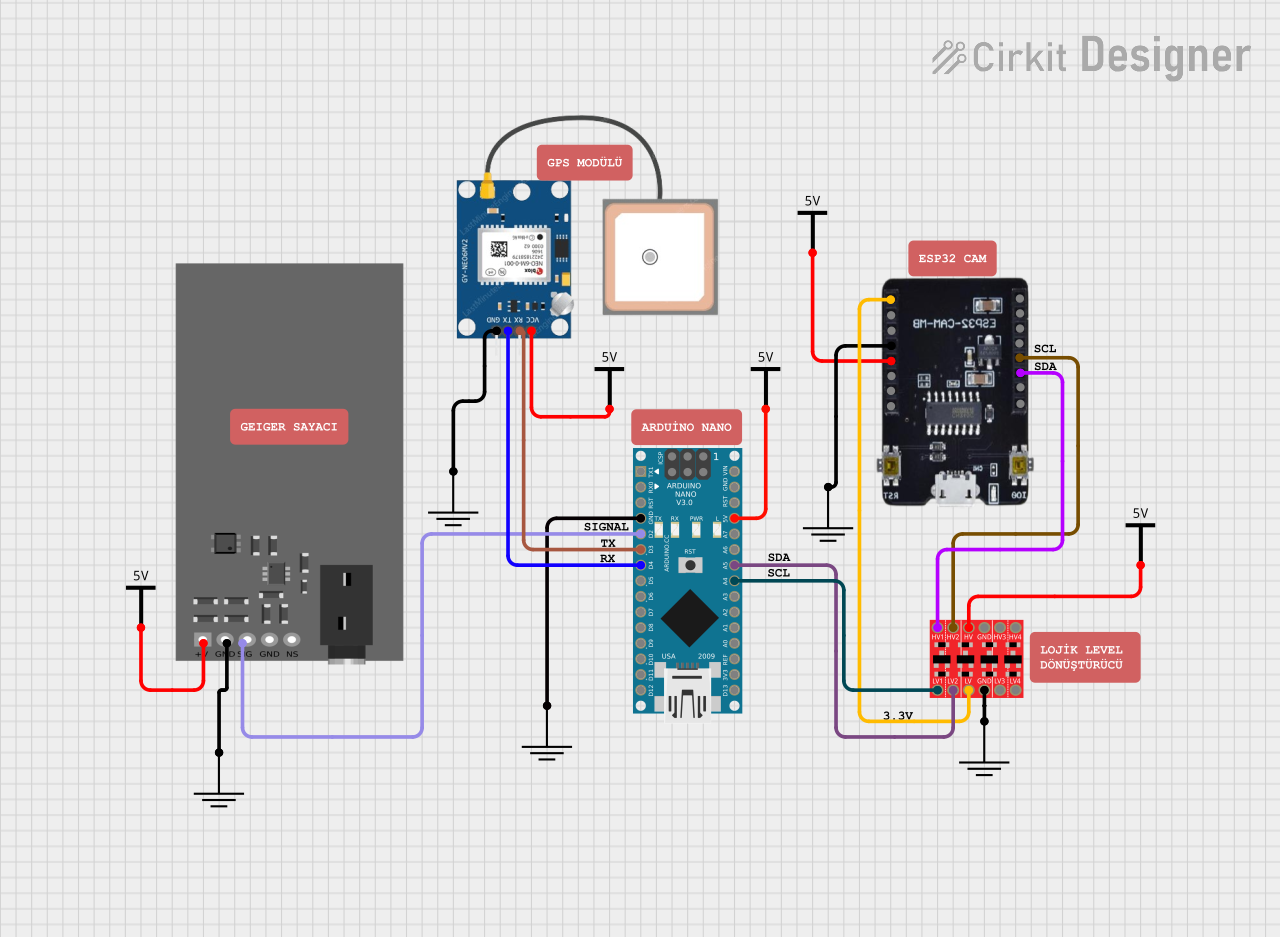
This circuit is a radiation detection and monitoring system that uses an ESP32-CAM for capturing images and streaming video, an Arduino Nano for processing data from a GPS module and a Geiger counter, and a bi-directional logic level converter for interfacing between different voltage levels. The ESP32-CAM also serves as a web server to display the radiation levels and GPS coordinates in real-time.
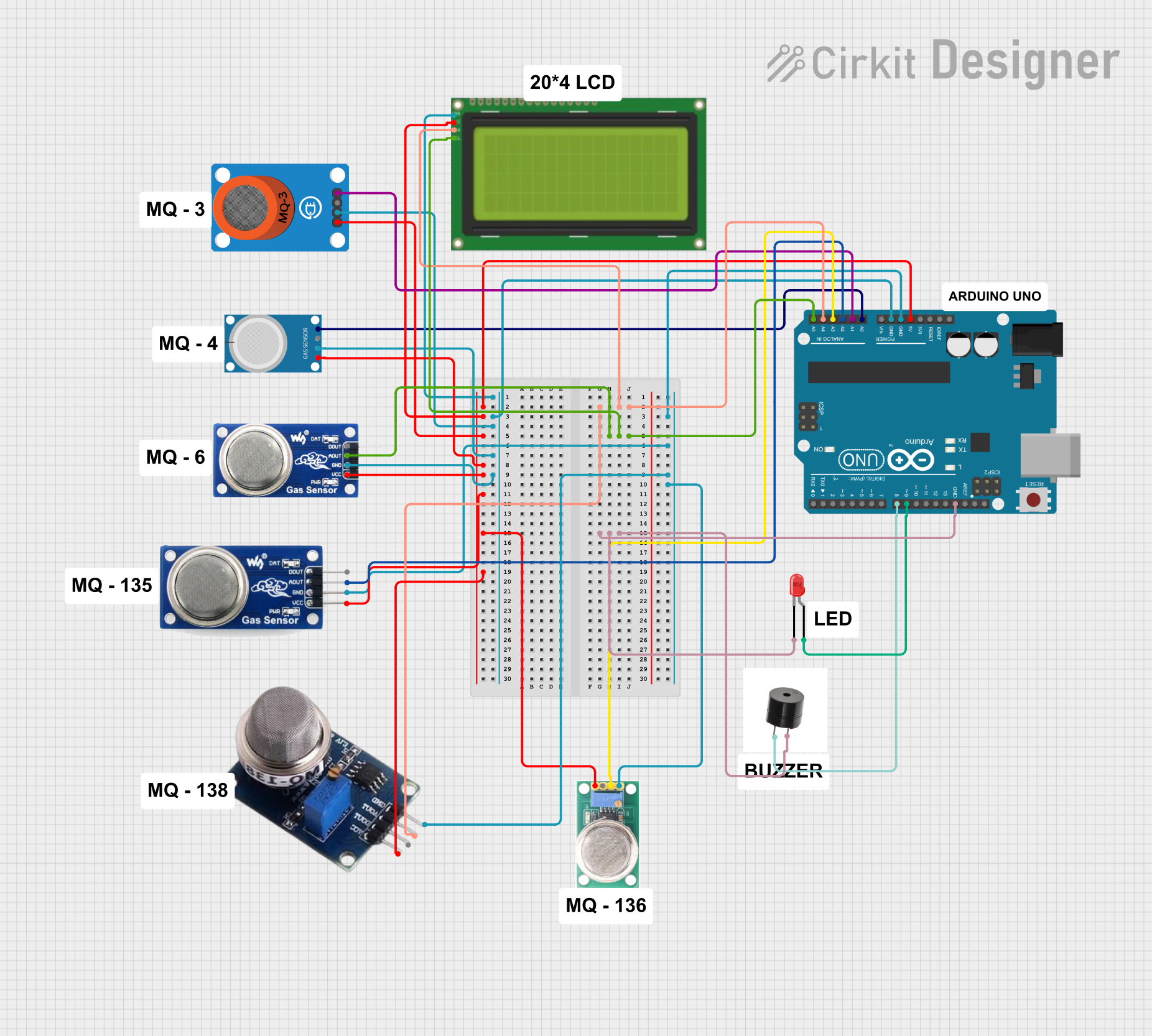
This circuit is a lung cancer detector that uses six gas sensors connected to an Arduino UNO to monitor air quality. The sensor readings are displayed on a 20x4 LCD, and if any sensor value exceeds a predefined threshold, a buzzer and an LED are activated to alert the user.
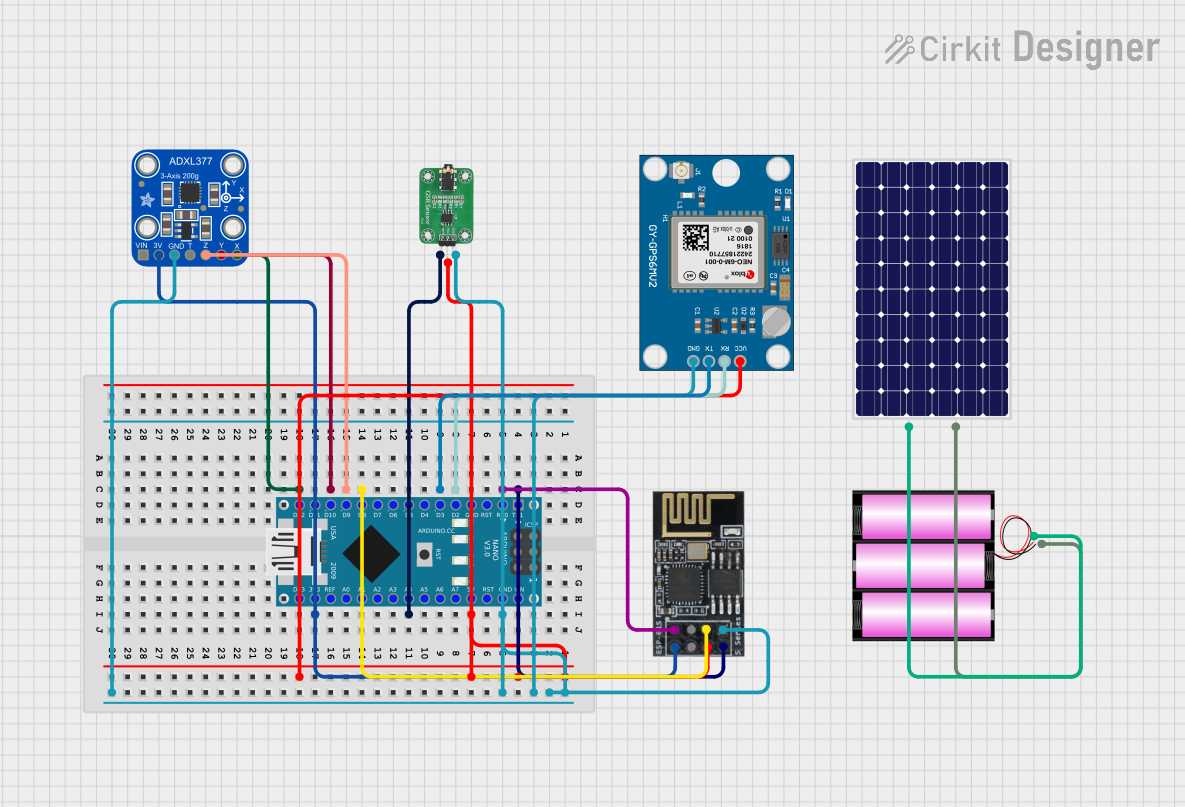
This circuit is a sensor-based data acquisition system using an Arduino Nano, which collects data from a GSR sensor, an ADXL377 accelerometer, and a Neo 6M GPS module. The collected data is then transmitted via a WiFi module (ESP8266-01) for remote monitoring. The system is powered by a 12V battery, which is charged by a solar panel.
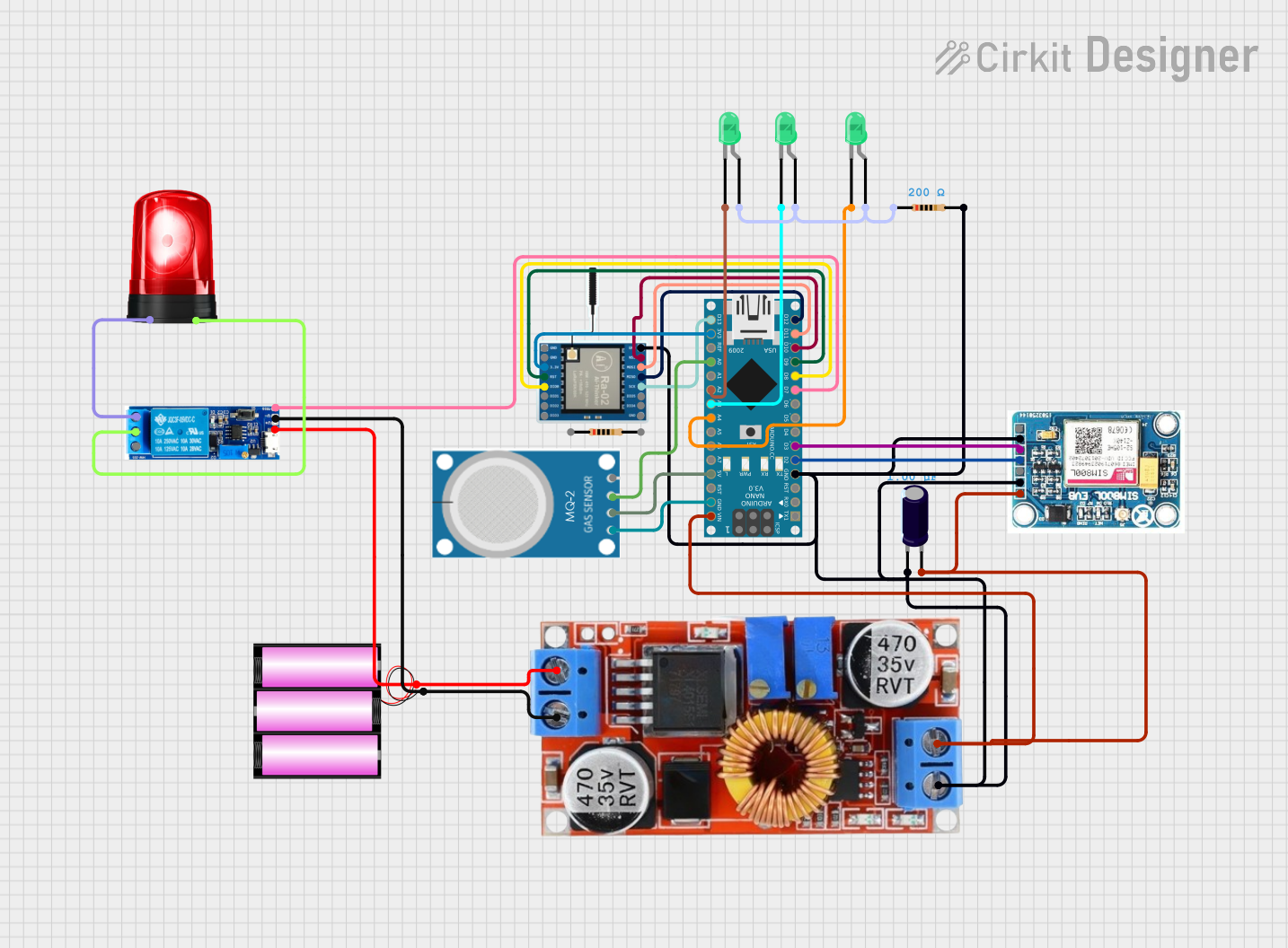
This circuit is a remote monitoring and alert system that uses an Arduino Nano to interface with a GSM module (SIM 800L) and a LoRa module for communication. It includes an MQ-2 gas sensor for detecting gas levels, a relay module to control a siren for alerts, and multiple LEDs for status indication. The system is powered by a 12V battery with a step-down regulator to provide the necessary voltages.
Environmental Monitoring: Measuring background radiation levels in various environments.
Radiation Safety: Detecting hazardous radiation levels in industrial or medical settings.
Educational Tools: Teaching students about ionizing radiation and its detection.
DIY Projects: Integrating radiation detection into custom electronics projects.
Technical Specifications
The following table outlines the key technical details of the Gravity SEN0463 Geiger Counter Module:
Parameter
Specification
Operating Voltage
3.7V to 5.5V
Operating Current
≤ 120mA
Detection Range
0.1 μSv/h to 1,000 μSv/h
Supported Radiation Types
Alpha, Beta, Gamma
Output Signal
Digital pulse (high level: 5V)
Interface Type
3-pin Gravity interface
Dimensions
85mm x 55mm x 24mm
Weight
70g
Pin Configuration and Descriptions
The module features a 3-pin Gravity interface for easy connection. The pinout is as follows:
Pin
Name
Description
1
VCC
Power supply input (3.7V to 5.5V)
2
GND
Ground connection
3
SIGNAL
Digital output signal (pulses corresponding to radiation events)
Usage Instructions
How to Use the Component in a Circuit
Power the Module: Connect the VCC pin to a 3.7V to 5.5V power source and the GND pin to the ground.
Connect the Signal Pin: Attach the SIGNAL pin to a microcontroller's digital input pin (e.g., Arduino UNO) to read the radiation pulses.
Monitor Radiation: Use the digital pulses from the SIGNAL pin to calculate the radiation level. Each pulse corresponds to a detected radiation event.
Important Considerations and Best Practices
Safety First: While the module itself is safe, ensure you handle radioactive materials with care and follow all safety guidelines.
Avoid High Humidity: The GM tube is sensitive to moisture. Use the module in a dry environment to prevent damage.
Power Supply: Ensure a stable power supply within the specified voltage range to avoid malfunction.
Pulse Counting: Use a microcontroller or counter circuit to count the pulses over a specific time period to calculate the radiation dose rate.
Example Code for Arduino UNO
Below is an example code snippet to interface the Gravity SEN0463 Geiger Counter Module with an Arduino UNO:
// Geiger Counter Module (SEN0463) Example Code
// This code reads radiation pulses from the SIGNAL pin and calculates the CPM
// (Counts Per Minute) and approximate radiation dose rate in μSv/h.

const int signalPin = 2;  // Connect SIGNAL pin to digital pin 2
volatile int pulseCount = 0;  // Variable to store pulse count

unsigned long previousMillis = 0;  // Timer for 1-minute interval
const unsigned long interval = 60000;  // 1 minute in milliseconds

void setup() {
  pinMode(signalPin, INPUT);  // Set SIGNAL pin as input
  attachInterrupt(digitalPinToInterrupt(signalPin), countPulse, RISING);
  Serial.begin(9600);  // Initialize serial communication
}

void loop() {
  unsigned long currentMillis = millis();

  // Check if 1 minute has passed
  if (currentMillis - previousMillis >= interval) {
    previousMillis = currentMillis;

    // Calculate radiation dose rate
    float doseRate = pulseCount * 0.00812;  // Conversion factor for μSv/h
    Serial.print("CPM: ");
    Serial.print(pulseCount);
    Serial.print(", Radiation Dose Rate: ");
    Serial.print(doseRate);
    Serial.println(" μSv/h");

    pulseCount = 0;  // Reset pulse count for the next interval
  }
}

// Interrupt service routine to count pulses
void countPulse() {
  pulseCount++;
}
Notes on the Code
The countPulse function is triggered on each rising edge of the SIGNAL pin, incrementing the pulse count.
The conversion factor 0.00812 is specific to the GM tube used in the SEN0463 module and converts CPM (Counts Per Minute) to μSv/h.
Troubleshooting and FAQs
Common Issues and Solutions
No Output Signal:
Cause: Incorrect wiring or insufficient power supply.
Solution: Double-check the connections and ensure the power supply is within the specified range (3.7V to 5.5V).
Inconsistent Readings:
Cause: Electrical noise or unstable power supply.
Solution: Use a decoupling capacitor (e.g., 0.1μF) across the power supply pins to filter noise.
High Background Radiation Levels:
Cause: Environmental factors or nearby radioactive sources.
Solution: Verify the environment and ensure no radioactive materials are present.
Module Overheating:
Cause: Prolonged operation in high-temperature environments.
Solution: Operate the module within the recommended temperature range and ensure proper ventilation.
FAQs
Q1: Can this module detect all types of radiation?
A1: The SEN0463 module can detect alpha, beta, and gamma radiation. However, the sensitivity to each type depends on the GM tube and environmental factors.
Q2: How do I calculate the radiation dose rate?
A2: Count the pulses over a 1-minute interval to get the CPM (Counts Per Minute). Multiply the CPM by the conversion factor (0.00812) to calculate the dose rate in μSv/h.
Q3: Is the module safe to use?
A3: Yes, the module is safe to use. However, always follow safety guidelines when working with radioactive materials.
Q4: Can I use this module with other microcontrollers?
A4: Yes, the module can be used with any microcontroller that supports digital input, such as Raspberry Pi, ESP32, or STM32.
By following this documentation, users can effectively integrate and utilize the Gravity SEN0463 Geiger Counter Module in their projects.


 Open Project in Cirkit Designer