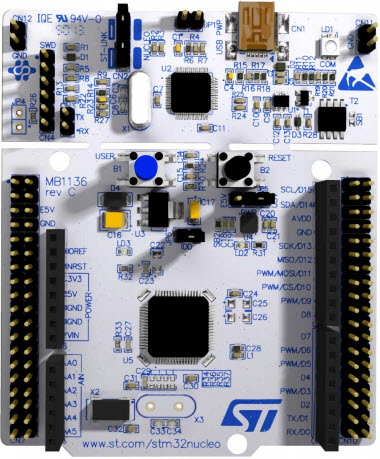
The STM32F446RE is a high-performance microcontroller developed by STMicroelectronics, part of the STM32 family. It is based on a 32-bit ARM Cortex-M4 core with a maximum clock speed of 180 MHz. This microcontroller is designed to deliver exceptional computational power and advanced features, making it ideal for a variety of applications.
Explore Projects Built with STM32F446RE
Use Cirkit Designer to design, explore, and prototype these projects online. Some projects support real-time simulation. Click "Open Project" to start designing instantly!
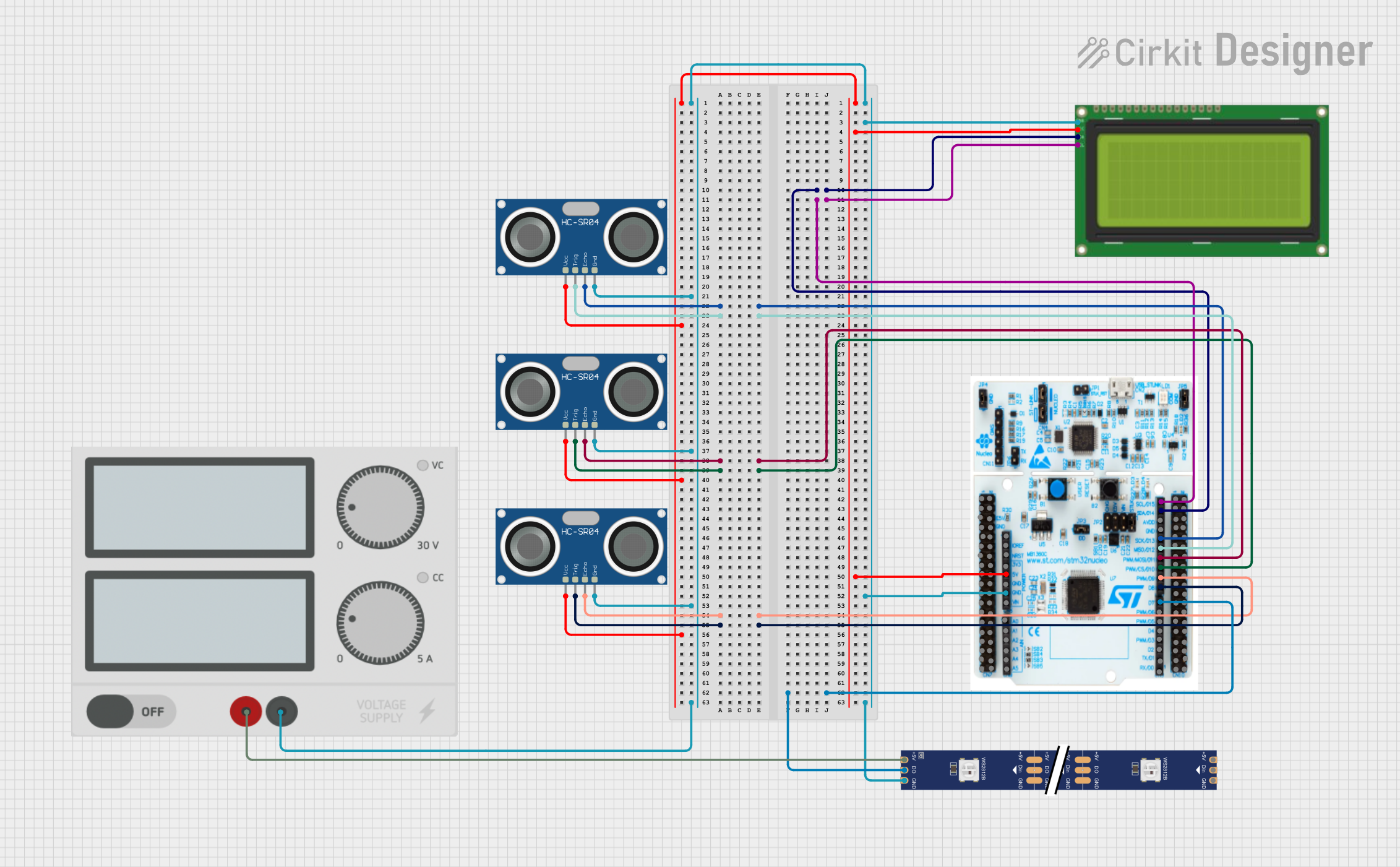
This circuit features a STM32 Nucleo F303RE microcontroller interfaced with three HC-SR04 ultrasonic sensors for distance measurement and a 20x4 LCD display over I2C for data output. Additionally, there is a WS2812 RGB LED strip controlled by the microcontroller for visual feedback. The power supply provides a common 5V to the LCD, ultrasonic sensors, LED strip, and the microcontroller's +5V input, with all components sharing a common ground.
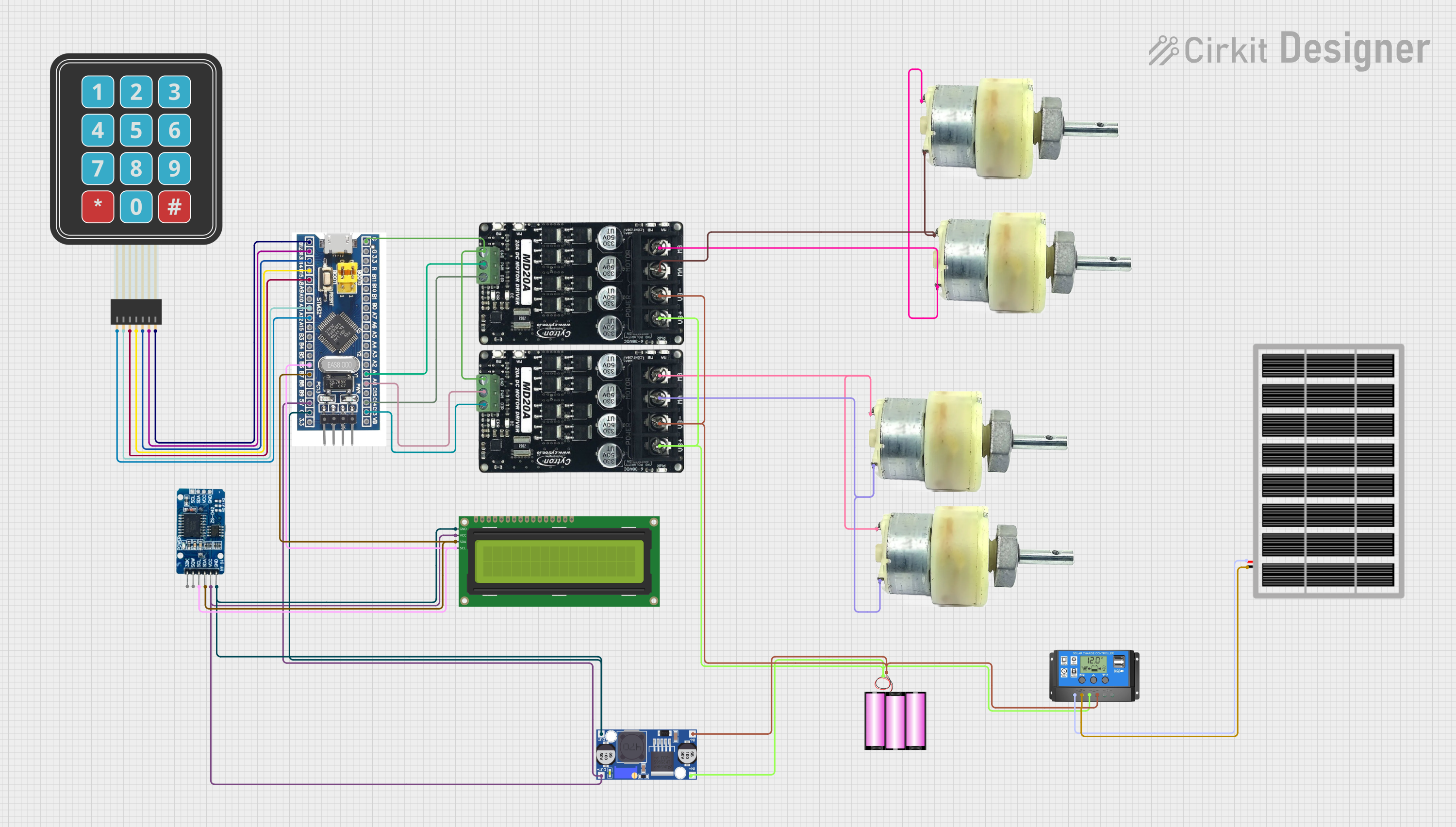
This circuit features an STM32F103C8T6 microcontroller interfaced with a membrane matrix keypad for input, an RTC DS3231 for real-time clock functionality, and a 16x2 I2C LCD for display. It controls four 12V geared motors through two MD20 CYTRON motor drivers, with the motor power supplied by a 12V battery regulated by a buck converter. The battery is charged via a solar panel connected through a solar charge controller, ensuring a renewable energy source for the system.
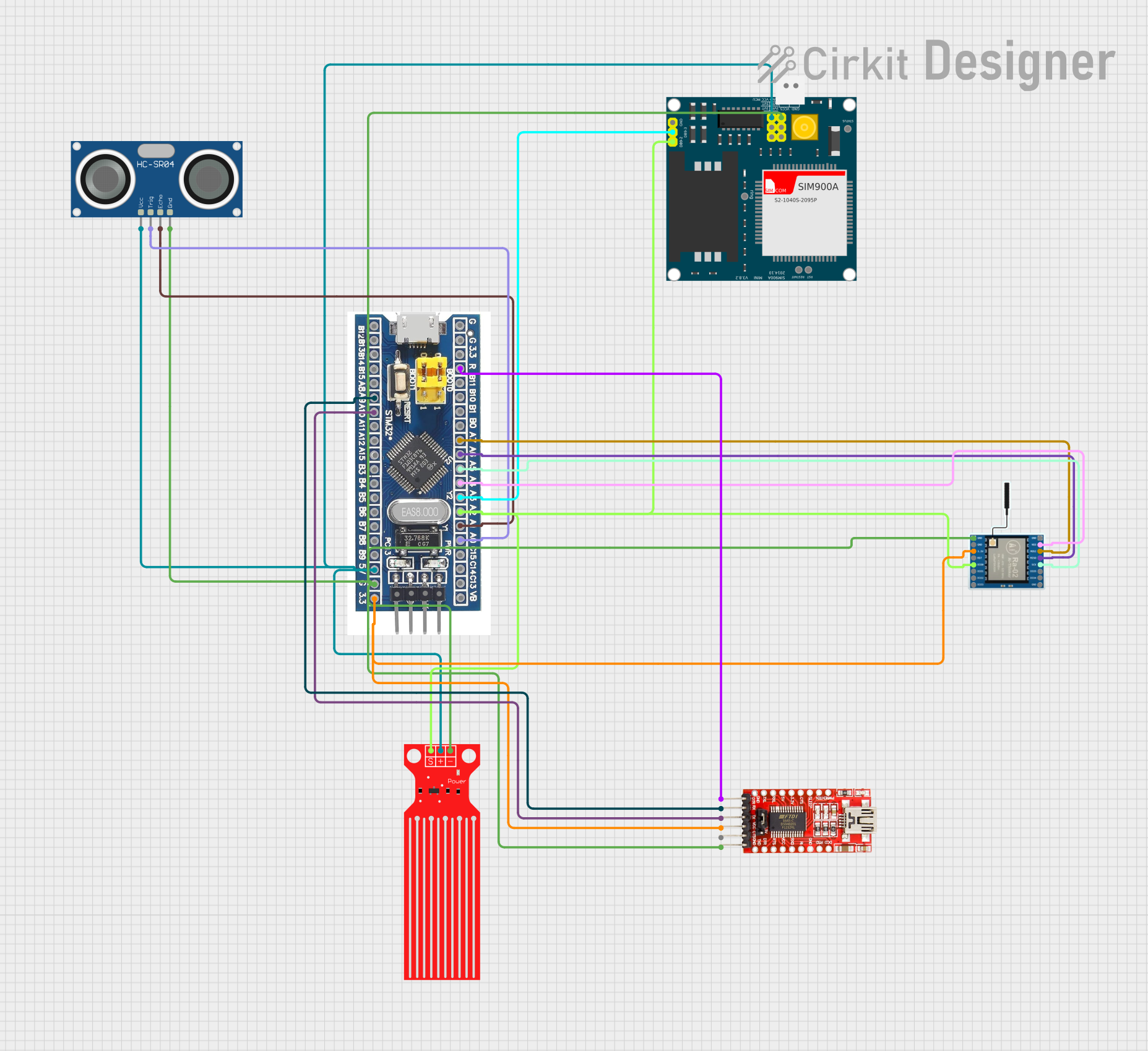
This circuit features a microcontroller (STM32F103C8T6) interfaced with a SIM900A GSM module, an HC-SR04 ultrasonic sensor, a water level sensor, and a LoRa Ra-02 SX1278 module for long-range communication. The STM32F103C8T6 is configured to communicate with the GSM module and LoRa module via serial connections, and it reads data from the ultrasonic and water level sensors. An FTDI Programmer is connected for programming and serial communication with the microcontroller.
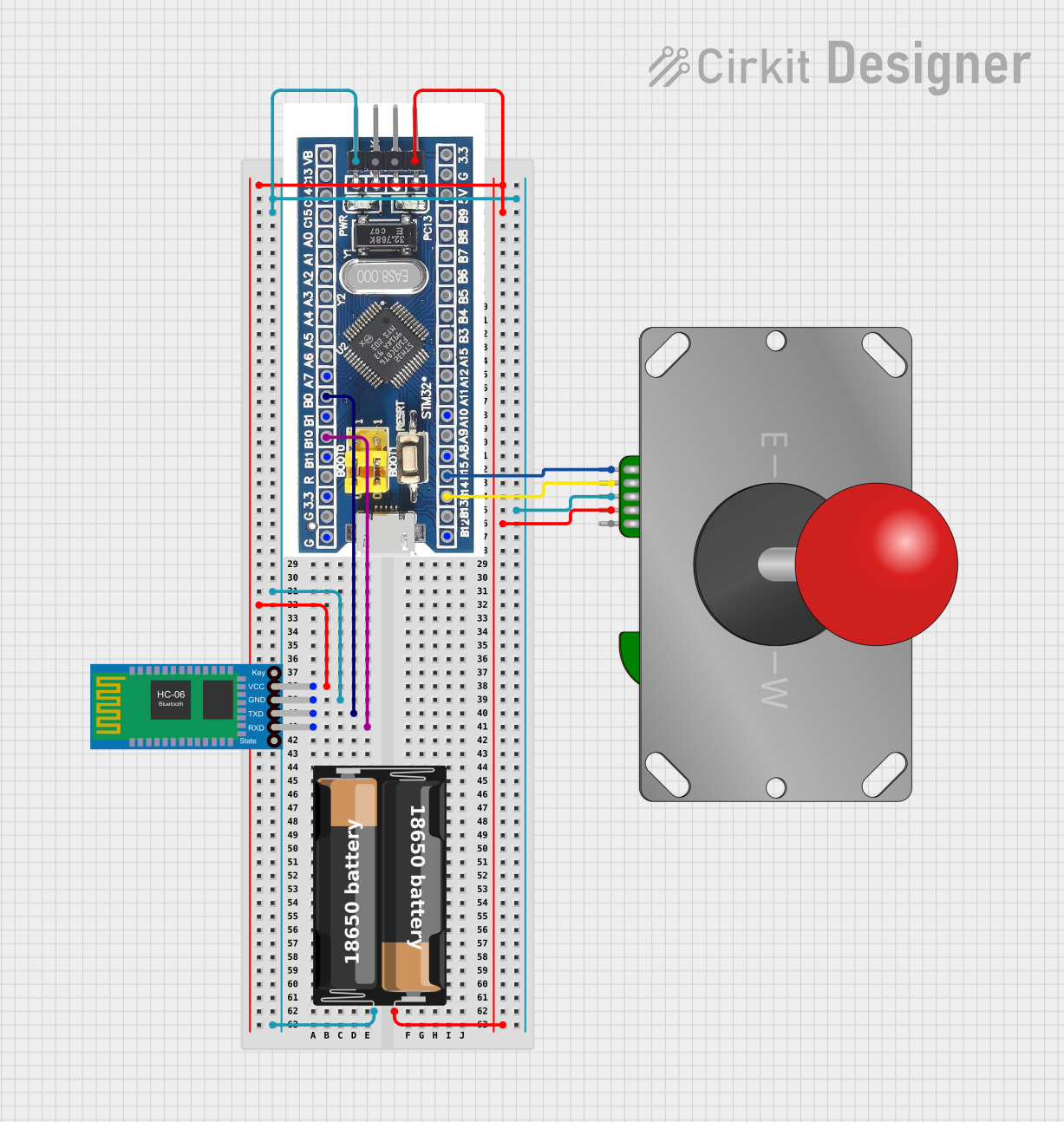
This circuit features an STM32F103C8T6 microcontroller interfaced with a Bluetooth HC-06 module for wireless communication and an Adafruit Arcade Joystick for user input. The microcontroller's pins B0 and B10 are connected to the TXD and RXD pins of the Bluetooth module, enabling serial communication, while pins B14 and B15 interface with the joystick's directional controls. The circuit is powered by a battery, with power distribution managed through the microcontroller's 3.3V pin and common ground connections.
The STM32F446RE microcontroller offers a wide range of features and capabilities. Below are its key technical specifications:
Key Features
Core: ARM Cortex-M4 with FPU (Floating Point Unit)
Clock Speed: Up to 180 MHz
Flash Memory: 512 KB
SRAM: 128 KB
GPIO Pins: 50 (on the Nucleo-64 board)
Communication Interfaces:
3x SPI
3x I2C
4x USART/2x UART
1x CAN
1x USB OTG (Full-Speed)
Timers: 14 (including advanced control timers for motor control)
ADC: 3x 12-bit ADCs
DAC: 2x 12-bit DACs
Operating Voltage: 1.7V to 3.6V
Package: LQFP64 (64-pin)
Pin Configuration and Descriptions
The STM32F446RE is available on the Nucleo-64 development board, which provides easy access to its pins. Below is a table summarizing the key pin functions:
Pin Name
Function
Description
PA0
GPIO, ADC_IN0, TIM2_CH1
General-purpose I/O, ADC input, Timer channel
PA1
GPIO, ADC_IN1, TIM2_CH2
General-purpose I/O, ADC input, Timer channel
PB6
GPIO, I2C1_SCL, TIM4_CH1
I2C clock line, Timer channel
PB7
GPIO, I2C1_SDA, TIM4_CH2
I2C data line, Timer channel
PC13
GPIO
General-purpose I/O
PA9
GPIO, USART1_TX
UART transmit pin
PA10
GPIO, USART1_RX
UART receive pin
PA5
GPIO, SPI1_SCK
SPI clock line
PA6
GPIO, SPI1_MISO
SPI data input
PA7
GPIO, SPI1_MOSI
SPI data output
For a complete pinout, refer to the STM32F446RE datasheet.
Usage Instructions
The STM32F446RE can be used in a variety of circuits and applications. Below are the steps and best practices for using this microcontroller:
Getting Started
Power Supply: Ensure the microcontroller is powered with a voltage between 1.7V and 3.6V. If using the Nucleo-64 board, connect it via USB or an external power source.
Programming Environment: Install an Integrated Development Environment (IDE) such as STM32CubeIDE or Keil uVision. Alternatively, you can use the Arduino IDE with the STM32 core installed.
Flashing the Code: Use the onboard ST-LINK debugger/programmer to upload your code to the microcontroller.
Example: Blinking an LED
Below is an example of how to blink an LED connected to pin PA5 using the STM32F446RE and the Arduino IDE:
// Include the STM32 HAL library
#include <Arduino.h>

// Define the LED pin
#define LED_PIN PA5

void setup() {
  // Set the LED pin as an output
  pinMode(LED_PIN, OUTPUT);
}

void loop() {
  // Turn the LED on
  digitalWrite(LED_PIN, HIGH);
  delay(500); // Wait for 500 milliseconds

  // Turn the LED off
  digitalWrite(LED_PIN, LOW);
  delay(500); // Wait for 500 milliseconds
}
Important Considerations
Clock Configuration: Configure the system clock properly to achieve the desired performance. Use the STM32CubeMX tool to generate initialization code for clock settings.
Peripheral Initialization: Always initialize peripherals (e.g., UART, SPI, I2C) before using them in your application.
Debugging: Use the ST-LINK debugger for real-time debugging and troubleshooting.
Troubleshooting and FAQs
Common Issues
Microcontroller Not Responding
Cause: Incorrect power supply or faulty connections.
Solution: Verify the power supply voltage and check all connections.
Code Upload Fails
Cause: ST-LINK debugger not detected or incorrect settings in the IDE.
Solution: Ensure the ST-LINK driver is installed and the correct board is selected in the IDE.
Peripherals Not Working
Cause: Peripheral not initialized or incorrect pin configuration.
Solution: Double-check the initialization code and pin assignments.
FAQs
Can I use the STM32F446RE with the Arduino IDE?
Yes, the STM32F446RE is compatible with the Arduino IDE. Install the STM32 core to get started.
What is the maximum clock speed of the STM32F446RE?
The maximum clock speed is 180 MHz.
How do I configure the system clock?
Use the STM32CubeMX tool to generate clock configuration code or manually configure the RCC (Reset and Clock Control) registers.
Can I use the STM32F446RE for motor control?
Yes, the STM32F446RE includes advanced control timers suitable for motor control applications.
By following this documentation, you can effectively use the STM32F446RE microcontroller in your projects. For more details, refer to the official datasheet and reference manual provided by STMicroelectronics.

 Open Project in Cirkit Designer